
Supertone Air for macOS
Description
Runs on macOS 10.13 or later, Intel and Apple Silicon. Works at 44.1 kHz, 48 kHz and 96 kHz — AudioSuite only, no real-time.
Where it sits — clip by clip on a dialogue track. Not a bus processor, not a real-time insert.
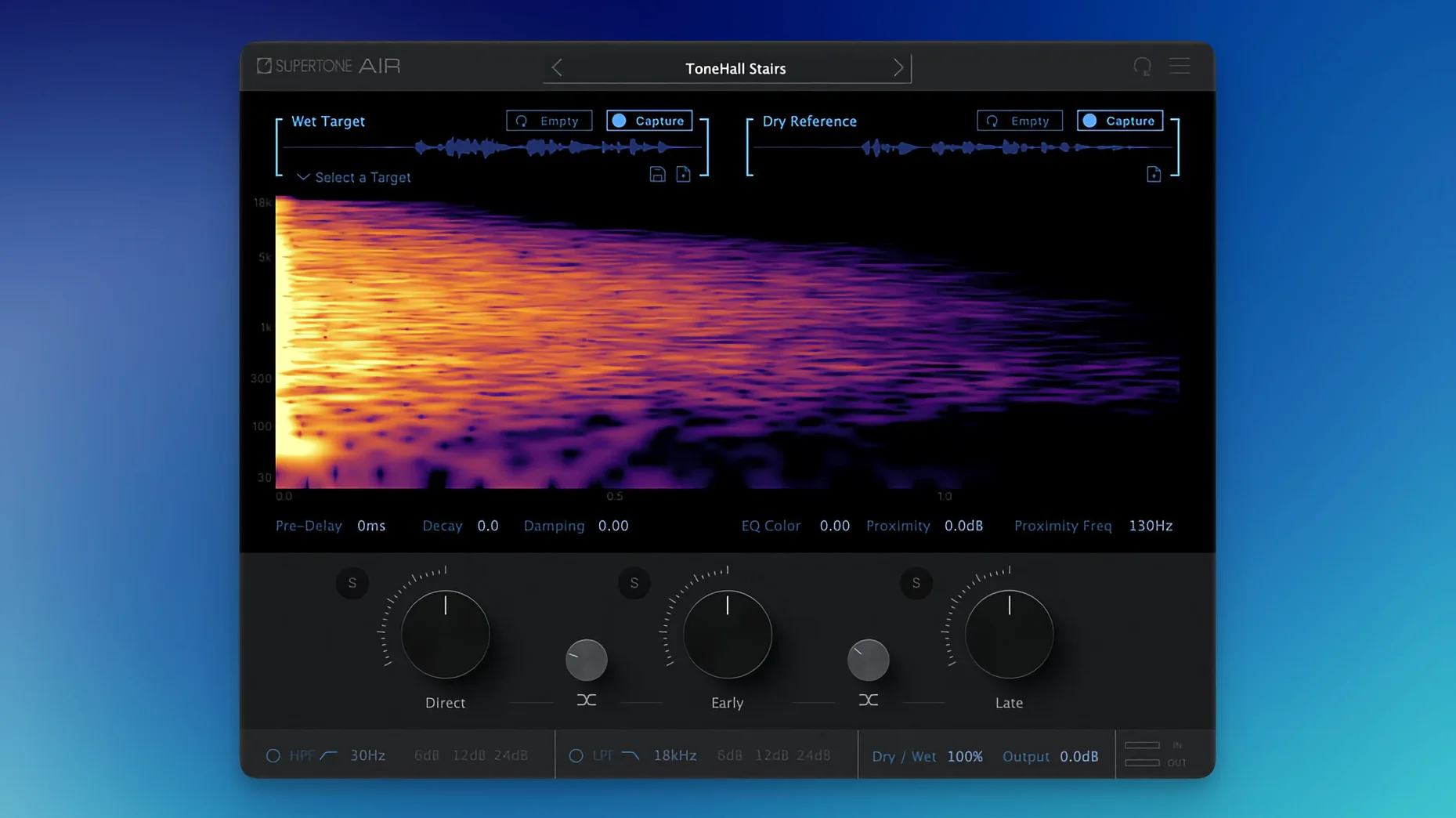
Acoustic Scene Transfer — neural-network analysis of a source clip's reverb and EQ fingerprint. Applies that fingerprint to a dry ADR take.
Profile export — save and share Air profiles so a mix stage can match later pickup lines to the same scene.
The workflow is short. Capture a few seconds of location dialogue with the ambience baked in. Capture the ADR clip. Process. You get the wet-dry blend and EQ curve without manually routing reverbs or copying EQs. It is one plug-in doing two jobs at once.
First-day setup that saves headaches
Pick a known-good scene from your session — one where the boom and lav are well balanced and the room tone is clean. Capture that as your first profile. Even a two-second snippet works as long as it contains only ambience and no foreground movement. Label the profile after the scene and mic position, not the actor. You will thank yourself on day five.
Map the plug-in to a keyboard shortcut in Pro Tools. AudioSuite workflows live and die on speed. Having Supertone Air two keystrokes away means you process a clip, audition it, tweak the blend, and move on without touching the mouse.
Keep your captures at the same sample rate as the session. The plug-in handles 44.1, 48 and 96 kHz, but rate-converting a capture mid-session introduces a variable you do not need. If you track ADR at 96 kHz and the location audio is 48, pick one rate for the day and stick with it.
The plug-in name changed, so old shortcuts probably broke
The plug-in file name was changed from Air to Supertone Air. That sounds cosmetic, but if you had shortcuts or AudioSuite favourites pointing to the old name, they broke. Re-link them once and you are done.
The more important fix was for users who had Sound Particles Air installed. The two plug-ins shared a naming conflict that caused installation failures. Version 1.0.1 sorts that — both can now sit on the same system without stepping on each other.
Everyday behaviour did not change. Processing speed, capture quality, and the profile format are identical to the initial release. The update was about stability, not new features.
Dialogue in your capture will ruin the reverb
- Capturing dialogue instead of ambience. The analyser needs reverb tail and room tone, not speech. A pause between words works. A cough or a chair scrape does not. If your capture has a plosive in it, the processed ADR will carry an echo of that plosive and you will chase it for ten minutes before realising why.
- Over-processing. The default blend is 100% wet. That rarely sounds natural on close-miked ADR. Back the wet-dry mix to 60–70% and nudge it from there. Dry voice keeps the performance present; the wet layer just beds it into the scene.
- Ignoring early reflections. If the source clip is a kitchen and the ADR was recorded in a booth, the early-reflection slider does more heavy lifting than the reverb tail. Push it up before touching decay.
- Processing a whole reel at once. Acoustic Scene Transfer analyses one space at a time. If your cut jumps from a car interior to a hallway, each shot needs its own capture. Batch-processing a mixed reel gives you reverb that does not belong to either location.
- Forgetting the profile export. If a mix stage needs to match a line six weeks later, a saved Air profile is faster than hunting down the original session. Export it as a WAV too, so the profile travels even if the plug-in version drifts between rooms.
One last thing: if you downloaded supertone clear mac thinking it was a different product, you have the right plug-in. The naming around Supertone's toolkit sometimes causes confusion — Air is the dialogue match tool, not a general noise reducer.
Worth it if ADR matching eats into your editing day.
What’s new
- Renames the plug-in file from Air to Supertone Air.
- Fixes an install conflict for anyone who had Sound Particles Air installed.
Requirements
- macOS 10.13 or later
- Intel or Apple Silicon Mac
- Pro Tools (AudioSuite only)
- Sample rates: 44.1 kHz, 48 kHz, 96 kHz
Comments 0
Sign in or create an account to leave a comment.
No comments yet…
If you’ve installed it, say how it went. Mention your Mac and macOS version — it helps the next person more than you’d think.
More in VST Plugins
All in VST Plugins-
 Superior Drummer
3.4.4
Apple Silicon
Superior Drummer
3.4.4
Apple Silicon
-
 Synapse Audio The Legend HZ v2.0.2.R1
2.1
Apple Silicon
Synapse Audio The Legend HZ v2.0.2.R1
2.1
Apple Silicon
-
 Synchro Arts VocAlign 6 Pro
6.1.30
Apple Silicon
Synchro Arts VocAlign 6 Pro
6.1.30
Apple Silicon
-
 T-RackS
6.3.2
Apple Silicon
T-RackS
6.3.2
Apple Silicon
-
 Steinberg SpectraLayers Pro
13.0.20-All-in-One
Apple Silicon
Steinberg SpectraLayers Pro
13.0.20-All-in-One
Apple Silicon
-
 Spire
1.5.19
Apple Silicon
Spire
1.5.19
Apple Silicon
-
 Sonic Academy KICK
1.1.8
Apple Silicon
Sonic Academy KICK
1.1.8
Apple Silicon
-
 Sonarworks SoundID Reference
5.12.0
Apple Silicon
Sonarworks SoundID Reference
5.12.0
Apple Silicon