
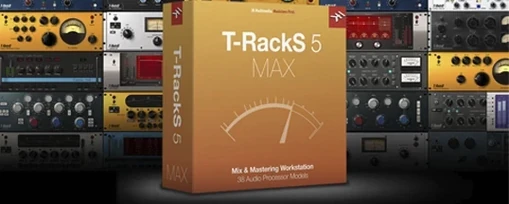
T-RackS for macOS
Description
You can run T-RackS 6.3.2 on any Intel 64-bit Mac or Apple Silicon machine that’s on macOS 10.15 Catalina or later. The software is 64-bit throughout and supports floating-point processing at up to 192 kHz, 32-bit.
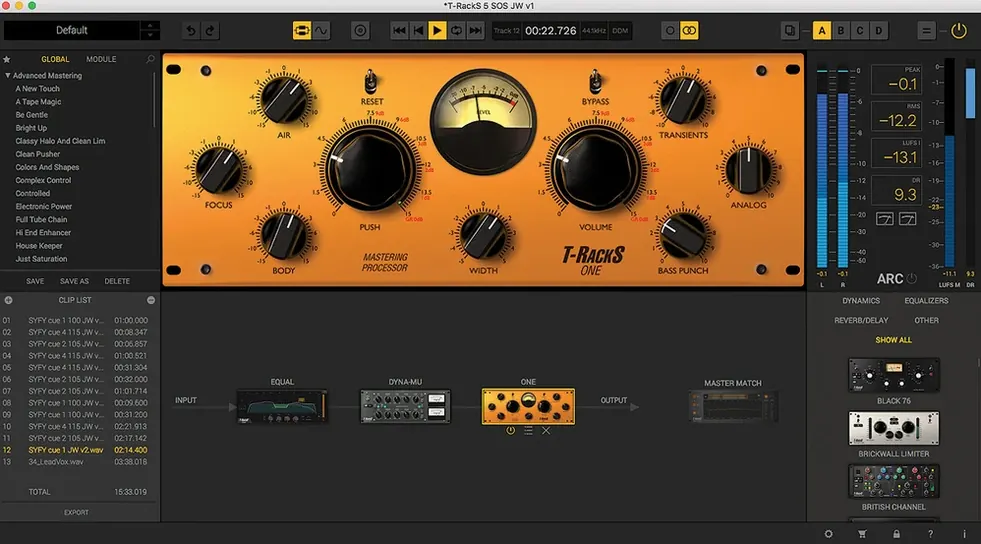
Drag nine processors into any order
- Building a mastering chain from scratch. The module manager lets you drag nine processors into any order you need. It’s the same thinking as a hardware rack, just without the patch cables.
- Using processors inside your DAW. You aren’t stuck in the standalone shell. Pull individual modules up as plug-ins on tracks and buses for spot treatment.
- Finishing an album. The software includes album assembly with sequencing and metadata embedding, so you can finalise a full release without jumping to another tool.
Manual dithering, no guesses
- The interface is a recent redesign. If you learned an older version, the controls have moved around. It’s cleaner, but muscle memory won’t help.
- Dithering is manual. You pick from four options. No automatic setting guesses what you want, so you need to know your delivery format.
- Language support is English only. The interface, manual and metadata fields don’t switch to other languages.
Loads in any VST 3, AU or AAX DAW
The plug-ins load in any DAW that speaks Audio Units, VST 3 or AAX. That covers Logic Pro, Ableton Live, Pro Tools, Cubase, Reaper and most of the serious contenders. You don't need to use the standalone shell at all if you prefer staying inside your session.
With a modular chain of 16 slots in serial or parallel, you can treat it like a self-contained mastering desk inside your DAW. Route a stereo mix out to a bus, drop the T-RackS chain on it, and you're working with the same signal flow you'd get from the standalone console.
It also plays nicely with macOS audio routing. The standalone app sees whatever interface Core Audio sees, so aggregate devices and multi-channel setups work as expected. If you print stems from your DAW to a mastering session folder, the album assembly module can pull them in and sequence them without leaving the app.
It does not integrate with Apple's Music app or iTunes metadata — the embedding is for WAV and other formats, straight into the file headers. That's fine for distribution but don't expect it to populate your personal library automatically.
Drop in a 24-bit bounce and start shaping
- You bounce a stereo mix from your DAW at 24-bit, 48 kHz and drop it into the standalone Mastering Console. The waveform draws immediately.
- You open the module manager and drag in EQual first — a gentle high-pass at 30 Hz, then a small dip around 300 Hz to clear some mud.
- Next comes Dyna-Mu. You set a slow attack, medium release, just enough gain reduction to catch the loudest peaks without pumping.
- Master Match X goes in after that. You load a reference track — something from a commercial release in a similar genre — and let it analyse the tonal balance. You dial the intensity back to about 40% so it guides rather than clones.
- ONE sits at the end of the chain for final level. You push the input until the loudest section sits around -1 dB true peak. You pick the MBIT+ dither for a 16-bit CD export.
- You open album assembly, drag in three more tracks, set the gaps and sequencing, add the artist name and album title into the metadata fields, then export the set as 16-bit WAVs.
The whole thing takes about twenty minutes once you know the processors. The chain saves as a preset for next time.
Plug-ins missing after an Apple Silicon install
Plug-ins don't show up in the DAW. This happens most often after a fresh install on Apple Silicon. Make sure your DAW is running natively and not in Rosetta mode. T-RackS installs both ARM and Intel builds, but a mismatched host can hide them from the plug-in list. Rescan your plug-ins from the DAW's preferences and restart.
The standalone app won't see your audio interface. Check that macOS hasn't grabbed the device for system sounds. Open Audio MIDI Setup and make sure your interface isn't set as the default output for alerts. Then select it manually in T-RackS under audio settings.
Dyna-Mu pumps or distorts at low thresholds. The processor models a vari-mu compressor and it can get grabby. Back the threshold off and use the parallel mix knob to blend the compressed signal with the dry one. That keeps the weight without the artefacts.
Master Match X sounds too thin. If your mix and the reference track are in different keys or have wildly different bass energy, the match curve overcompensates. Use a narrower frequency range — disable the corrections below 80 Hz and above 12 kHz — and lower the intensity further. The results get more natural fast.
Exported files have no embedded artwork. Album assembly writes metadata to the file header, but artwork embedding depends on the format. WAV supports it loosely; not every playback app reads it. If you need guaranteed artwork, export as FLAC or use a dedicated tag editor afterwards.
Requirements
- macOS 10.15 Catalina or later
- Intel 64-bit or Apple Silicon Mac
- 64-bit operating system
Comments 0
Sign in or create an account to leave a comment.
No comments yet…
If you’ve installed it, say how it went. Mention your Mac and macOS version — it helps the next person more than you’d think.
More in VST Plugins
All in VST Plugins-
 Synchro Arts VocAlign 6 Pro
6.1.30
Apple Silicon
Synchro Arts VocAlign 6 Pro
6.1.30
Apple Silicon
-
 Synapse Audio The Legend HZ v2.0.2.R1
2.1
Apple Silicon
Synapse Audio The Legend HZ v2.0.2.R1
2.1
Apple Silicon
-
 Supertone Air
1.0.1
Apple Silicon
Supertone Air
1.0.1
Apple Silicon
-
 Superior Drummer
3.4.4
Apple Silicon
Superior Drummer
3.4.4
Apple Silicon
-
 Steinberg SpectraLayers Pro
13.0.20-All-in-One
Apple Silicon
Steinberg SpectraLayers Pro
13.0.20-All-in-One
Apple Silicon
-
 Tone Empire EDYN
1.0.2
Apple Silicon
Tone Empire EDYN
1.0.2
Apple Silicon
-
 Toontrack EZkeys
2.1.5
Apple Silicon
Toontrack EZkeys
2.1.5
Apple Silicon
-
 Spire
1.5.19
Apple Silicon
Spire
1.5.19
Apple Silicon