

Steinberg SpectraLayers Pro for macOS
Description
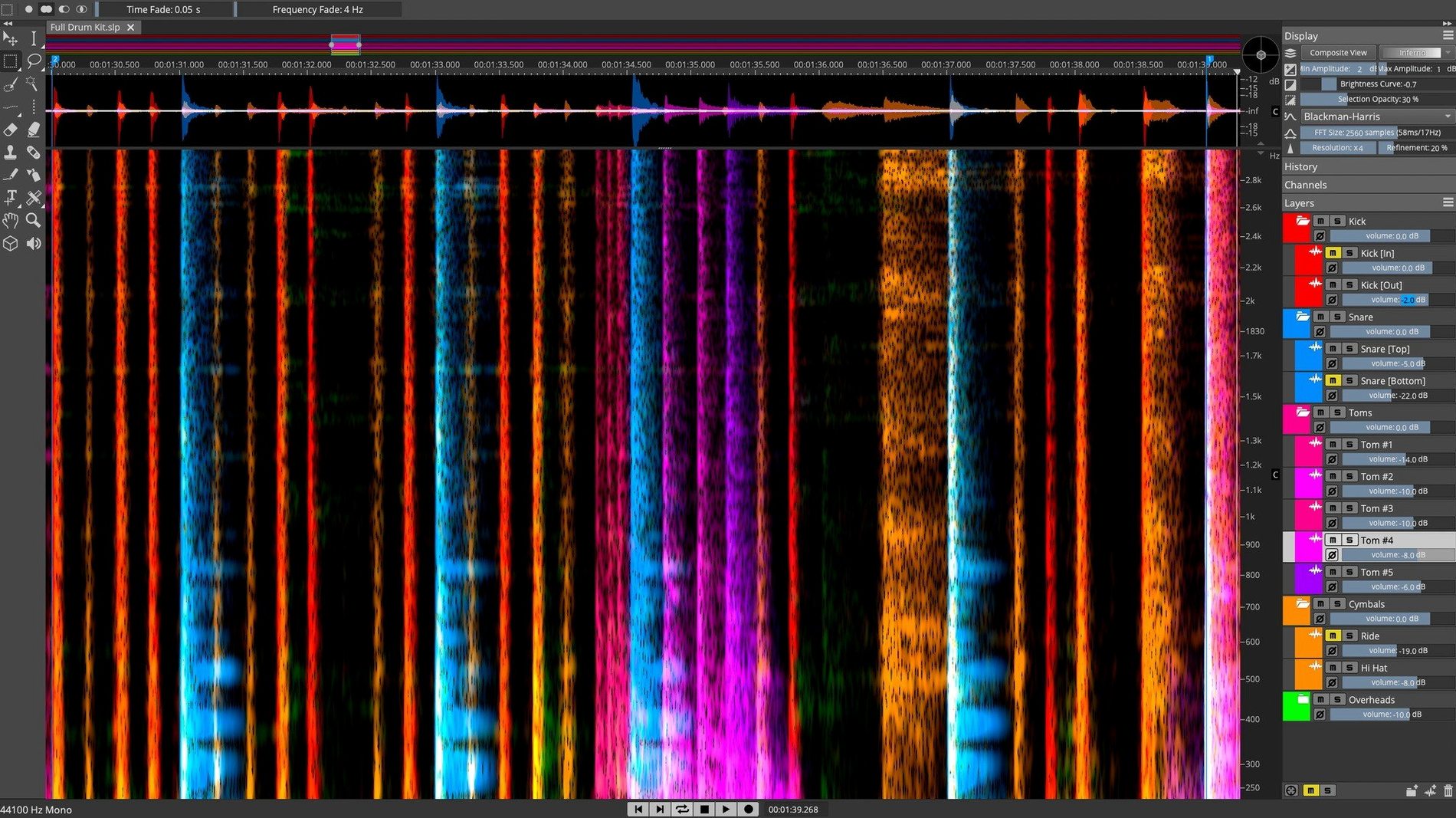
Think of it as the audio equivalent of a pixel-level photo editor, but for a single track or an entire mix bus.
Track — where you surgically remove a chair squeak from an otherwise perfect vocal take, or de-ess a cymbal-heavy overhead recording without a standard compressor.
Stem — AI-based unmixing splits a finished stereo mix into vocal, drum, bass and other layers, even when you have no multitrack. You can then rebalance or repurpose parts.
Bus — on a dialogue bus, you can visually spot and attenuate overlapping background noise that a gate would miss, all before it hits your channel strip.
Laggy display? Drop the FFT size to 2048 or 1024
The spectral display can feel laggy when you first open a long file. This is nearly always down to the FFT size being too high for real-time scrolling. Drop it to 2048 or 1024 in the Display settings and things smooth out. You can always switch back to a higher resolution for precise work on a short selection.
ARA 2 integration. If SpectraLayers doesn't show up as an ARA extension in Nuendo or Cubase, the culprit is usually a mismatched install location. The plug-in component must live in /Library/Audio/Plug-Ins/VST3 — no subfolders, no symlinks. Delete it, run the installer again and reboot the host. That fixes it nine times out of ten.
AI unmixing producing mushy cymbals in the drum stem? Try running the separation with the "Enhanced" algorithm rather than "Fast". It takes longer but handles high-frequency transients far more cleanly. Also worth feeding it a full-resolution file — mp3 compression artefacts throw the model off noticeably.
Export options trip people up too. If you're sending stems back to a DAW, export as 32-bit float WAVs to preserve headroom. 16-bit will clip any layer that peaks above 0 dBFS during separation, and SpectraLayers doesn't warn you about it.
AI unmixing a four-minute track in about twenty seconds
On Apple Silicon, the app is responsive. Loading a four-minute 48 kHz stereo file takes under three seconds on an M1 Pro. The AI unmixing — the heaviest task — chews through a track of that length in about twenty seconds on the same machine. Intel Macs feel a generation slower, especially during real-time spectral previews with large FFT windows.
Memory is the real appetite. A single 96 kHz multitrack session can push past 6 GB of RAM without blinking. If you work at high sample rates, 16 GB is a practical floor. Below that, macOS starts swapping and the spectrogram redraws stutter.
Stability has been solid through version 13.0.20. No random quits during editing, though I have seen the occasional beachball when loading a corrupted WAV header. The app doesn't crash — it just hangs until you force quit. Lesson: check your file headers before importing.
Plug-in hosting for VST3 effects works inside the standalone app, but expect a few third-party plug-ins to fail GUI rendering on Sonoma. FabFilter and iZotope stuff loads fine. Smaller developers' plug-ins sometimes draw a blank window. The audio processing still runs; you just can't tweak the knobs.
Removing a bar stool scrape at 800 Hz in a live recording
Say you've got a live acoustic recording — vocal, guitar, and a bar stool scraping across the floor at 1:42. The scrape sits around 800 Hz and lasts half a second.
Step 1. Drag the file in. SpectraLayers builds the spectrogram. Switch the display to 3D view so you can see the scrape as a ridge poking out from the guitar's harmonics.
Step 2. Zoom in on the offending area — click and drag a time selection, then scroll to zoom the frequency axis. The scrape is a bright horizontal smear. Select the Lasso tool, set it to freehand, and draw around just that blob.
Step 3. Right-click the selection and choose Gain. Pull it down 12 dB. Play back the section — the scrape has dropped below the guitar's sustain. A conventional EQ would have dulled the whole bar.
Step 4. Now you want to isolate the vocal for a separate reverb send. Select the whole file, go to Layers > Unmix > Stems, pick the "Vocals / Music" preset and let the AI run. When it finishes, you get a new layer stack — vocals on top, everything else below.
Step 5. Solo the vocal layer. There is still some guitar bleed in the upper mids. Select the Pattern Finder, click on a clean bit of bleed, set the similarity threshold to about 80%, and hit Find All. The tool highlights every occurrence across the layer. Apply a gentle gain reduction to the whole lot in one pass.
Step 6. Export the layers as individual WAVs, drop them into your DAW, and carry on mixing.
Dialogue editors cutting phone buzz without touching the voice band
Post-production editors working on dialogue-heavy projects. The Voice Denoiser and spectral selection tools let you remove a mobile phone buzz or an air-conditioner hum without touching the voice band. You work faster than with RX's adaptive mode because you can see exactly what you are cutting.
Remixers and beatmakers who regularly pull stems from stereo tracks. The AI separation is good enough that a vocal extracted from an mp3 can sit in a new production without obvious artefacts — provided the source mix wasn't drowning in reverb.
Restoration engineers dealing with vinyl rips or old tape transfers. The Pattern Finder catches recurring clicks and crackle across a whole side of audio in seconds. Manual de-essing on a spectral level beats any automatic de-esser when the sibilance is inconsistent.
It's less useful if you only ever work with pristine multitracks. The spectral view excels at fixing problems, not at creative sound design from scratch — though you can certainly warp audio into unrecognisable shapes if you feel like experimenting.
Sound is shown as a 3D spectrogram, so you select and process audio by frequency and time, not just by ear.
What’s new
Installer release notes are available for version 13.0.20.
Requirements
- macOS 12 or later
- Apple Silicon and Intel Macs
FAQ
What's the difference between SpectraLayers Pro and Elements?
Pro includes the full AI-based component unmixing, 3D visualisation and advanced manual editing tools. Elements is a cut-down version for simpler repair work.
Comments 0
Sign in or create an account to leave a comment.
No comments yet…
If you’ve installed it, say how it went. Mention your Mac and macOS version — it helps the next person more than you’d think.
More in VST Plugins
All in VST Plugins-
 Spire
1.5.19
Apple Silicon
Spire
1.5.19
Apple Silicon
-
 Sonic Academy KICK
1.1.8
Apple Silicon
Sonic Academy KICK
1.1.8
Apple Silicon
-
 Sonarworks SoundID Reference
5.12.0
Apple Silicon
Sonarworks SoundID Reference
5.12.0
Apple Silicon
-
 Superior Drummer
3.4.4
Apple Silicon
Superior Drummer
3.4.4
Apple Silicon
-
 Supertone Air
1.0.1
Apple Silicon
Supertone Air
1.0.1
Apple Silicon
-
 Slate Digital Submerge
1.0.5
Apple Silicon
Slate Digital Submerge
1.0.5
Apple Silicon
-
 Slate Digital Storch Filter
1.0.6
Apple Silicon
Slate Digital Storch Filter
1.0.6
Apple Silicon
-
 Slate Digital Murda Melodies
1.1.1
Apple Silicon
Slate Digital Murda Melodies
1.1.1
Apple Silicon