
Superior Drummer for macOS
Description
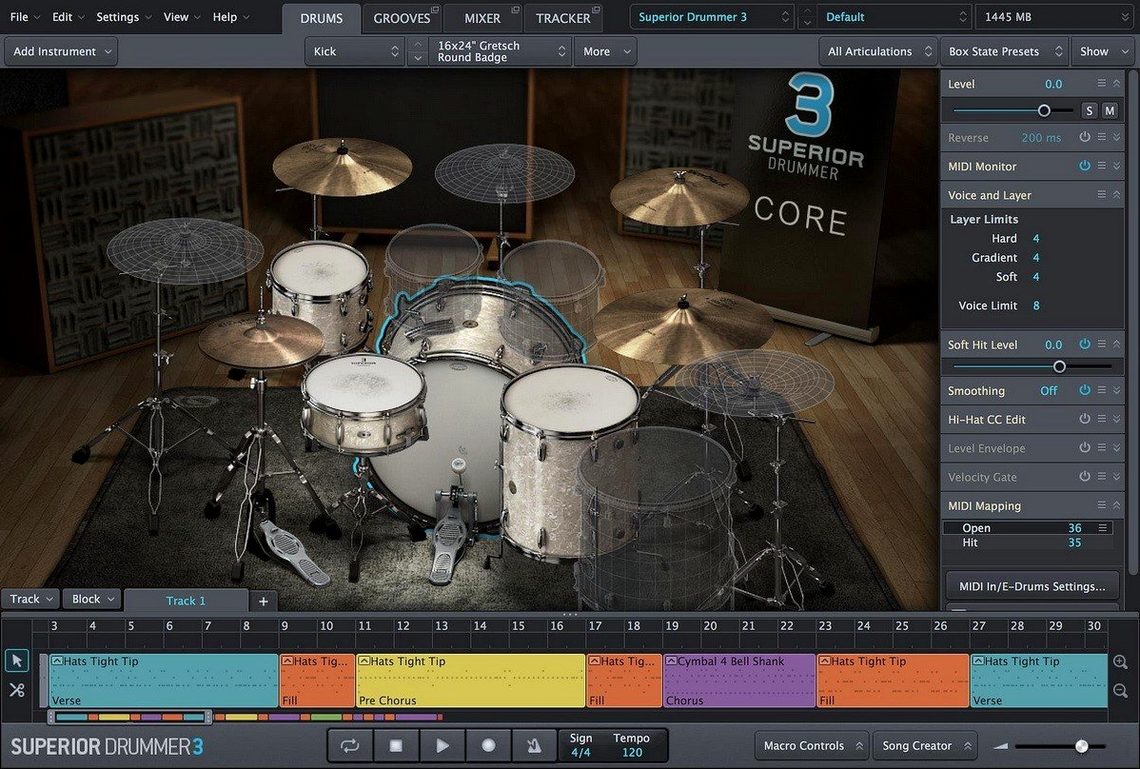
If you already use EZdrummer and its library feels a bit like a well-furnished rental flat, Superior Drummer is the house you build yourself. Same developer, but here you get the raw multitrack channels, full bleed control and the mixing desk to place the drums wherever they sit best in a session.
- Track setup. Load it as a multi-output instrument on a stereo instrument track. Route kick, snare, hats, toms and overheads to separate aux tracks in your DAW so you can process each mic independently — exactly like a recorded kit.
- Kit selection. Pick from the 7 included kits. Each loads with its own mixer preset, so you start with a ready-to-play room sound and tweak from there.
- Bus grouping. Send the close mics to a drum bus with gentle compression for glue. Keep room mics on a separate bus if you want to crush them in parallel later.
- MIDI extraction. Feed a drum loop into the audio-to-MIDI conversion. It maps hits to the loaded kit so you can replace or layer sounds without retriggering by hand.
You end up with the same routing you would use for a live drum recording, but inside the box. The 35 built-in effects are enough to shape the sound without third-party plug-ins, and the library covers both acoustic kits and electronic hybrid setups.
The drum room inside your DAW
Superior Drummer isn't a one-stop groove machine. It's the drum room. You still need a DAW to host it, and you still need something to feed it MIDI — a keyboard, pad controller, or a pre-written pattern dragged onto the track. The plugin itself doesn't sequence a song. It responds to what you send it.
People who treat it as a drum module sitting inside Logic or Ableton get on best with it. Route the multi-output version, not the stereo one, or you lose the whole point of having bleed and close mics separated. The stereo instance is fine for sketching. It's a waste for a finished track.
It also plays well with Toontrack's own MIDI packs, which map directly to the default kit layout. If you drop in a third-party groove library, spend five minutes checking which articulations land where. The hi-hat especially — many external MIDI files assume a different open/closed mapping, and you'll get half-open hats where you wanted a tight closed chick.
Newer SDX expansions require the 3.4.0 library format
Version 3.4.0 introduced the library file format that newer SDX expansions need. If you bought any Superior Drummer 3 product released from spring 2025 onward, you already depend on that update. The core sound engine stayed the same — the raw audio path didn't change — but the way the plugin reads sample containers did.
Version 3.4.4 tidied up a handful of things. The most visible one for daily work: loading times improved for kits that pull from large SDX libraries, particularly the ones recorded with multiple surround mic sets. It's not a dramatic difference on an internal SSD, but on an external drive over USB it shaved several seconds off the "Loading bleed samples" stage.
A small but useful fix in 3.4.4 addressed a crash some users hit when switching kits while the audio-to-MIDI conversion window was still open. That workflow — converting a loop, dragging the MIDI onto the track, then swapping kits to audition different sounds — is now stable.
Point the plugin to moved sound content
Library not found after installation. The installer puts sound content in a location you choose. If you moved it afterwards, the plugin won't find it. Go to the Settings tab, click "Add Library Path," and point it to the top-level folder that contains the SDX directories. A rescan takes under a minute.
Multi-output routing disappearing. Some DAWs — particularly Logic — don't automatically create the aux channels when you instantiate the multi-output version. After loading the plugin, look for a small "+" icon in the mixer channel strip. That creates the additional outputs one by one. Do it before you start programming or you'll redo your routing later.
Hi-hat pedal tightness feels wrong. The default pedal curve isn't for everyone. Open the mapping page, find the hi-hat pedal CC, and adjust the curve graph. A more aggressive curve means tighter closed sounds earlier in the pedal travel. If your controller only sends 0–127 without smooth increments, the curve adjustment helps but won't work miracles.
Audio-to-MIDI mis-hits on busy material. Feed it a full mix with bass and guitars and it'll trigger snare hits from guitar transients. Solo the drum bus first, or at least high-pass the source at 200 Hz before conversion. The algorithm works best on kick and snare transients that are already isolated.
Mistakes newcomers keep making
Loading the stereo instance for a finished production. It's the fastest way to get sound, and the slowest way to get a good mix. Without separate kick and snare channels, EQ decisions that help one drum will hurt another. Start with multi-output even if you only use three faders at first.
Treating every kit like it's ready to record. The included 7 kits come with mixer presets that show off the room sound. That doesn't mean they suit your track. The default preset on the Ayotte kit, for instance, has a long ambient tail that sounds gorgeous soloed but turns to mush inside a busy arrangement. Dry it up with the close-mic faders and add ambience to taste later.
Ignoring the envelope section. People spend ten minutes EQing a snare that just needs the decay shortened. The envelope controls — attack, hold, decay — sit directly above the mixer strip. A snare that rings too long can be tamed with a shorter decay, no EQ required. That alone saves more CPU and phase-shift headaches than stacking three plugins on the channel.
Assuming all SDX libraries install and run without the latest app version. The 3.4.0 requirement for 2025 releases onward catches people out. They grab a new expansion, install it, and then wonder why the kit list shows nothing. The fix is straightforward: update the plugin to 3.4.4, which includes the necessary library format support and a couple of stability improvements on top.
A final practical note: the 230 GB library doesn't need to live on your boot drive. Move it to a fast external SSD — USB-C or Thunderbolt — and set the library path once. The plugin streams samples directly from disk, so drive speed matters more than where the drive lives.
What’s new
Version 3.4.4 is out. Version 3.4.0 or later is needed for Superior Drummer 3 products released from Q2 2025 onward.
Requirements
- macOS 10.13 or later
- Intel or Apple Silicon Mac
- 64-bit host
- English interface
FAQ
Can Superior Drummer turn drum audio into MIDI?
Yes. It includes a drum audio-to-MIDI conversion feature that maps hits to the loaded kit. It works as a bridge between acoustic and electronic production.
How many kits and effects come with Superior Drummer?
It ships with 7 full kits and 35 mixer effects, covering everything from dynamics to modulation and reverb.
What macOS version does Superior Drummer need?
It requires macOS 10.13 or later and a 64-bit host. It runs natively on both Intel and Apple Silicon Macs.
Comments 0
Sign in or create an account to leave a comment.
No comments yet…
If you’ve installed it, say how it went. Mention your Mac and macOS version — it helps the next person more than you’d think.
More in VST Plugins
All in VST Plugins-
 Supertone Air
1.0.1
Apple Silicon
Supertone Air
1.0.1
Apple Silicon
-
 Synapse Audio The Legend HZ v2.0.2.R1
2.1
Apple Silicon
Synapse Audio The Legend HZ v2.0.2.R1
2.1
Apple Silicon
-
 Synchro Arts VocAlign 6 Pro
6.1.30
Apple Silicon
Synchro Arts VocAlign 6 Pro
6.1.30
Apple Silicon
-
 T-RackS
6.3.2
Apple Silicon
T-RackS
6.3.2
Apple Silicon
-
 Steinberg SpectraLayers Pro
13.0.20-All-in-One
Apple Silicon
Steinberg SpectraLayers Pro
13.0.20-All-in-One
Apple Silicon
-
 Spire
1.5.19
Apple Silicon
Spire
1.5.19
Apple Silicon
-
 Sonic Academy KICK
1.1.8
Apple Silicon
Sonic Academy KICK
1.1.8
Apple Silicon
-
 Sonarworks SoundID Reference
5.12.0
Apple Silicon
Sonarworks SoundID Reference
5.12.0
Apple Silicon