
Slate Digital Murda Melodies for macOS
Description
Version 1.1.1 is a maintenance release without new features, so the plugin you're getting is the same solid tool that gained Apple Silicon support back in 1.0.8. It sits unassumingly in your plugin list until you need a sound that stock effects can't reach.
Insert it last on your lead vocal bus
- On a lead vocal bus. Insert it last. Use the high-pass to clean up rumble, then dial in a short synced delay and a touch of the hall-style reverb. The stereo widener, which stays mono-compatible, pushes the vocal across the field without losing centre focus.
- On a melody track. Place it directly on a synth or sample channel. The reverse processing is the star here — automate the mix knob to throw selected phrases backwards. Combine it with the modulation control to add pitch drift that mimics old tape.
- On a drum bus. Use the low-pass filter to darken a full kit, then engage a 1/8-note synced delay for a slapback feel. Keep the reverb short and the modulation off. It tightens a trap beat without making it washy.
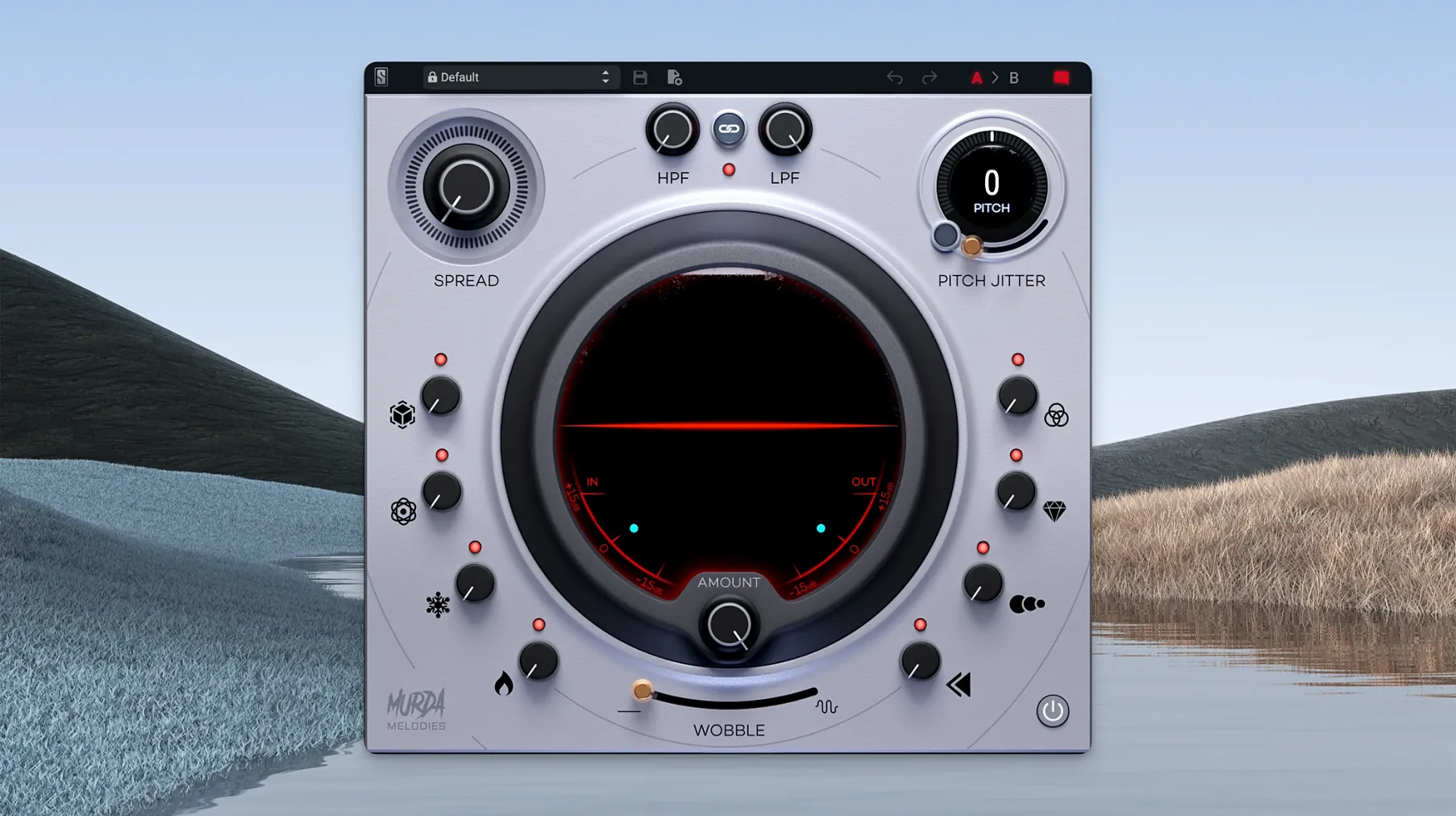
Each of the eight controls has its own knob, so you're not menu-diving. The analog-modelled filters have a pleasant grit when pushed, and the reverse effect is more musical than most stock alternatives. It's built for hip-hop, trap and R&B textures, but it works on anything that needs a quick dose of character.
Spend the first hour with the Pitch Jitter knob. It does more than it lets on. At low values — between 0.5 and 2 — it adds a barely-there instability that softens stiff synth lines. Push it past 5 and the pitch starts to warble like a worn cassette motor. For trap hi-hats, try setting it to 8 with the wet/dry around 30%. The hats stay rhythmic but gain an uneasy, organic flicker that cuts through a dense mix better than EQ alone.
Save three user presets early. One with just the filters and a touch of widening, one built around a long reverse swell, and one dry telephone-style setting with the high-pass at 400 Hz and the low-pass at 2.5 kHz. Having those ready stops you from twisting knobs when an idea is moving fast. The factory presets — all 50-plus of them — are worth scrolling through on a muted track before you commit to your own. Murda Beatz's own patches tend toward dramatic pitch drops and cavernous spaces, which make good starting points but often need the reverb tail shortened for a real session.
If macOS blocks the installer, open System Settings, go to Privacy & Security, and allow it from there. Standard procedure, but easy to forget at 2 a.m.
Turning a dry loop into a hook
- Drop Murda Melodies onto a melody bus that's already gain-staged to around -12 dB. Pull up the default preset and zero everything except the filters.
- Set the high-pass to 120 Hz and the low-pass to 8 kHz. This carves out sub-bass mud and tames digital fizz before any effects hit the signal.
- Engage the synced delay at 1/4 notes. Bring the feedback up to about 35% and the mix to 25%. You want a trailing echo, not a second voice.
- Dial the reverb to a medium hall, decay around 1.8 seconds, mix at 20%. Keep it behind the delay in the signal chain mentally — the delay feeds into it naturally.
- Add the modulation effect slowly. Turn the rate to roughly 1.2 Hz and the depth until you hear a slow chorus movement. Stop just before it becomes obvious.
- Now bring in the pitch shifter. Drop the pitch by 7 semitones and set the mix to 18%. The shifted signal sits underneath the dry, thickening the melody without sounding like a separate layer.
- Automate the reverse mix knob on the last two beats of every fourth bar. A short reverse swell at bar endings pulls the ear into the next phrase.
The result is a loop that sounds wider, deeper, and slightly unhinged — exactly what a hook should do in a beat that runs three minutes.
Three things people ask before they grab it
Does it work if I don't make trap beats? Yes. The name implies a narrow lane, but the toolset is broad. The filters alone are useful on any source that needs tone shaping with a bit of analogue colour. The reverse effect is a quick way to create transitional textures in pop, electronic and even ambient work. You'll ignore the vinyl wobble if you're mixing folk, but the rest of the plugin translates fine.
Will it run natively on my M1 or M2 machine? Yes. Native Apple Silicon support landed in version 1.0.8 and carries through to the current 1.1.1 release. No Rosetta translation needed. AU, VST3 and AAX formats all load as ARM-native, and the mono-to-stereo routing works correctly in every format that version 1.0.8 addressed.
How heavy is the CPU load? Moderate. Eight effects running simultaneously on a single instance will nudge the meter on older Apple Silicon machines, but it's not a session-killer. If you're stacking it across 20 tracks, bounce in place occasionally and move on. The reverse processing uses the most cycles, so automate bypass on that block when it's not actively in use.
Requirements
- macOS 11 or later
- Apple Silicon processor
FAQ
Does Murda Melodies run on Intel Macs?
The plugin gained native Apple Silicon support in version 1.0.8. It requires macOS 11 or newer.
What effects are included?
It has eight controls covering modulation, reverb, synced delays, reverse processing, analog-modelled low-pass and high-pass filters, and a mono-compatible stereo widener.
Is it only for hip-hop?
It was designed with hip-hop, trap and R&B in mind, but the effects work on any material where you want to reshape melodies and add texture.
Comments 0
Sign in or create an account to leave a comment.
No comments yet…
If you’ve installed it, say how it went. Mention your Mac and macOS version — it helps the next person more than you’d think.
More in VST Plugins
All in VST Plugins-
 Slate Digital Fresh Air
1.0.9
Apple Silicon
Slate Digital Fresh Air
1.0.9
Apple Silicon
-
 Slate Digital Storch Filter
1.0.6
Apple Silicon
Slate Digital Storch Filter
1.0.6
Apple Silicon
-
 Slate Digital Submerge
1.0.5
Apple Silicon
Slate Digital Submerge
1.0.5
Apple Silicon
-
 ShaperBox
3.6.1
Apple Silicon
ShaperBox
3.6.1
Apple Silicon
-
 Sonarworks SoundID Reference
5.12.0
Apple Silicon
Sonarworks SoundID Reference
5.12.0
Apple Silicon
-
 Sonic Academy KICK
1.1.8
Apple Silicon
Sonic Academy KICK
1.1.8
Apple Silicon
-
 Serum
2.0.24
Apple Silicon
Serum
2.0.24
Apple Silicon
-
 Spire
1.5.19
Apple Silicon
Spire
1.5.19
Apple Silicon