
Slate Digital Storch Filter for macOS
Description
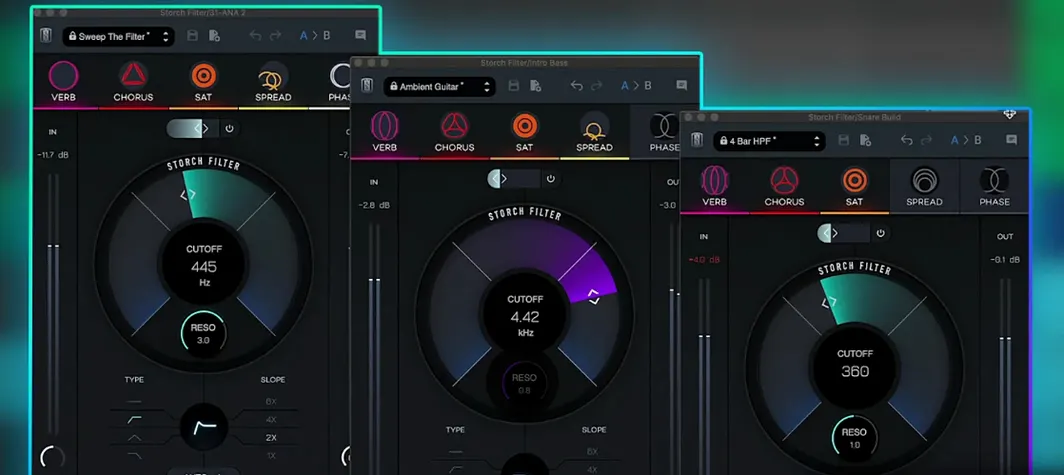
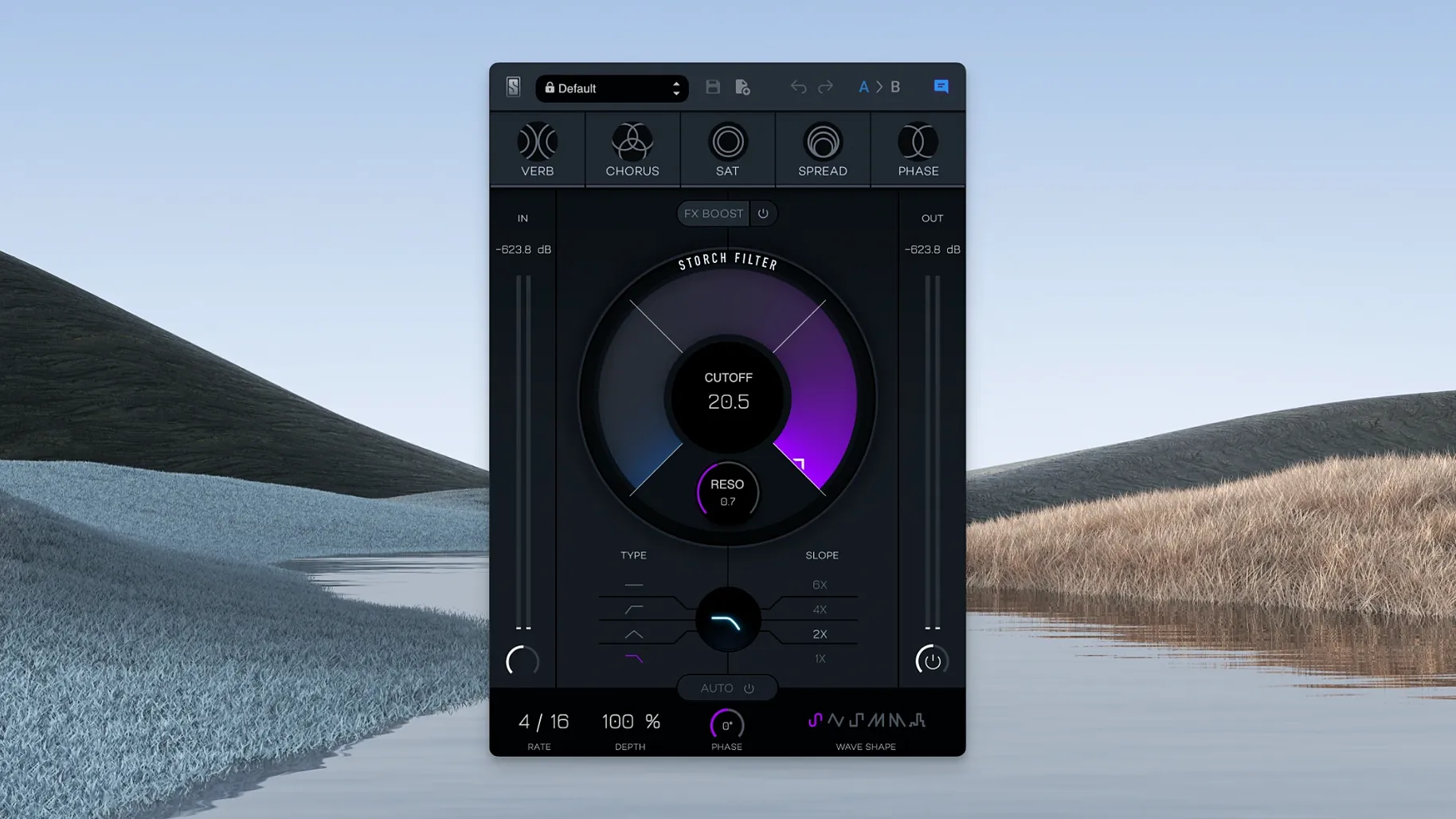
The FX Boost slider is where things get interesting. It's not just a wet/dry mix; it pushes the combined effects chain harder, giving you a sound that moves from subtle colour to something far more pronounced. The whole plugin hangs on two core controls: cutoff and resonance. Every built-in effect — reverb, chorus, saturation, stereo widening and phaser — reacts to how you set them.
One-knob movement across multiple effects at once
- Producers who want one-knob movement across multiple effects
- Quick sound design with the included Scott Storch presets
- Adding instant character to synths, keys and samples
Apple Silicon only, creative processing focus
- Requires macOS 11 or later; Apple Silicon only
- Interface language is English
- A creative processor, not a surgical utility filter
A beatmaker's first afternoon with it
A producer loads up a dull Rhodes loop. It sits flat in the mix, no movement, no front-to-back depth. She drops Storch Filter on the channel, pulls up preset 14 — something Scott Storch named after a session tempo — and nudges the cutoff down to about 200 Hz. The built-in phaser and saturation wake up immediately because they're tied to that single knob. Within thirty seconds the loop breathes. A slow LFO triangle wave shifts the filter centre, and the stereo widening effect spreads the high end outward as the cutoff rises.
She automates the FX Boost slider to push the reverb tail harder on the last beat of every fourth bar. That's it. No separate reverb send, no chained plugins, no modulation mapping. The whole process took under two minutes, and the part now sits in the arrangement without competing with the vocal.
Skipping the drive circuit on clean keyboard parts
Treating it like a surgical EQ
Storch Filter is not a replacement for a parametric EQ. New users sometimes set a steep cutoff and wonder why the low end disappears in an ugly way. The resonance control interacts with the saturation stage — push both high and you get a biting, almost wah-like tone that works on a synth lead but wrecks a full drum bus. Use a clean channel EQ for corrective cuts. Use this for movement and character.
Ignoring the LFO wave shapes
The autofilter section offers six LFO shapes, but beginners often leave it on the default sine and call it done. A square wave into the cutoff creates rhythmic gating that syncs well with a half-time groove. The random sample-and-hold shape turns any sustained pad into an unpredictable texture. Try them before reaching for a separate tremolo or trance gate plugin.
Leaving FX Boost at zero
The five built-in effects are subtle when the FX Boost slider stays parked at the bottom. A common complaint is that the plugin sounds "thin" — that's usually because reverb and saturation are barely in the signal. Push the slider to at least 40% before judging the sound. You can always pull it back.
Replaces three or four chained plugins in one window
Storch Filter works best when it replaces three or four plugins you'd normally chain by hand. Instead of inserting an adjustable low pass filter, then a phaser, then a stereo widener and a separate reverb send, you get one window and two main controls. That saves CPU and keeps automation tidy — one lane for cutoff, one for FX Boost.
It pairs well with a drum bus compressor placed after it in the chain. The filter shapes the tone and movement; the compressor glues the result to the rest of the kit. On a synth lead, try placing a slap delay before Storch Filter so the repeats get progressively darker as the filter sweeps down. That's something you'd normally set up with a 0.5 filter EQ following a delay — here it's just the one plugin doing the work.
On macOS, the plugin shows up in Logic Pro, Ableton Live and any other AU or VST3 host running on Apple Silicon. It respects the system's audio routing, so you can use it on a bus, an aux track or directly on an audio channel. The presets load quickly — no sample library to scan, no external content folder to manage. If you're building a live performance set in MainStage, the low CPU footprint means you can run several instances without glitching.
Sound designers working in post-production sometimes use it as a quick character filter for dialogue or Foley. The saturation stage adds a little grit to a voiceover without needing a separate distortion plugin, and the chorus barely detunes at low settings — just enough to thicken a thin recording. It's not what the plugin was built for, but it works.
What’s new
Build 1.0.6.
Requirements
- macOS 11 or later
- Apple Silicon Mac
- Interface: English
FAQ
Which effects are built into the Storch Filter?
The plugin includes reverb, chorus, saturation, stereo widening, and a phaser. They are all linked to the main cutoff and resonance controls.
Does the Slate Digital Storch Filter run on Intel Macs?
No. The current version requires an Apple Silicon Mac running macOS 11 or later.
Comments 0
Sign in or create an account to leave a comment.
No comments yet…
If you’ve installed it, say how it went. Mention your Mac and macOS version — it helps the next person more than you’d think.
More in VST Plugins
All in VST Plugins-
 Slate Digital Murda Melodies
1.1.1
Apple Silicon
Slate Digital Murda Melodies
1.1.1
Apple Silicon
-
 Slate Digital Submerge
1.0.5
Apple Silicon
Slate Digital Submerge
1.0.5
Apple Silicon
-
 Slate Digital Fresh Air
1.0.9
Apple Silicon
Slate Digital Fresh Air
1.0.9
Apple Silicon
-
 Sonarworks SoundID Reference
5.12.0
Apple Silicon
Sonarworks SoundID Reference
5.12.0
Apple Silicon
-
 ShaperBox
3.6.1
Apple Silicon
ShaperBox
3.6.1
Apple Silicon
-
 Sonic Academy KICK
1.1.8
Apple Silicon
Sonic Academy KICK
1.1.8
Apple Silicon
-
 Spire
1.5.19
Apple Silicon
Spire
1.5.19
Apple Silicon
-
 Serum
2.0.24
Apple Silicon
Serum
2.0.24
Apple Silicon