

Slate Digital Submerge for macOS
Description
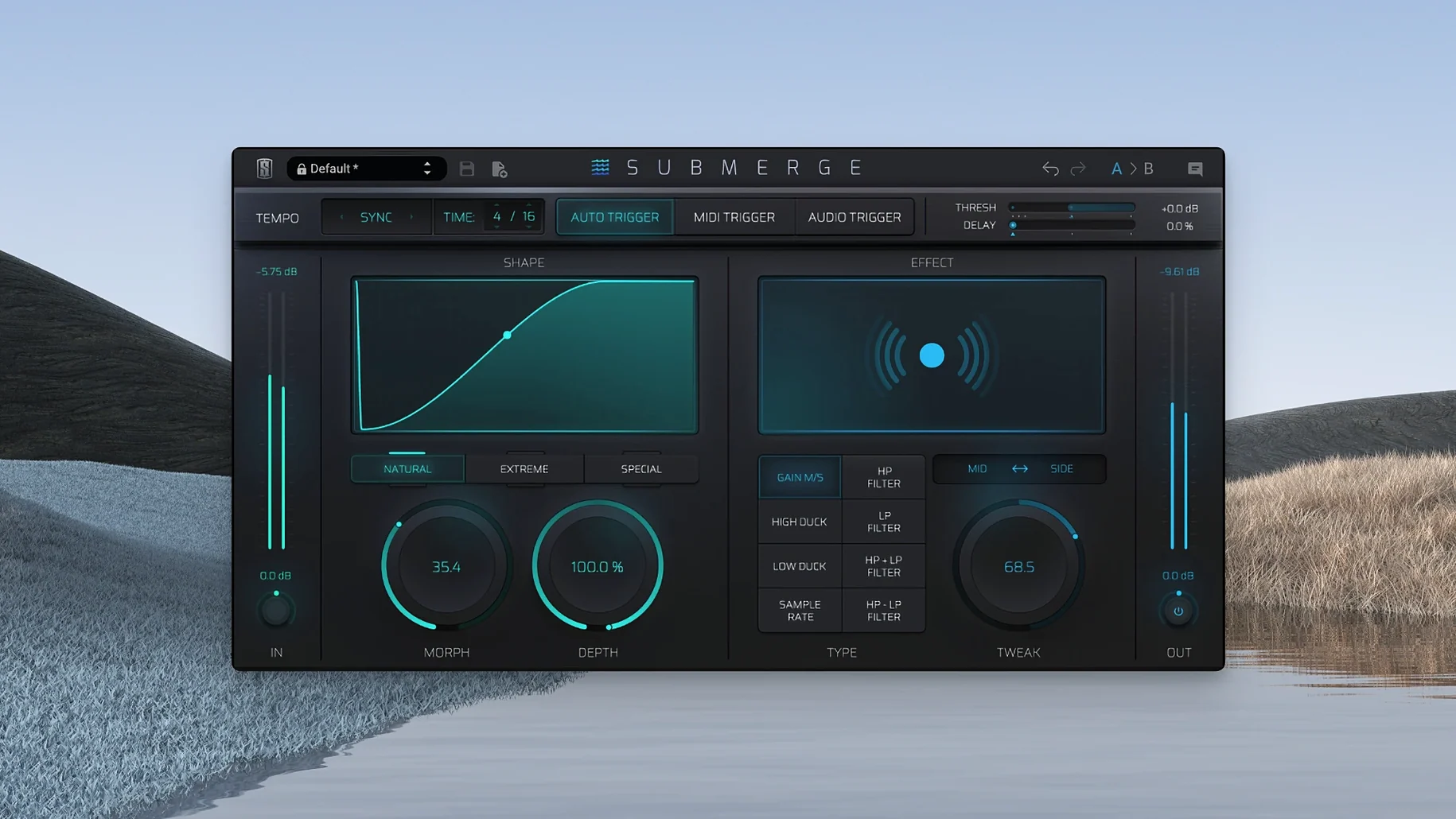
Riding a fader by hand to make room for a kick drum gets old fast. Submerge handles the ducking for you, whether you want a clean mix space or an obvious pumping effect.
Duck bass and pads under the kick without sidechain routing
- Bass and pad buses — duck them under the kick so the low end stops fighting.
- Synth groups — add tempo-synced pumping without drawing automation lanes.
- Parallel effects channels — reduce a reverb or delay when the dry signal hits, or invert the curve with Shift to push it forward.
- Mid/Side duties — apply the movement to the side signal only and leave the centre stable.
How the triggering works
Submerge gives you three ways to drive the ducking. Auto trigger mode syncs to the project tempo, so the effect lands on the grid without a sidechain input. MIDI trigger mode reacts to MIDI notes, which suits electronic productions where the kick is a sampler instrument. Audio trigger mode reacts to an external audio signal routed into the plug-in. Holding Shift inverts the curve and changes ducking into pushing. A sample-rate reduction control adds grit when the movement alone is not enough.
Auto mode locks to 1/4-note dips with zero routing
You drop Submerge onto a bass channel. The kick track is on a different bus, and you cannot be bothered with routing. Switch to Auto trigger mode, set the speed to 1/4 notes, and the bass dips neatly on every beat. Depth sits at about 40% — enough to clear space without making the track sound seasick.
Next you open the curve panel. Natural gives a smooth fade back up, which works for the verse. On the chorus you flick to Extreme. The bass snaps back harder and the whole section pushes forward. You hold Shift, the curve flips, and the bass swells into the kick instead of ducking — wrong for this song, but you make a mental note for the bridge.
Now the hi-hats. A little movement would help the groove. You drop Submerge on the hat group, stay in Auto, and set the speed to 1/8 notes. Depth comes down to 15%. You engage Mid/Side processing so only the side signal ducks. The centre stays crisp, the stereo image breathes around the kick, and you have not touched a single sidechain bus.
Last tweak: the sample-rate reduction knob. You turn it up to about 12 o’clock. The hats get a faint digital crunch as they recover. Not clean. Good.
Threshold too low in Auto mode kills the ducking
The most common one is leaving the Threshold too low in Auto mode. The plug-in does not need an external signal, but the Threshold still matters — if it is set near the floor, Submerge barely reacts. Push it up until the gain reduction meter moves with the tempo, then back off a touch.
Another mistake is overusing the Extreme curve on everything. It sounds exciting soloed. In a full mix, three or four tracks snapping back like elastic bands turn the low end into a trampoline. Use Extreme on one or two elements and leave the rest on Natural, or dial Depth below 30%.
Beginners also miss that the Morph control changes the envelope shape differently per curve type. On Natural, Morph softens the attack. On Extreme, it shifts the hold time. Twisting it without watching the waveform display leads to settings you cannot easily repeat. Move it slowly and listen for the pocket.
Audio trigger mode catches people out when the sidechain source is a pre-fader send. If you mix the kick fader down later, the ducking amount changes. Route your trigger source post-fader, or commit to the send level early.
Finally, ignoring the Tweak knob. It adjusts the release stage independently of Speed. A fast Speed with a slow Tweak setting gives you a quick dip but a lazy recovery — useful on pads, awkward on percussive bass lines. Know which one you want.
A sound designer’s scenario
A sound designer is building a drone for a sci-fi score. The drone runs through a long reverb, but the reverb tail masks every transient in the scene. They insert Submerge on the reverb return and set the trigger to Audio, fed from a close-miked impact layer.
Threshold catches only the hardest transients. Speed is set to 1/64 — near-instant ducking. Depth is at 70%. Every time an impact hits, the reverb drops away hard and swells back in under the ring-out. The effect feels like the room itself is flinching.
They hold Shift to invert the curve on a second instance, this time on the dry drone channel. Now impacts push the drone forward instead of ducking it. Low-pass filtering inside Submerge keeps the push focused below 200 Hz. The scene breathes around the action without a single fader move. Someone searching for a Slate Digital torrent might grab Submerge just for the auto-ducking, but it is the combination of curve inversion and filtering that makes the patch work.
Requirements
- macOS 11 or later
- Apple Silicon
- Interface language: English
Comments 0
Sign in or create an account to leave a comment.
No comments yet…
If you’ve installed it, say how it went. Mention your Mac and macOS version — it helps the next person more than you’d think.
More in VST Plugins
All in VST Plugins-
 Slate Digital Storch Filter
1.0.6
Apple Silicon
Slate Digital Storch Filter
1.0.6
Apple Silicon
-
 Slate Digital Murda Melodies
1.1.1
Apple Silicon
Slate Digital Murda Melodies
1.1.1
Apple Silicon
-
 Slate Digital Fresh Air
1.0.9
Apple Silicon
Slate Digital Fresh Air
1.0.9
Apple Silicon
-
 Sonarworks SoundID Reference
5.12.0
Apple Silicon
Sonarworks SoundID Reference
5.12.0
Apple Silicon
-
 Sonic Academy KICK
1.1.8
Apple Silicon
Sonic Academy KICK
1.1.8
Apple Silicon
-
 ShaperBox
3.6.1
Apple Silicon
ShaperBox
3.6.1
Apple Silicon
-
 Spire
1.5.19
Apple Silicon
Spire
1.5.19
Apple Silicon
-
 Serum
2.0.24
Apple Silicon
Serum
2.0.24
Apple Silicon