
Neural DSP Soldano SLO-100 X for macOS
Description
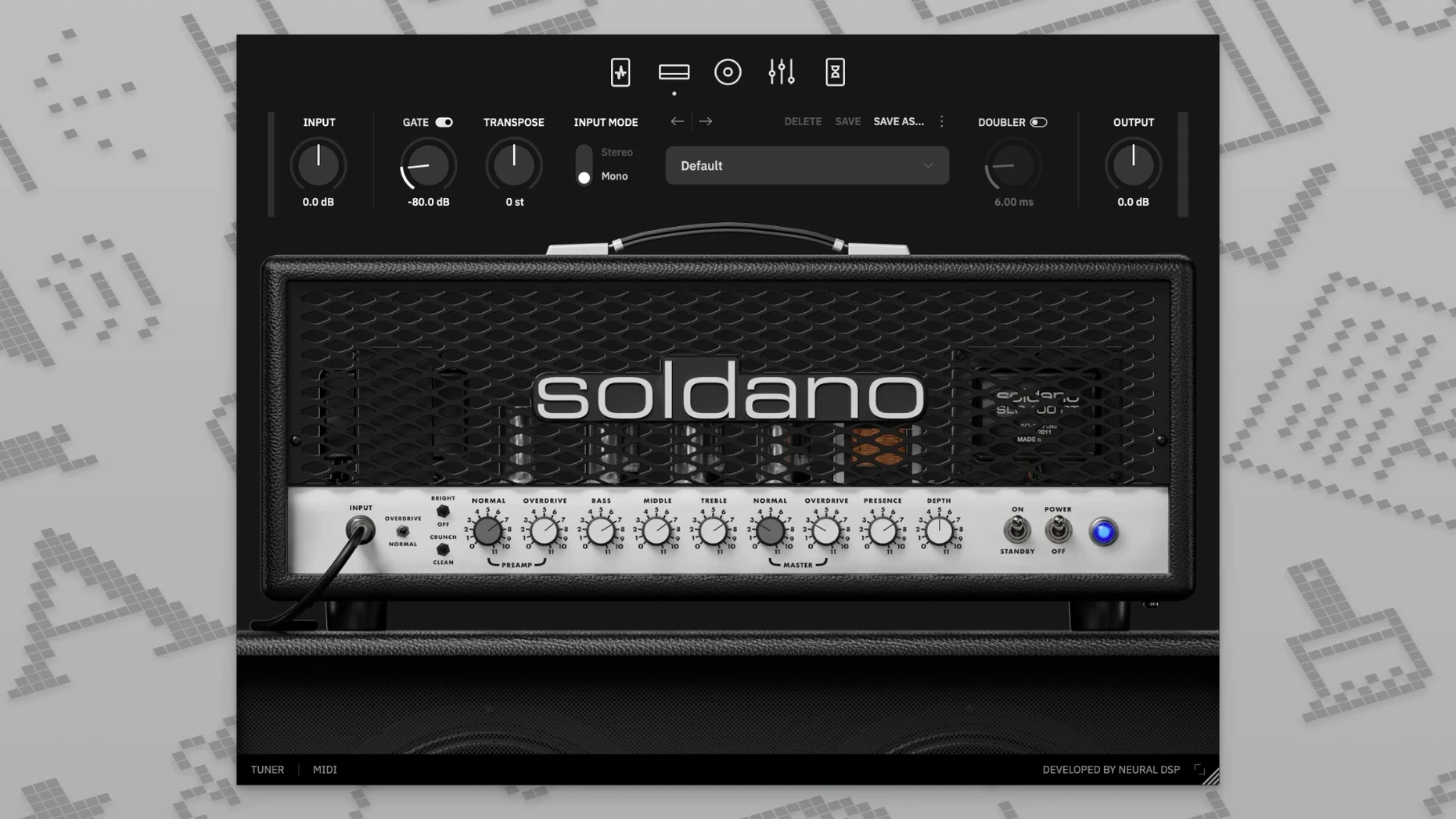
Neural DSP Soldano SLO-100 X is a complete software re-creation of the amplifier that defined American high-gain guitar tone. It runs as a 64-bit AU, VST2, VST3, AAX plug-in or as a standalone app, and it is fully compatible with native Apple Silicon. On the host side, Logic Pro X 10.5 or later is the listed minimum for AU support.
64-bit AU, VST2, VST3, AAX and standalone installer
The installer provides AU, VST2, VST3 and AAX plug-ins, plus a standalone application. All are 64-bit only, so you need a 64-bit host to load the plug-in versions.
How does it sound?
The X version uses updated modelling technology compared to the original release. You get the core SLO-100 lead and crunch character, a nine-band graphic EQ with high-pass and low-pass filters, and a cabinet section with hundreds of impulse response presets. You can load your own IR files, too.
It loads as a 64-bit plug-in only
Matching dull DI takes to a real valve amp sound
A mix engineer receives a session from a band who tracked DI guitars at home. The raw takes are clean, slightly dull, and the producer's brief is simple: make the rhythm tracks sound like a valve amp that has been driven hard in a decent room. The SLO-100 X is opened as an insert on a stereo bus. Within five minutes of loading the default preset and switching to the Crunch mode, the parts gain the midrange push and harmonic fizz that the original DIs lacked. The nine-band EQ then carves out a narrow cut at 400 Hz to keep the low mids from fighting the bass guitar. It is not a substitute for re-amping through a physical cabinet, but for a delivery deadline the next morning, it is close enough that the producer does not ask for a revision.
Mode-switching keeps playback glitch-free on Apple Silicon
On an Apple Silicon Mac, the plug-in loads in under two seconds inside Logic Pro. Switching between the four amplifier modes — Clean, Bright, Crunch, Overdrive — happens without an audio dropout or a CPU spike that derails playback. With eight instances running across a moderately busy project, the performance meter barely moves. The standalone app is equally snappy and useful for a quick practice session without launching a full DAW.
Memory use stays modest. The cabinet IR browser scrolls through factory options without lag, and loading a user IR folder with a few hundred files does not slow the interface. The doubling effect adds a slight latency penalty, so it is best committed during mixing rather than tracking, but the transpose control is tight enough for real-time playing.
Dialling in a lead tone in six steps
- Load the plug-in on a mono audio track and set the input gain so the meter peaks around -12 dB.
- Select the Overdrive mode. Back the gain down to about 4 — high-gain amps rarely need to be dimed to sing.
- Enable the boost pedal in the preamp section. Keep its level at noon and the tone control slightly above centre to push the upper mids forward without harshness.
- Open the cab section and pick a 4x12 impulse response with ribbon-mic voicing. Roll off the high-pass filter to 80 Hz and the low-pass to 8 kHz to keep the tone tight in a busy mix.
- Add a touch of the built-in vintage chorus — mix at 15 %, depth shallow — to widen the stereo image without making the lead sound processed.
- Insert the delay post-amp, set to a dotted-eighth tap tempo synced to the project. High-cut the repeats at 3 kHz so they sit behind the dry signal.
The result is a lead voice that cuts through a dense chorus without extra EQ on the channel strip. Save the whole chain as a user preset and recall it for the next tune in the set.
If someone searches for a neural dsp soldano slo-100 free download, they are likely chasing exactly this kind of immediate, mix-ready gain structure — one that does not require a chain of third-party saturation plug-ins just to wake up the amp model.
It includes a doubling effect for thickening rhythm parts and a transpose control that shifts tuning up or down without touching your instrument's machine heads.
What’s new
Adds the X revision with updated amplifier modelling technology.
Requirements
- macOS 10.15 or later
- Intel or Apple Silicon Mac
- 64-bit host software for plug-in use
FAQ
Does it work on a Mac with Apple Silicon?
Yes, Neural DSP Soldano SLO-100 X has native Apple Silicon support. It also runs on Intel Macs with macOS 10.15 or newer.
Comments 0
Sign in or create an account to leave a comment.
No comments yet…
If you’ve installed it, say how it went. Mention your Mac and macOS version — it helps the next person more than you’d think.
More in VST Plugins
All in VST Plugins-
 Neural DSP Parallax X
1.0.0
Apple Silicon
Neural DSP Parallax X
1.0.0
Apple Silicon
-
 Neural DSP Mantra
1.0.1
Apple Silicon
Neural DSP Mantra
1.0.1
Apple Silicon
-
 Neural DSP Archetype Rabea X
1.0.1
Apple Silicon
Neural DSP Archetype Rabea X
1.0.1
Apple Silicon
-
 Neural DSP Archetype Petrucci
1.0.0
Apple Silicon
Neural DSP Archetype Petrucci
1.0.0
Apple Silicon
-
 Neural DSP Archetype Cory Wong X
1.0.1
Apple Silicon
Neural DSP Archetype Cory Wong X
1.0.1
Apple Silicon
-
 Native Instruments Massive X
1.7.1
Apple Silicon
Native Instruments Massive X
1.7.1
Apple Silicon
-
 noteGRABBER
2.0.0
Apple Silicon
noteGRABBER
2.0.0
Apple Silicon
-
 Nudist Audio Nudistort
1.2.5
Apple Silicon
Nudist Audio Nudistort
1.2.5
Apple Silicon