

Neural DSP Mantra for macOS
Description
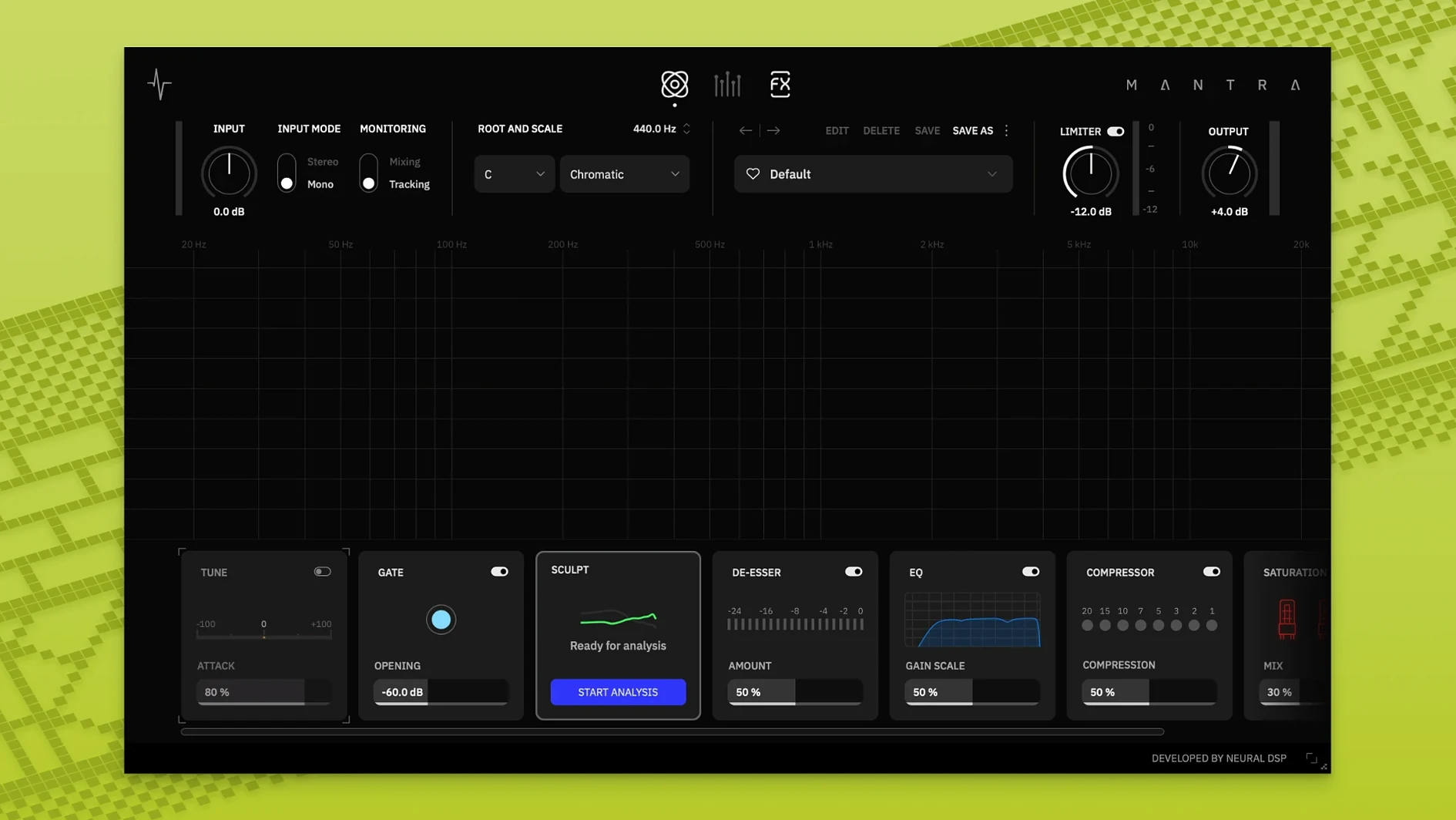
Mantra runs on macOS 10.13 or newer, on both Intel and Apple Silicon Macs. It loads as an AU, VST3 or AAX plug-in and gives you a full vocal chain in a single window — pitch correction, gating, de-essing, compression, saturation, doubling and effects, all split across two workflow modes.
- Recording mode — near-zero latency so you can track with processing on and hear the finished tone in your headphones.
- Mixing mode — switches the engine to final-quality processing for polish and detail work.
- Sculpt section — handles gate, de-esser and a Tilt EQ (added in 1.1.0), each on a single knob that blends the right amount of processing behind the scenes.
- Pitch and harmony — corrects tuning and builds vocal stacks from one dial; you choose the key and the plugin does the rest.
- Effects and saturation — a unified block that pushes the voice from clean sheen to driven texture without leaving the interface.
Every module runs from one main knob, which keeps you moving instead of staring at parameter lists. The whole thing is built for a DAW workflow where you track, tune and mix a vocal without reaching for half a dozen separate plugins.
What the versions changed
Version 1.1.0 turned Mantra into a standalone app, so you can warm up a vocal chain before the DAW is even open. The Preset Explorer got a rework — faster to scan, easier to audition settings without breaking your flow.
Inside Sculpt, a Tilt EQ control joined the gate and de-esser. One knob tilts the tonal balance brighter or darker, which is handy when a mic sounds too dull on the way in and you want to fix it before compression clamps down. The Harmonies block picked up a DI Mute switch; kill the direct signal and hear only the stacked voices, useful when you are building a thick double and need to check what the layers are actually doing.
Version 1.0.1 arrived earlier with under-the-hood fixes. Neural DSP did not publish full notes, but the release settled early stability quirks on Apple Silicon. If you grabbed the neural dsp mantra v1.0.1 macos [u2b]-flare build, that is the one that locked in dual-architecture support without Rosetta gymnastics.
Dialing in a pop vocal chain from zero to print-ready
You drop Mantra on a lead vocal track. The plugin opens in Recording mode, so you click through the Preset Explorer and land on a clean pop starting point. Sculpt is already nudging the gate and de-esser; you tilt the EQ a touch toward brightness because the singer's mic is a ribbon and the top end needs waking up.
You set the key to D minor. The pitch correction sits at a moderate speed — enough to catch flat thirds, not so fast that it sounds robotic. You turn the Harmonies dial to add a higher octave at low mix, then mute the DI with the new switch to confirm the harmony is not phasing against the dry vocal. It sits right, so you unmute and move on.
The singer wants to hear some character in the cans, so you push the saturation block until the voice gains a little hair around 2 kHz. Compression runs at 3 dB of reduction on peaks. In Recording mode the round-trip is tight enough that nobody mentions latency.
When tracking is done, you flip into Mixing mode. The engine re-engages at full resolution. You back off the de-esser slightly — the ribbon mic did not spit sibilance the way a condenser would — and tighten the compressor's response by opening the deep settings for a faster release. The tilt EQ in Sculpt gets a half-step nudge darker because the saturation added enough presence.
You print the track, bypass Mantra, and the raw vocal sounds smaller and farther away. That is the point. One plugin, one window, from tracking tone to final print.
Requirements
- macOS 10.13 or later
- Intel or Apple Silicon processor
- AU, VST3 or AAX host
FAQ
Does Neural DSP Mantra work on Quad Cortex?
No. Mantra is a computer plug-in only and is not available on Quad Cortex hardware.
What is the difference between Recording and Mixing mode?
Recording mode gives you processed monitoring with near-zero latency for tracking. Mixing mode switches to a higher-quality processing engine for final vocal polish.
Comments 0
Sign in or create an account to leave a comment.
No comments yet…
If you’ve installed it, say how it went. Mention your Mac and macOS version — it helps the next person more than you’d think.
More in VST Plugins
All in VST Plugins-
 Neural DSP Archetype Rabea X
1.0.1
Apple Silicon
Neural DSP Archetype Rabea X
1.0.1
Apple Silicon
-
 Neural DSP Parallax X
1.0.0
Apple Silicon
Neural DSP Parallax X
1.0.0
Apple Silicon
-
 Neural DSP Archetype Petrucci
1.0.0
Apple Silicon
Neural DSP Archetype Petrucci
1.0.0
Apple Silicon
-
 Neural DSP Soldano SLO-100 X
1.0.0
Apple Silicon
Neural DSP Soldano SLO-100 X
1.0.0
Apple Silicon
-
 Neural DSP Archetype Cory Wong X
1.0.1
Apple Silicon
Neural DSP Archetype Cory Wong X
1.0.1
Apple Silicon
-
 Native Instruments Massive X
1.7.1
Apple Silicon
Native Instruments Massive X
1.7.1
Apple Silicon
-
 noteGRABBER
2.0.0
Apple Silicon
noteGRABBER
2.0.0
Apple Silicon
-
 Nudist Audio Nudistort
1.2.5
Apple Silicon
Nudist Audio Nudistort
1.2.5
Apple Silicon