

Neural DSP Archetype Petrucci for macOS
Description
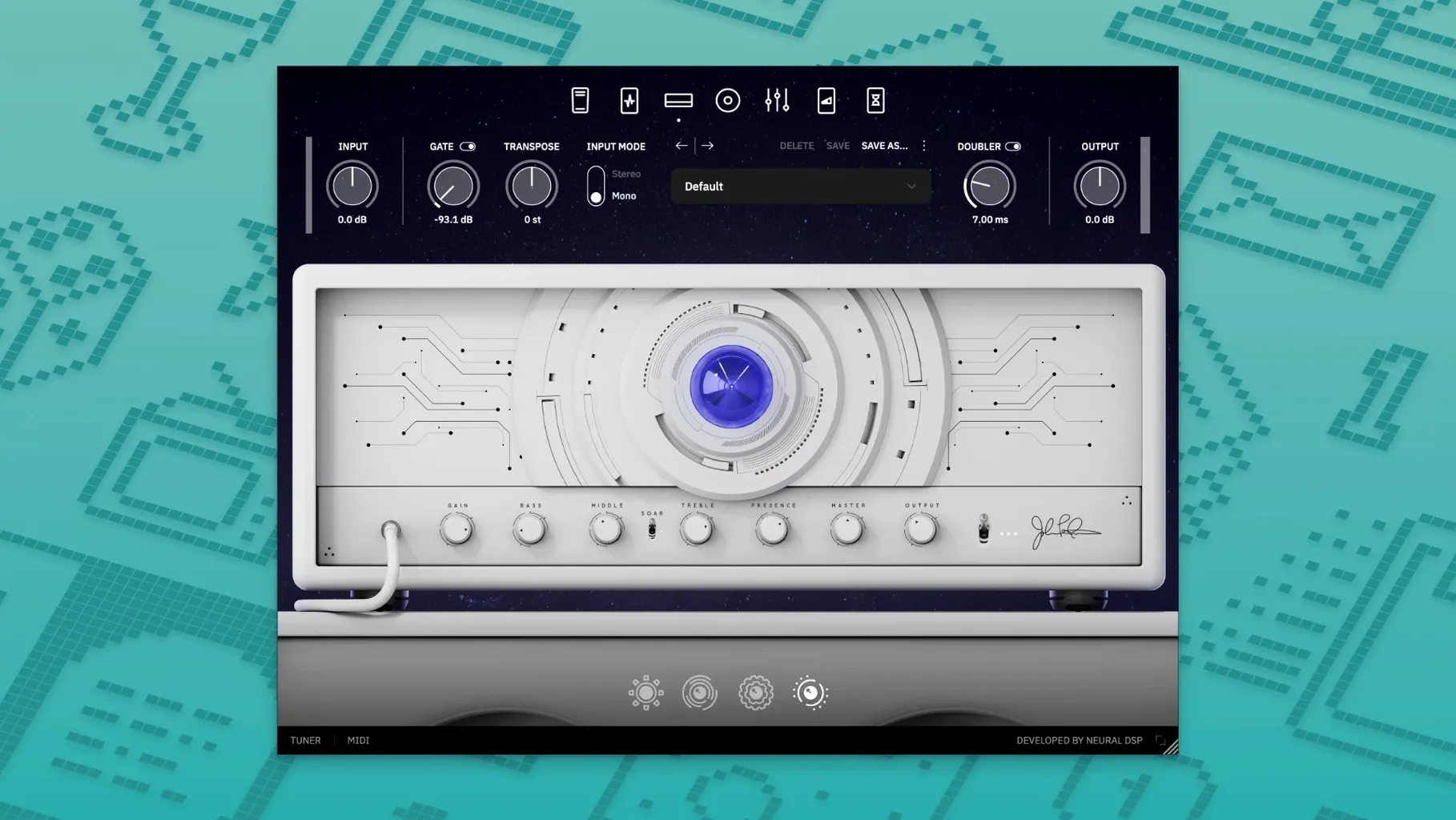
Session players and home recordists who need a high-gain rhythm sound or a liquid lead tone without a pedalboard in the room reach for this. It's named after John Petrucci, and it's built for people who want to plug in and get to work.
- Insert it on a mono guitar track for a full rig in one slot — amp, cab, and post-effects handled.
- Drop it on a bus when you want to blend a DI with a processed amp tone for re-amping later.
- Use the standalone version as a quick practice tool when you don't want to boot the DAW.
- Load it on an aux channel for a dedicated delay or reverb send from the plugin's built-in effects.
- Stick it on a stereo instrument bus to add some grit to a soft synth line that needs to cut through.
The plugin runs natively on Apple Silicon, so it won't choke a modern Mac. It also works on Quad Cortex hardware if you want the same sounds on stage. For tracking or writing, it does the job without forcing you to learn half a dozen routing tricks.
Play the default patch for ten minutes first
Don't start by scrolling through presets for an hour. Load the default patch, set your interface buffer to 128 samples or lower, and play for ten minutes. Get a feel for the raw response before you tweak anything. The amp models react to pick attack in a way that rewards clean technique, and you'll miss that if you jump straight into tweaking the EQ.
If you're coming from another amp sim, the gain structure might feel tighter than you're used to. Back the input gain off by 2–3 dB on your interface before you assume the plugin is too hot. On most Focusrite and UAD boxes, the instrument input sits a little high for the way Neural DSP calibrates its models. A quick trim at the source cleans up the bottom end without losing sustain.
The transposer block is worth testing early. Drop it a whole step down and check your lowest string for warbling. If you hear artefacts, nudge the mix knob back to around 90% wet — full wet sometimes chokes the transient on palm-muted chugs. That's not a bug, just a side effect of real-time pitch shifting on complex waveforms.
Use one doubler voice as a single slap thickener
The doubler isn't just for width. Set the left voice to a 15 ms delay with no detune and the right voice off, then pan the track centre. You'll get a single slap that thickens single-note lines without the chorusy smear that detune adds. Useful for clean arpeggios where a full stereo spread would sound artificial.
Hold Option while dragging any knob to slow it down for fine adjustments. The EQ bands in the post section are narrow enough that a quarter-dB move changes the character noticeably on distorted tones. Option-drag gives you that control without opening a text field.
The cabinet section has a built-in room mic fader that's easy to overlook. Push it to about 30% and blend it in parallel when you're tracking a part that'll sit dry in a sparse mix. It adds a sense of space that beats a reverb plugin for keeping the guitar anchored in the same acoustic as the drums.
If you're using the standalone app, Command-K opens the audio settings directly. Saves you hunting through menus when you switch interfaces between tracking and practice sessions.
Runs on Intel Macs back to macOS 10.15
Will it work on an older Intel Mac? Yes. The plugin supports macOS 10.15 and runs on x86 64-bit as well as ARM. On a 2018 Mac mini with an i7, you can run a handful of instances at 64 samples without crackling — just don't expect to track with the doubler and the delay both active on a busy session.
Does it need an iLok dongle? No physical dongle required. The activation system uses a software licence file, so you're not tying up a USB port. That matters if you're on a MacBook with only two ports and one's already occupied by your interface.
Can I load it on Quad Cortex? Yes. The plugin is compatible with both Quad Cortex and Quad Cortex mini. If you build a tone at home and want to take it to rehearsal, you can transfer the preset without rebuilding it from scratch on the hardware. The models translate cleanly between the two.
Is the metronome any good? It's a basic click with a few subdivisions — nothing you'd use for complex time-signature work. For straightforward 4/4 practice it's fine. If you need odd meters, keep your DAW's click or a dedicated app handy.
How's the CPU hit compared to other Neural DSP plugins? On Apple Silicon it sits in the middle of the pack. It's lighter than Archetype Gojira with the pitch block active, slightly heavier than Archetype Plini. On an M1 MacBook Air, you'll get about 12–14 stereo instances at 128 samples before the session starts to protest.
What’s new
Initial 1.0.0 release for Windows and macOS.
Requirements
- macOS 10.15 or later
- 64-bit Intel or Apple Silicon Mac
- VST2, VST3, AU or AAX host, or standalone use
FAQ
What plugin formats does Archetype Petrucci come in?
It is available as 64-bit VST2, VST3, AU and AAX, plus a standalone application.
Does it run on Intel and Apple Silicon Macs?
Yes, it has native Apple Silicon support and works on x86 64-bit architecture too.
Comments 0
Sign in or create an account to leave a comment.
No comments yet…
If you’ve installed it, say how it went. Mention your Mac and macOS version — it helps the next person more than you’d think.
More in VST Plugins
All in VST Plugins-
 Neural DSP Archetype Cory Wong X
1.0.1
Apple Silicon
Neural DSP Archetype Cory Wong X
1.0.1
Apple Silicon
-
 Neural DSP Archetype Rabea X
1.0.1
Apple Silicon
Neural DSP Archetype Rabea X
1.0.1
Apple Silicon
-
 Neural DSP Mantra
1.0.1
Apple Silicon
Neural DSP Mantra
1.0.1
Apple Silicon
-
 Neural DSP Parallax X
1.0.0
Apple Silicon
Neural DSP Parallax X
1.0.0
Apple Silicon
-
 Native Instruments Massive X
1.7.1
Apple Silicon
Native Instruments Massive X
1.7.1
Apple Silicon
-
 Neural DSP Soldano SLO-100 X
1.0.0
Apple Silicon
Neural DSP Soldano SLO-100 X
1.0.0
Apple Silicon
-
 noteGRABBER
2.0.0
Apple Silicon
noteGRABBER
2.0.0
Apple Silicon
-
 Nudist Audio Nudistort
1.2.5
Apple Silicon
Nudist Audio Nudistort
1.2.5
Apple Silicon