

Native Instruments Massive X for macOS
Description
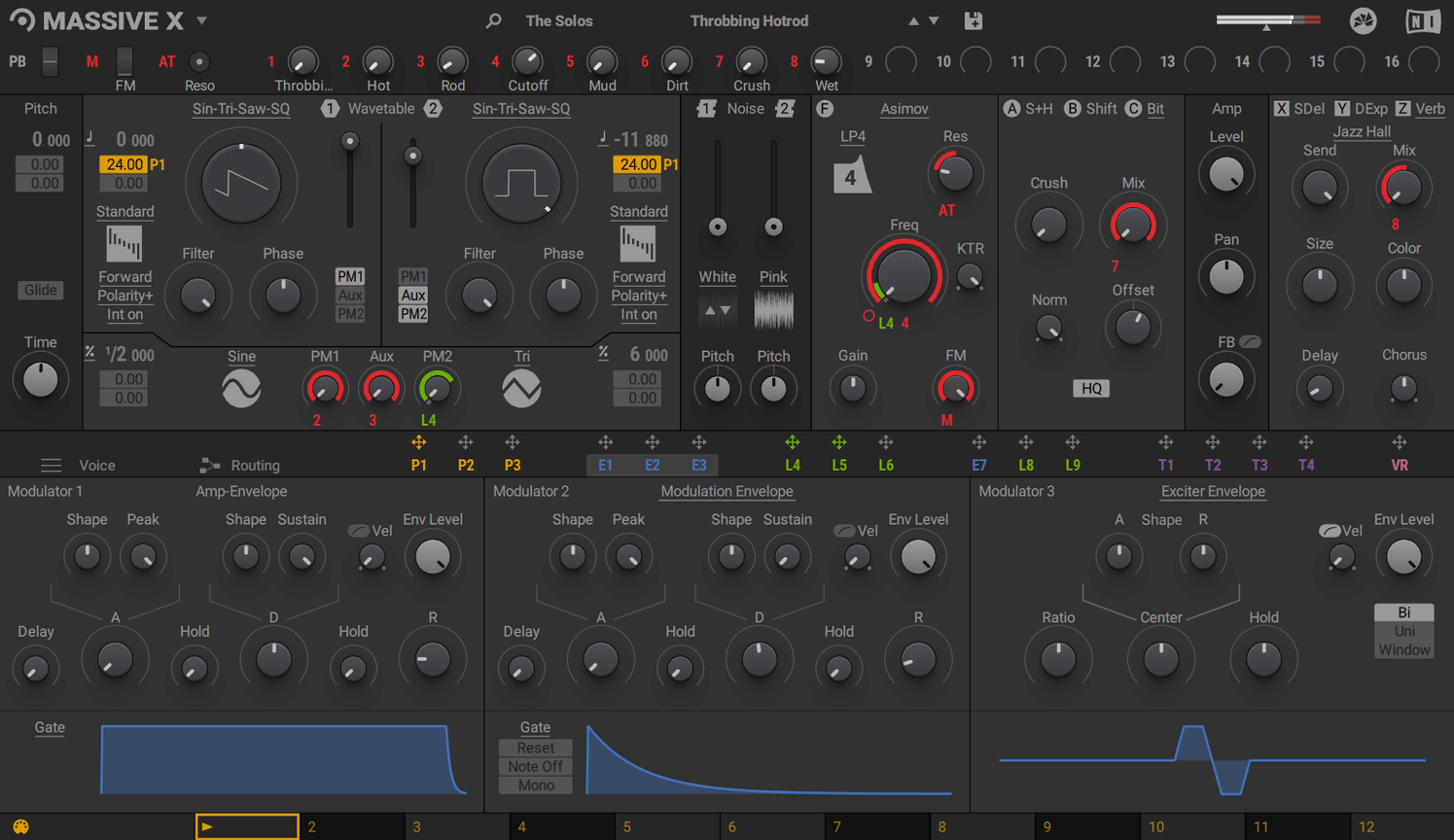
10 wavetable playback modes. That's what you get to dig into straight away, shaping each oscillator's response before you even touch a filter.
The original Massive stays on your drive
- Does it replace the original Massive? No. The two coexist. You keep the original for older projects and its known sound. Massive X is a separate synth with a different engine and workflow.
- Can I use it without a DAW? No. There is no standalone mode. You load it as a VST, AU or AAX instrument inside a host.
The Performer section is where it gets interesting. You draw modulation shapes and assign them to parameters. A Remote Octave control lets you trigger those patterns from a keyboard. Add two phase modulation generators into the routing and the sound-design range opens up quickly. It is a deep synth, and it expects you to explore.
170 wavetables and 10 playback modes before you even touch a filter
Sound designers who build patches from scratch get the most from Massive X. The oscillator section alone gives you 170 wavetable options and 10 playback modes — enough to keep someone busy for months before they touch the filters. If you enjoy patching cables in a modular rack, the routing here will feel familiar. Any output can connect to any input, and there is no fixed signal path telling you what to do next.
Producers working on film scores or game audio tend to settle in quickly. The Performer section lets you draw modulation curves that shift over time, which suits evolving drones and tense atmospheres. Keyboard players who want expressive presets out of the box also do well — the factory library has 780 patches, many mapped to velocity and aftertouch in useful ways.
Bedroom beat-makers who just want a bass sound in two clicks might find it heavy going. Massive X rewards patience. You sit with it, route something strange into something else, and half an hour later you have a sound that makes you grin. It is not a preset-surfing synth, even though the presets are solid. It is a workshop.
Complex routings can still make an Intel Mac sweat
Is the CPU hit as bad as people say? It can be. A single instance with a complex routing chain and both phase modulation generators active will make an older Intel Mac sweat. On Apple Silicon machines the load is more manageable, but you still want to freeze or bounce tracks if you plan on running ten instances. It is not a lightweight synth and does not pretend to be.
Does a massive torrent version or a massive crack mac download behave the same? People searching for a massive crack mac or typing massive x torrent mac into a search bar usually hit two problems: activation failures and missing wavetable content. The synth relies on its library being intact and correctly indexed. When files are stripped or the activation glue is half-baked, presets go silent and the oscillators load empty tables. A native instruments massive x v1.7.1 release packed by a group that knows what they are doing avoids those headaches, but random massive torrent pulls often do not.
Will my old Massive patches open here? No. Different engine, different file format. You keep Massive installed for those sounds and treat Massive X as a new instrument that happens to share part of a name.
Phase modulation pushes past what Serum’s editor shows you
Massive X vs. Serum. Serum's wavetable editor is more visual — you see the waveform change as you drag points. Massive X does not hold your hand that way, but its routing and dual phase modulation generators push into territory Serum cannot reach without external effects. Serum feels quicker for dialling in a modern bass or lead. Massive X feels bigger when you want a sound with moving parts that interact in unpredictable ways.
Massive X vs. Phase Plant. Phase Plant's modular snap-together approach is more flexible on paper — you add as many oscillators, filters and effects as the computer can handle. Massive X is a fixed architecture with deep modulation, which sounds like a limitation but often means faster results. In Phase Plant you can spend ten minutes building a signal chain that Massive X gives you in two. The trade-off is that Phase Plant goes further once you commit the time.
Massive X vs. Pigments. Pigments offers wavetable, analog-modelled and sample-based engines in one box, plus a pretty interface that shows modulation happening. Massive X is narrower in scope — wavetables only — but its oscillator modes and routing depth mean it does more with that one thing. Pigments suits someone who wants three synth types and a tutorial-friendly UI. Massive X suits someone who already knows synthesis and wants a wavetable engine that does not compromise.
Stock routing keeps you stuck tweaking the same filter for an hour
Ignoring the routing tab entirely. The default signal path works, but the synth comes alive when you break it. A common first-day error is tweaking filter cutoffs for an hour while leaving the routing at stock settings. Click the routing view and patch an oscillator output into a different filter input, or send an LFO to something unexpected. The sound shifts more in five minutes of repatching than in an hour of knob-turning.
Over-modulating before listening. The Performer section is fun. You draw a shape, assign it to wavetable position, and suddenly the sound warps in a cool way. The mistake is adding three performers, two LFOs and a tracker before you have a basic tone worth modulating. Build a static sound first — oscillators, filter, amp envelope. Then add one modulation source and listen. Then add another. Modulation soup sounds exciting for thirty seconds and unusable in a track.
Skipping the Remote Octave trick. The Performer patterns can be triggered from the keyboard using the Remote Octave control. Beginners often overlook this and treat the Performer as a fixed loop. Assign a pattern to a low octave key and you can fire it off like a one-shot modulation stab, which turns a drone into a rhythmic element without touching automation lanes.
Assuming high voice counts are free. Cranking the polyphony to 32 voices and playing fat chords with long release times is a fast way to hear your DAW stutter. Start at 8 voices unless you know the patch needs more, and only increase it after you hear dropout. The synth does not warn you — it just crackles.
What’s new
Adds v1.7.1 with maintenance fixes.
Requirements
- macOS 13 or later
- Apple Silicon or Intel with AVX support
- 4 GB RAM (6 GB recommended)
- OpenGL 2.1 or higher graphics card
- Internet connection for download and activation
FAQ
Does Massive X replace Massive?
No. It is a successor with a new engine, but it installs alongside Massive so you can use both.
Can Massive X run on its own?
No. It is a plugin only. You need a DAW or another host that loads VST, AU or AAX instruments.
Comments 0
Sign in or create an account to leave a comment.
No comments yet…
If you’ve installed it, say how it went. Mention your Mac and macOS version — it helps the next person more than you’d think.
More in VST Plugins
All in VST Plugins-
 Neural DSP Archetype Cory Wong X
1.0.1
Apple Silicon
Neural DSP Archetype Cory Wong X
1.0.1
Apple Silicon
-
 Neural DSP Archetype Petrucci
1.0.0
Apple Silicon
Neural DSP Archetype Petrucci
1.0.0
Apple Silicon
-
 Neural DSP Archetype Rabea X
1.0.1
Apple Silicon
Neural DSP Archetype Rabea X
1.0.1
Apple Silicon
-
 Neural DSP Mantra
1.0.1
Apple Silicon
Neural DSP Mantra
1.0.1
Apple Silicon
-
 Neural DSP Parallax X
1.0.0
Apple Silicon
Neural DSP Parallax X
1.0.0
Apple Silicon
-
 Neural DSP Soldano SLO-100 X
1.0.0
Apple Silicon
Neural DSP Soldano SLO-100 X
1.0.0
Apple Silicon
-
 noteGRABBER
2.0.0
Apple Silicon
noteGRABBER
2.0.0
Apple Silicon
-
 Nudist Audio Nudistort
1.2.5
Apple Silicon
Nudist Audio Nudistort
1.2.5
Apple Silicon