
LFOTool for macOS
Description
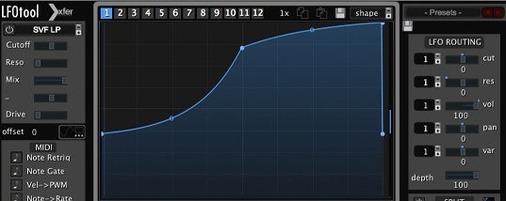
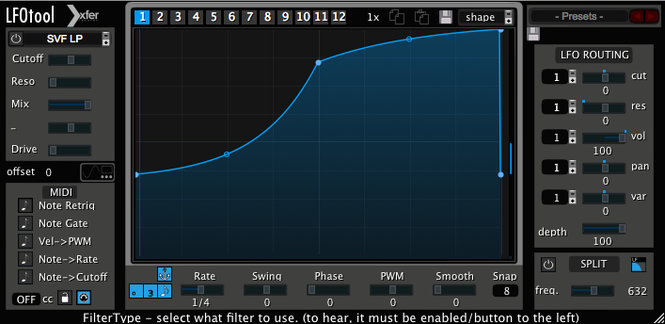
Right-click a point in the graph and drag the tension handle. That single gesture in LFOTool's curve editor is where most of the useful work happens — turning a simple ramp into a rhythmic ducking shape, or a sine into something that breathes with the kick drum.
Stack up to 4 modulation graphs per preset
- Up to 4 graphs at once. Stack modulation shapes that run in parallel, each targeting a different parameter or MIDI destination.
- 12 graphs per preset. Switch between them by MIDI note or host automation — useful for verse/chorus changes without touching the mouse.
- BPM-synced or free-running. Set the LFO rate in hertz when you want drift, or lock it to host tempo with optional swing.
- MIDI CC output. The same curves can control software instruments, other effects, or external hardware over MIDI.
- Sample-accurate sync. Modulation lands exactly where it should, every bar.
Audio and MIDI in one slot
LFOTool processes incoming audio — which makes it a volume shaper, a filter modulator, a tremolo — and simultaneously spits out a MIDI message stream. You can duck a bassline with one graph while a second graph sends CC data to a synth's cutoff knob. The point-and-tension editor is the same for both jobs, so you learn one set of moves.
Drag one point to duck a pad in seconds
Load a simple kick-and-pad loop in your host. Insert LFOTool on the pad track, not the kick. Open the default preset and drag the graph’s top-right point downward until the pad ducks audibly with the kick. Don’t tweak anything else yet. That single move teaches you more than reading the manual.
Next, click through a dozen factory presets while the loop plays. Watch the graph window as you switch. You’ll spot shapes that look nothing like a sine or triangle — curves with sharp elbows, flat plateaus, quick recovery slopes. These are the templates you’ll steal from later. Pick one that’s close to what you want and adjust from there, rather than starting from an empty graph.
Before the session ends, map one graph to MIDI CC output and point it at a synth parameter. Even a simple ramp controlling filter cutoff will cement how LFOTool stops being just a volume shaper and becomes a modulation hub.
Put it on the track you want to shape, not the trigger
- Inserting it on the wrong track. LFOTool processes the audio on the channel where it lives. If you want to duck a bassline when the kick hits, put it on the bass track — not the kick. It doesn't sidechain. It just shapes what passes through it, synced to the transport.
- Drawing curves blindfolded. New users often draw wild multi-peak shapes before checking what they sound like. Draw one hump. Listen. Adjust the tension. Then add complexity. A single well-tensioned curve beats four messy ones every time.
- Forgetting the graph switcher. A preset can hold 12 graphs, but beginners treat it like it holds one. Assign graph changes to MIDI notes and your verse, chorus, and bridge can have completely different modulation shapes without loading a new preset.
- Ignoring the phase offset. When two graphs modulate the same target, a slight phase shift between them stops them from stacking awkwardly. Beginners leave everything at zero and wonder why the result feels lumpy.
- Relying on eyes over ears. Staring at the curve while it plays is a trap. Close your eyes for four bars. Does the ducking breathe with the track or fight it? Adjust by feel, then glance at the graph to confirm.
Carve a bassline around a kick with manual graph clicks
You open a project with a chugging synth bass that needs to get out of the kick’s way. The kick hits on one and three. You drop LFOTool onto the bass channel. Instead of scrolling presets, you click the graph window, choose a downward saw shape, and pull the tension handle until the slope mirrors the kick’s decay — quick drop, slower return.
The bass ducks. It’s cleaner, but sterile. You add a second graph, this one a shallow sine at double the BPM rate, and route it to the same volume parameter. Blend it subtly. The bass now pulses with a hint of movement behind the main duck. Less robotic.
You decide the filter could use attention too. A third graph — a smooth triangle — goes to MIDI CC output, targeting the bass synth’s cutoff. The filter opens slightly as each note decays. Three graphs, one preset, no automation lanes drawn in the DAW. You save the preset and bounce the section. Done in four minutes.
Lock to your DAW grid or break free with hertz mode
Open the rate section and confirm whether you want BPM sync or hertz mode. The default is BPM-synced, which suits most production work. But if you’re designing a riser or an evolving pad that shouldn’t lock to the grid, switch to hertz and dial in a slow 0.3 Hz sweep. You’ll hear the difference immediately.
Check the smoothing control. A small amount — just a few milliseconds — takes the digital edge off fast volume cuts without softening the transient beyond usefulness. Zero smoothing on a hard duck can produce clicks. Beginners leave it at zero and blame the plug-in for pops that are fixable in seconds.
If you plan to send MIDI CC, open your host’s MIDI routing and confirm LFOTool appears as a MIDI source. Some hosts require you to enable it explicitly. Do that now, not when you’re mid-flow and wondering why the external synth isn’t moving.
Finally, assign a MIDI controller knob to the graph mix fader. Being able to ride the wet/dry balance of all active graphs from hardware turns LFOTool from a set-and-forget insert into something you perform. Push more modulation in the bridge, pull it back in the verse. Simple and musical.
Requirements
- macOS 10.11 or later
- Intel or Apple Silicon Mac
- VST or AudioUnit-compatible host
FAQ
Can LFOTool control external hardware?
Yes, it sends MIDI CC messages from its LFO graphs to software instruments, effects, or external MIDI hardware.
Comments 0
Sign in or create an account to leave a comment.
No comments yet…
If you’ve installed it, say how it went. Mention your Mac and macOS version — it helps the next person more than you’d think.
More in VST Plugins
All in VST Plugins-
 LANDR Vocal Bundle
2025.12
Apple Silicon
LANDR Vocal Bundle
2025.12
Apple Silicon
-
 KORG TRITON
1.4.7
Apple Silicon
KORG TRITON
1.4.7
Apple Silicon
-
 KORG Collection
1.0.3
Apple Silicon
KORG Collection
1.0.3
Apple Silicon
-
 Komplete Kontrol
3.5.4
Apple Silicon
Komplete Kontrol
3.5.4
Apple Silicon
-
 Komplete FX Bundle
2026.1
Apple Silicon
Komplete FX Bundle
2026.1
Apple Silicon
-
 Kalifornia Dynamic KD Alkane
1.0.17.0
Apple Silicon
Kalifornia Dynamic KD Alkane
1.0.17.0
Apple Silicon
-
 iZotope Tonal Balance Control
3.0.0
Apple Silicon
iZotope Tonal Balance Control
3.0.0
Apple Silicon
-
 iZotope RX
12.0.0
Apple Silicon
iZotope RX
12.0.0
Apple Silicon