

KORG TRITON for macOS
Description
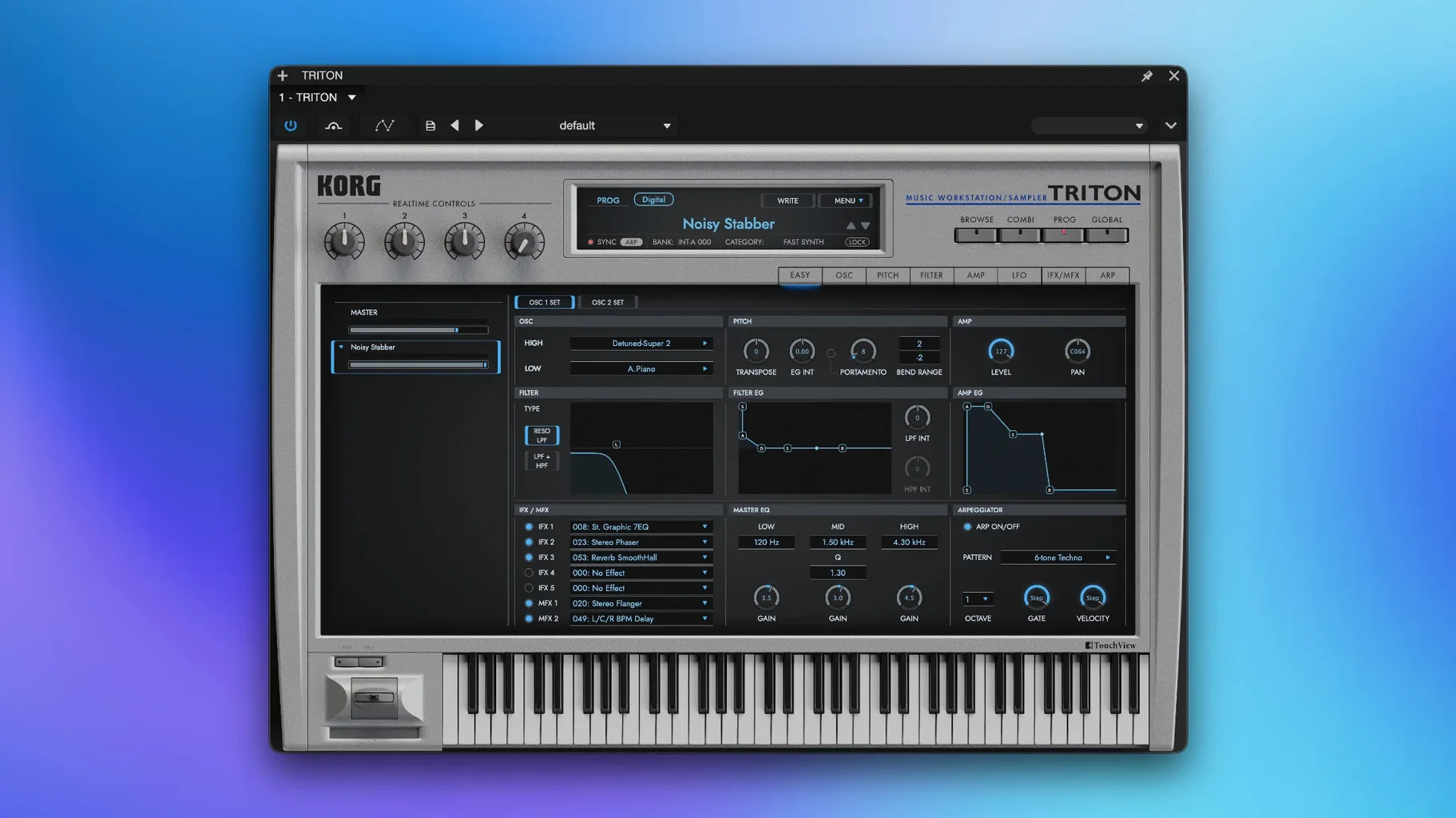
48 kHz is what the PCM samples were captured at. That’s enough to make the TRITON sound exactly like the workstation that dominated studios around the turn of the century. It’s a full software recreation of the HI synthesis system, sitting in your DAW as a VST or running standalone on an Apple Silicon Mac.
Carry a whole verse with eight multi-timbral parts
This isn’t a one-sound wonder. The combination mode gives you eight multi-timbral parts playing at once, so it can carry a whole verse on its own. Or drop it on a single track and treat it like a desk module.
Build full arrangements from combis that boot without a DAW
- Laying down full arrangements quickly, thanks to those eight-part combis.
- Thickening a chorus with a pad that already has its own effects chain.
- Keyboard players who want a standalone instrument that boots without a DAW.
Five insert effects shared across your multi-timbral setup
- Each track can eat one of the five insert effects, so plan your signal flow across a multi-timbral setup.
- Two filter types sounds lean by modern plugin standards — that’s the original spec.
- Two main effects plus a master EQ sit on the whole mix, not per part.
Hold Shift for finer knob control like the hardware
Most people open the plugin, grab a preset, and start playing. That works. But a few tucked-away shortcuts make the interface feel more like hardware once you know them.
Holding Shift while turning a knob gives you finer control—useful when you're nudging filter cutoff by half a millimetre. Double-clicking any knob resets it to its stored value, no menu diving required. The category search in the patch browser isn't just alphabetical; type "bass" or "pad" and it filters on the fly, which beats scrolling through 4,000 sounds one page at a time.
In combination mode, you can mute parts by clicking the part number rather than hunting for the mixer tab. It's the kind of thing the manual mentions once on page sixty-something, but it becomes second nature after a couple of late-night sessions.
Effect routing tricks
The five insert effects look fixed, but the routing matrix lets you chain two of them on a single part if you sacrifice another slot. Right-click an insert slot and the series/parallel options appear—not advertised loudly, but there. The master EQ has a spectrum display hidden behind the small graph icon, which helps when a combi gets boomy and you need to see which band to pull down.
One producer's afternoon with it
A beatmaker working on a lo-fi hip-hop track opens the TRITON standalone on a MacBook Air. She doesn't touch the DAW yet—she's just hunting for a texture that feels dusty without needing three extra plugins. She remembers the original workstation had a reputation for string pads that sat slightly off-centre in a mix, not pristine, but warm.
She loads a "Stereo Strings" patch, drops the filter cutoff to around forty percent, and nudges the resonance up slightly. One of the two master effects gets a chorus with the depth pushed past noon; the other stays dry. She plays a four-bar progression, holds Shift while adjusting the attack on the amp envelope to soften the bite, and records the audio straight into QuickTime. Twenty minutes later that loop is chopped and pitched down in her sampler, and she never opened a single insert effect. The instrument did what a hardware module would have done—gave her a sound with character, fast.
Runs as a native ARM binary, not Rosetta translation
Does it run natively on Apple Silicon, or is it Rosetta-only? It's native. The plugin and standalone app both run as ARM binaries, so you're not losing performance to translation. Intel Macs get the x86 build—the installer covers both architectures.
Can I use the TRITON sounds in another plugin or sampler? No. The PCM samples aren't exposed as loose WAV files you can drag elsewhere. The instrument is self-contained; everything plays inside the plugin or the standalone app. If you want a particular pad in your hardware sampler, you'll need to bounce the audio.
Is the eight-part combination mode like a multitimbral rack in a DAW? Yes, but with limits. You can address each part on a separate MIDI channel and layer up to eight sounds at once. However, the five insert effects are shared across those parts—you assign them, you don't multiply them. If part one and part two both want a compressor, you'll need to use the global master effects or handle dynamics in your DAW after the fact.
Does it sound identical to the hardware, or is it "close enough"? The PCM data was captured at 48 kHz from the original units, so the raw waveforms match. The two filter types behave as they did on the HI synthesis chip—no extra models, no analogue-modelled additions. What you lose is the output stage colouration of the old DACs, but what you gain is recall and zero noise floor. For most sessions, it's indistinguishable once a track has a bit of bus processing on it.
How painful is the activation? Follow the included instructions and you'll be up in a few minutes. No online accounts, no dongle. The process is offline.
Requirements
- macOS 11 or later
- Apple Silicon and Intel (x86 64-bit) support
- Standalone and VST formats
FAQ
Can the KORG TRITON plugin run without a DAW on a Mac?
Yes, it supports standalone use on both ARM and x86 64-bit Macs running macOS 11 or later.
Comments 0
Sign in or create an account to leave a comment.
No comments yet…
If you’ve installed it, say how it went. Mention your Mac and macOS version — it helps the next person more than you’d think.
More in VST Plugins
All in VST Plugins-
 KORG Collection
1.0.3
Apple Silicon
KORG Collection
1.0.3
Apple Silicon
-
 LANDR Vocal Bundle
2025.12
Apple Silicon
LANDR Vocal Bundle
2025.12
Apple Silicon
-
 Komplete Kontrol
3.5.4
Apple Silicon
Komplete Kontrol
3.5.4
Apple Silicon
-
 Komplete FX Bundle
2026.1
Apple Silicon
Komplete FX Bundle
2026.1
Apple Silicon
-
 LFOTool
1.768
Apple Silicon
LFOTool
1.768
Apple Silicon
-
 Kalifornia Dynamic KD Alkane
1.0.17.0
Apple Silicon
Kalifornia Dynamic KD Alkane
1.0.17.0
Apple Silicon
-
 iZotope Tonal Balance Control
3.0.0
Apple Silicon
iZotope Tonal Balance Control
3.0.0
Apple Silicon
-
 iZotope RX
12.0.0
Apple Silicon
iZotope RX
12.0.0
Apple Silicon