

Arturia Efx AMBIENT for macOS
Description
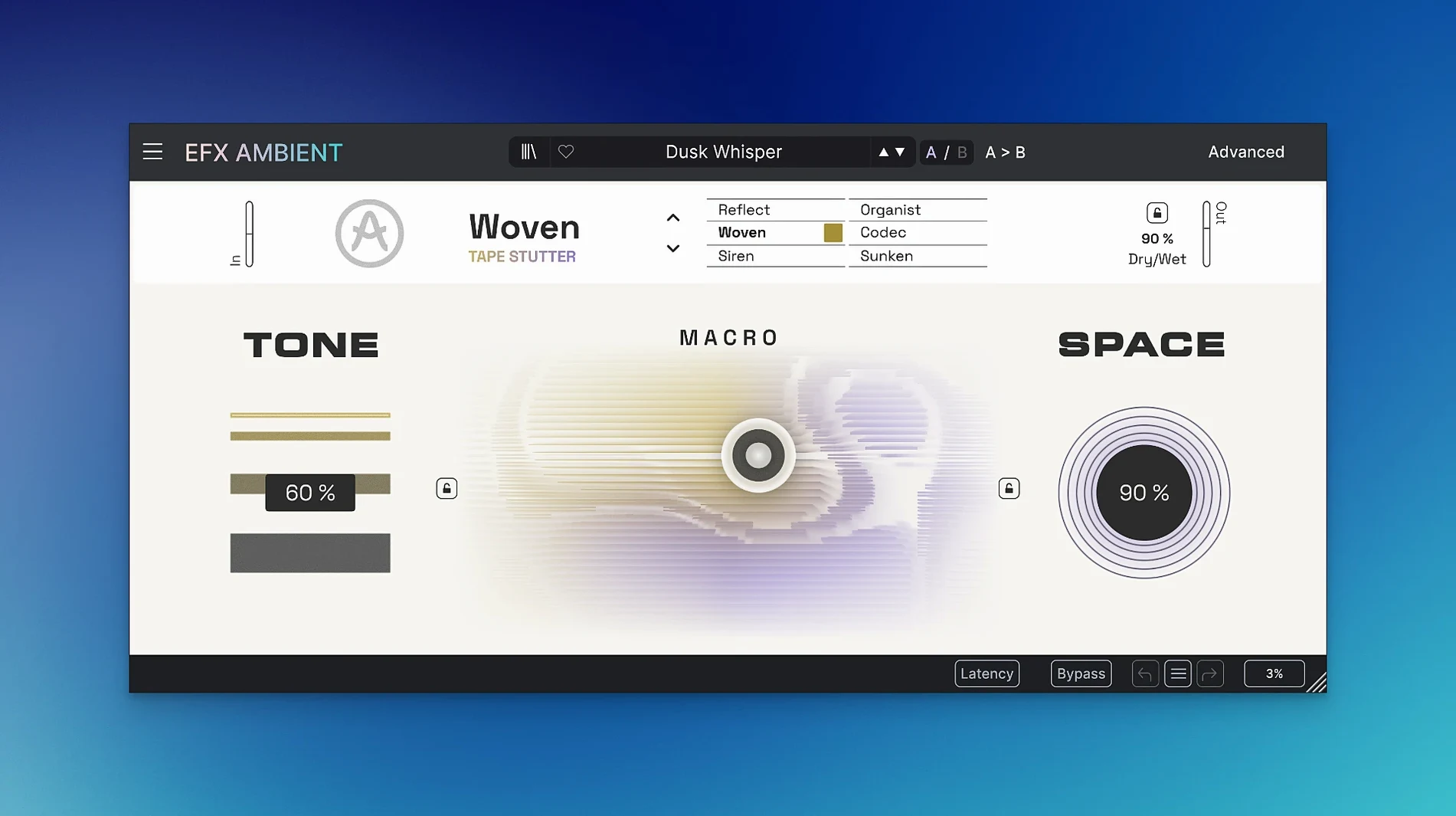
Version 1.0.0 is the initial release, so there is no changelog to unpick — just a new effect to place in a session. It lands in FX Collection 6 and is built for cinematic washes and ambient pads. On a track, it works as an insert for softening a synth or guitar part. On a bus, it gives a whole group the same spatial character without touching the source dry signal.
- Use on a send for a wet-only wash behind a vocal or lead part.
- Apply to a drum bus for blurred, smeared tails on cymbals and percussion.
- Place after a reverb to push the tail further into reverse or pitch-shifted territory.
- Use the 2D Macro to morph between the six modes without menu diving.
- Open the Advanced panel when you need to set exact times for the feedback and spectral behaviour.
Place it before EQ and compression so the tails get shaped downstream
Efx AMBIENT sits best after a sound source but before surgical EQ and compression. Put it early in the chain so the blurred tails and pitch artefacts get shaped by what follows, not the other way round. If you use Arturia's own Efx FRAGMENTS or Efx MOTIONS, swap their order to hear how the granular work interacts with AMBIENT's spectral processing. One common pairing is FRAGMENTS into AMBIENT for a granular cloud that then blooms into a soft wash.
On macOS, it respects Audio Unit routing rules properly. That means you can host it inside Logic's Smart Controls or map the 2D Macro to a trackpad gesture via the Learn function — no MIDI controller needed. The plug-in also plays well with aggregate I/O setups if you are running multiple interfaces. If you use a utility like SoundSource or Loopback, AMBIENT will process desktop audio on a bus without complaining about clock drift, which is rarer than it should be.
Loading it on the master bus smears transients across the whole mix
Most of them come from treating it like a basic reverb and leaving it at that.
- Loading it on the master bus. The spectral smear will eat transient detail across the whole mix. Use it on a send, not an insert, unless you are specifically after a lo-fi wash for a single stem.
- Ignoring the Advanced panel. The main view gives you the 2D Macro and mode buttons, but the feedback timing lives in Advanced. Without setting those, you get the same generic swell every time and blame the plug-in for being a one-trick pony.
- Cranking the mix to 100% wet and wondering why the source disappeared. Ambient effects work best with the dry signal still present underneath. Try 30–50% wet on an insert, or 100% wet on a send with the fader pulled back.
- Not checking latency. Some modes introduce a small delay. If you are tracking through it, switch to Low Latency mode or bypass it until mixdown. The plug-in reports its latency correctly to hosts, but not all DAWs compensate automatically on aux tracks.
Cycle through the six modes with the Macro centred on a piano send
Start by loading AMBIENT on a return track and sending a simple piano or pad to it. Cycle through the six modes one at a time with the Macro parked dead centre. Get a feel for what each mode does before you touch the motion controls. That alone will tell you which three you will actually use — the other three can wait.
Next, automate the 2D Macro instead of drawing it with a mouse. Record a pass where you move the X/Y control in time with the track. A slow diagonal sweep over eight bars creates a morph that sounds intentional, not randomised. If you are working on cinematic transitions, tie the Macro movement to a scene cut in your DAW — the tonal shift will land exactly on the downbeat.
For sound design sessions, run a short vocal phrase through the reverse mode and resample the output. Drag the resampled file back into your timeline, reverse it again in the DAW, and you have a swelling pad that still carries formant traces of the original voice. That technique works just as well with field recordings run through the pitch-shifting mode.
macOS 11.0 or later is required. If you want soft, blurred textures or reverse tails, this is where it sits.
What’s new
- Initial release version 1.0.0.
Requirements
- macOS 11.0 or later
- Intel or Apple Silicon
Comments 0
Sign in or create an account to leave a comment.
No comments yet…
If you’ve installed it, say how it went. Mention your Mac and macOS version — it helps the next person more than you’d think.
More in VST Plugins
All in VST Plugins-
 Arturia Analog Lab V
5.12.0
Apple Silicon
Arturia Analog Lab V
5.12.0
Apple Silicon
-
 Arturia Emulator II V
1.6.2
Apple Silicon
Arturia Emulator II V
1.6.2
Apple Silicon
-
 Arturia FX Collection
2026.02
Apple Silicon
Arturia FX Collection
2026.02
Apple Silicon
-
 Arturia Mellotron V
1.9.3
Apple Silicon
Arturia Mellotron V
1.9.3
Apple Silicon
-
 Arturia Pigments
7.0.1-6772
Apple Silicon
Arturia Pigments
7.0.1-6772
Apple Silicon
-
 Arturia V Collection 11 Pro
2025.20.26
Apple Silicon
Arturia V Collection 11 Pro
2025.20.26
Apple Silicon
-
 Ample Sound Ample Guitar LP III
4.0.1
Apple Silicon
Ample Sound Ample Guitar LP III
4.0.1
Apple Silicon
-
 Ample Guitar M
4.1.0
Apple Silicon
Ample Guitar M
4.1.0
Apple Silicon