
Ample Guitar M for macOS
Description
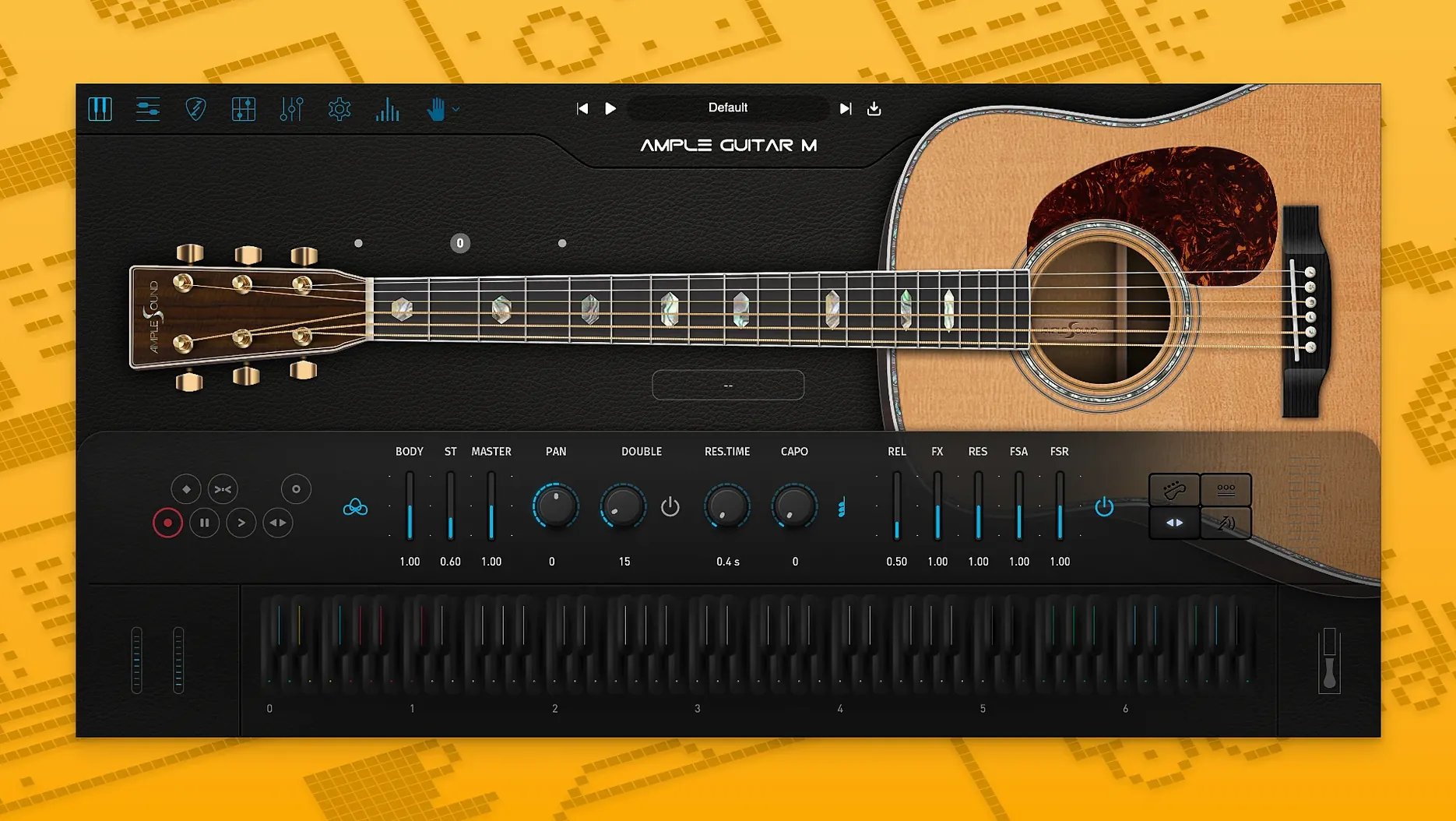
Getting a believable acoustic strum into a track without a mic, a quiet room and a guitarist who's free on Tuesday is the whole point of Ample Guitar M. It's a sampled Martin D-41 — steel strings, dreadnought body — that lands in your DAW instead of your live room. Version 4.1.0 needs macOS 10.13 or later and runs on Intel and Apple silicon.
- Strumming system. Build rhythm patterns instead of programming every stroke by hand.
- Tablature player. Load a Guitar Pro file and the plugin plays the part with the sampled instrument.
- Riffer. The built-in pattern tool. The 4.1.0 update added Swing Quantization and an Auto Vibrato Curve, so held notes move a little more naturally.
The sample library is a separate download, and the plugin won't work without it. The 4.1.0 sampler engine loads and plays it faster than before. Budget the disk space before you start.
The first time you open Ample Guitar M, the settings panel is worth five minutes of your time. Open the Settings tab and check the Disk vs RAM slider. The default pushes a chunk of the sample library into memory; if your Mac has 8 GB or less, drag it down a notch so the plugin streams more from disk instead. Next, look at the Velocity Curve — the flat line works, but a slight S-curve gives you better control over soft fingerpicked notes without losing the snap on harder plucks. Lastly, set the Default Articulation to Finger if most of your work is delicate picking. The factory default is often Sustain, which can feel stiff until you change it.
The sample library sits in a separate folder, and the plugin asks for its location on first run. Point it to the folder once and the path is stored. If you move the library later, you'll be asked again — no hunting through plists.
Tap one key for full strummed chords
Start with the strumming engine before you touch MIDI keys. Set the mode to Strum and pick a chord from the Chord Library on the left. Tap a single note on your keyboard and the engine voices the full chord with downstrokes and upstrokes assigned automatically. You'll hear whether the rhythm feel works for your track in seconds, without drawing a single automation lane.
When you switch to the tablature player, drag in a Guitar Pro file you already know — something simple. The plugin reads the fingerings and articulations from the file, so you can hear how the virtual Martin interprets a real arrangement. If a slide sounds too long, open the articulation panel and shorten the Slide Time knob, then save the changes as a new preset. That preset system is your friend: once you dial in a tone you like, store it. The factory presets are clean but generic.
A practical workflow: write your rhythm part with the Strummer, bounce it to audio, then record a second take using the Finger articulation for a few melodic fills on top. Two tracks, one instance of the plugin, and it sounds like a guitarist who tracked a double.
Articulations switch without the old delay
The 4.1.0 sampler engine is noticeably snappier when you switch between articulations during playback. Palm mutes and harmonics used to pop in a fraction late on older Macs; that gap is gone now. The Auto Vibrato Curve in Riffer also means a held note at the end of a phrase doesn't just sit there flat — it gradually warms up without you drawing modulation by hand.
Swing Quantization in Riffer is the other quiet improvement. Before 4.1, a strummed pattern with a shuffle feel needed manual offset tweaking. Now you set the swing percentage and Riffer nudges the strokes for you. It won't turn a straight rock strum into a jazz waltz, but it gets the groove close enough that you're adjusting rather than building from scratch.
What’s new
Adds Auto Vibrato Curve and Swing Quantization to Riffer. Improves sampler engine performance with faster loading and playback.
Requirements
- macOS 10.13 or later
- Intel or Apple Silicon Mac
- Sample library download required
- English interface
Comments 0
Sign in or create an account to leave a comment.
No comments yet…
If you’ve installed it, say how it went. Mention your Mac and macOS version — it helps the next person more than you’d think.
More in VST Plugins
All in VST Plugins-
 Ample Sound Ample Guitar LP III
4.0.1
Apple Silicon
Ample Sound Ample Guitar LP III
4.0.1
Apple Silicon
-
 Arturia Analog Lab V
5.12.0
Apple Silicon
Arturia Analog Lab V
5.12.0
Apple Silicon
-
 Arturia Efx AMBIENT
1.0.0
Apple Silicon
Arturia Efx AMBIENT
1.0.0
Apple Silicon
-
 Arturia Emulator II V
1.6.2
Apple Silicon
Arturia Emulator II V
1.6.2
Apple Silicon
-
 Arturia FX Collection
2026.02
Apple Silicon
Arturia FX Collection
2026.02
Apple Silicon
-
 Arturia Mellotron V
1.9.3
Apple Silicon
Arturia Mellotron V
1.9.3
Apple Silicon
-
 Arturia Pigments
7.0.1-6772
Apple Silicon
Arturia Pigments
7.0.1-6772
Apple Silicon
-
 Arturia V Collection 11 Pro
2025.20.26
Apple Silicon
Arturia V Collection 11 Pro
2025.20.26
Apple Silicon