

Ample Sound Ample Guitar LP III for macOS
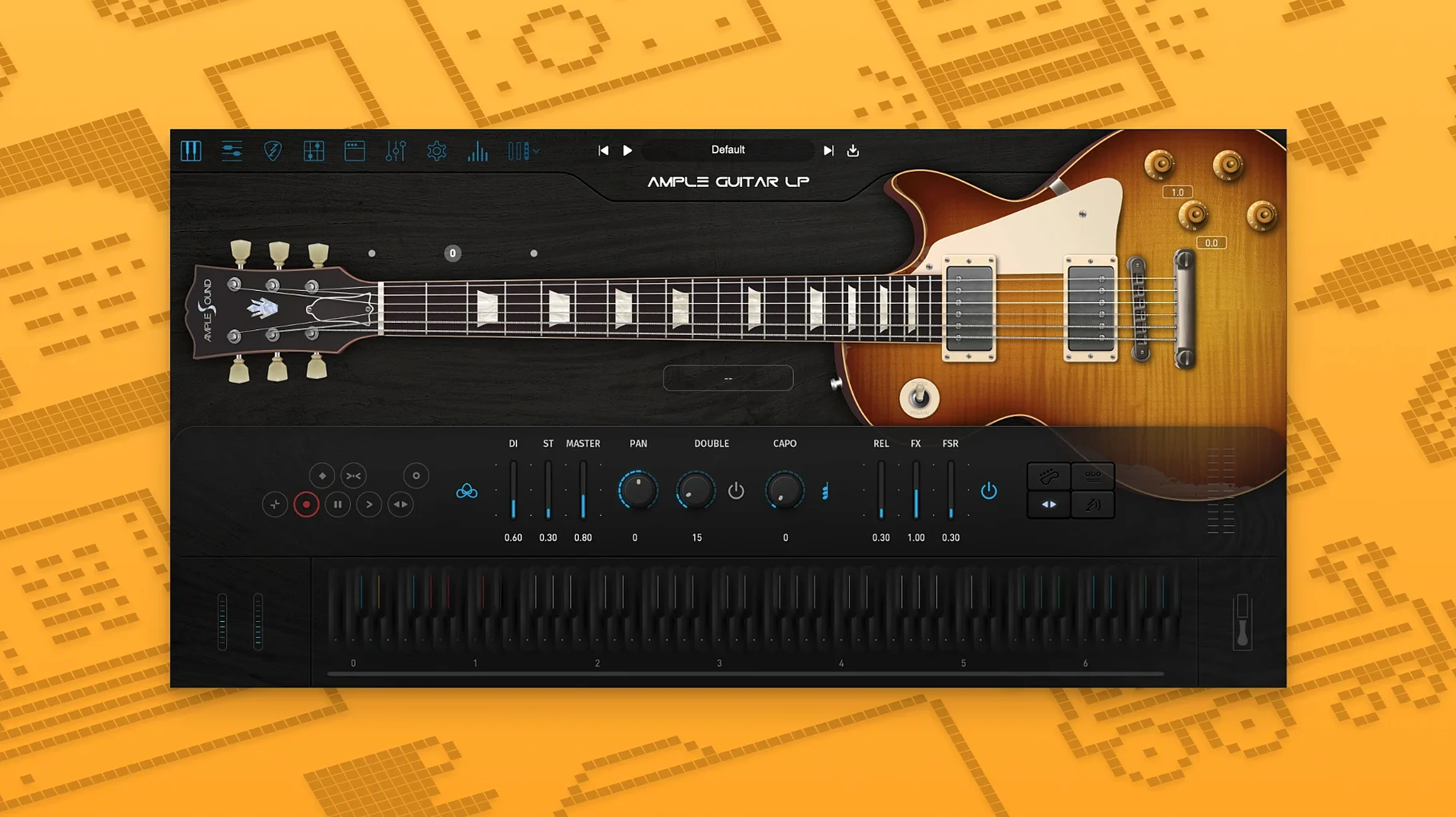
Description
Version 4 added a fingerstyle library, recorded with a 1959 Reissue, alongside the 1958 Les Paul sound the plugin is built on. That gives you picked phrases and sustained lead lines from the same instrument — handy if a track needs both.
Ample Guitar LP III 4.0.1 needs macOS 10.13 or later and runs natively on Apple silicon and Intel, so there's no Rosetta faff on an M-series Mac.
It is aimed at studio recording. For rock, blues or jazz parts that need to sit in a mix without endless tweaking, the base tone is a sensible starting point. Worth it if you write guitar parts but don't own the guitar.
A songwriter's sketch becomes a keeper
A songwriter has a verse that works on acoustic but wants the chorus to punch through with a raunchy Les Paul double-stop. She's not a guitarist and her attempts on a Squier sound thin. In twenty minutes with Ample Guitar LP III, she plays the part on a MIDI keyboard, switches to the bridge pickup, and nudges the amp gain until the double-stops bark. She leaves it in the demo, bandmates ask who played guitar, and the part stays on the final mix.
No real amp, no re-amping, no tuning breaks. Just a part that survived because the plugin sounded close enough to make the songwriter trust it.
Building a blues lead from scratch
A producer needs a twelve-bar blues solo for a library track. He has no Les Paul in the room and the deadline is tomorrow. Here's the workflow he settles on after a couple of false starts.
- Load the plugin on an instrument track. Pick the default Les Paul preset. Switch to the neck pickup for a rounder attack and dial the built-in amp to a mild crunch — enough to sustain bent notes without fizz.
- Play the melody in with a keyboard. Keep the MIDI part simple — single notes, the occasional third interval. Don't try to fake strumming on the keys. Quantise to 16th-note swing so the phrasing breathes but doesn't wander off the grid.
- Add articulations in the piano roll. Hammer-ons for quick passing tones, slides for the turnaround. Use the keyswitch map to trigger palm mutes on the choppy eighth-note riff that answers the vocal line. Most of the character comes from these three articulations.
- Double-track it. Duplicate the MIDI, nudge the copy seven ticks ahead, and pan the two tracks left and right. Drop the second track's gain by 2 dB and swap its pickup to the bridge for a slightly different transient. The chorus width arrives without a single strumming pattern.
- Shape the amp tone last. Roll off below 120 Hz and above 7 kHz. A gentle 400 Hz dip clears mud against the bass guitar. Add a short room reverb, barely audible, just to push the guitar back a step.
The solo sits in the track. A real Les Paul through a Tweed would be better, but the library client never asks.
Replace a placeholder scratch track in ten minutes
You open a half-finished rock track. The drums and bass are solid but the guitar scratch track is a placeholder. You mute it.
First ten minutes: create a new instrument track with Ample Guitar LP III. Browse presets until you find one labelled "Crunch Lead." It's too bright, so you turn the tone knob to 6 and back off the presence. You play a few chords on the keyboard. The plugin's strum engine handles downstrokes and upstrokes depending on velocity, so you tap lighter for upstrokes and hammer the keys for accented downbeats.
Next half hour: you draw in a performance. Power chords on beats one and three, muted chugs on the offbeats. You switch to picking mode for the bridge and play single-note arpeggios, adding a slide into every third note because the slide articulation just sounds expensive.
Final twenty minutes: you automate pickup changes between verse and chorus. Bridge pickup for the riff, neck pickup for the solo. You add a touch of the built-in delay, synced to eighth notes, and render the track. It sits in the mix the way a Les Paul through a 4x12 should — slightly forward, slightly aggressive, no mud.
Velocity curves and pickup positions that break the illusion
- Treating it like a piano. A keyboard velocity curve that works for a Rhodes does not work for palm mutes. Program the velocities or draw them — don't just play them in and hope.
- Ignoring the pickup selector. The same MIDI part sounds completely different on the bridge vs the neck. If your tone is either too dark or too spiky, try the other pickup before you reach for EQ.
- Stacking too many articulations on one phrase. A slide into a hammer-on into a vibrato sounds like a robot showing off. Pick one articulation per phrase and leave space around it.
- Running the amp gain too high too early. The built-in amp sim can get fizzy past 7 on the dial. Record cleaner and push it with a separate saturator afterward if you need more grit — you keep note definition that way.
- Skipping the manual's keyswitch map. Articulations are mapped to specific keys below the guitar's range. If you don't check which key triggers what, you end up with unintended slides or dead notes.
- Expecting strumming to sound real on a keyboard. It can, but only if you pay attention to the strum engine's velocity rules and use the humanise function. Otherwise it's a block chord with strings attached.
Requirements
- macOS 10.13 or later
- Intel or Apple silicon Mac
Comments 0
Sign in or create an account to leave a comment.
No comments yet…
If you’ve installed it, say how it went. Mention your Mac and macOS version — it helps the next person more than you’d think.
More in VST Plugins
All in VST Plugins-
 Ample Guitar M
4.1.0
Apple Silicon
Ample Guitar M
4.1.0
Apple Silicon
-
 Arturia Analog Lab V
5.12.0
Apple Silicon
Arturia Analog Lab V
5.12.0
Apple Silicon
-
 Arturia Efx AMBIENT
1.0.0
Apple Silicon
Arturia Efx AMBIENT
1.0.0
Apple Silicon
-
 Arturia Emulator II V
1.6.2
Apple Silicon
Arturia Emulator II V
1.6.2
Apple Silicon
-
 Arturia FX Collection
2026.02
Apple Silicon
Arturia FX Collection
2026.02
Apple Silicon
-
 Arturia Mellotron V
1.9.3
Apple Silicon
Arturia Mellotron V
1.9.3
Apple Silicon
-
 Arturia Pigments
7.0.1-6772
Apple Silicon
Arturia Pigments
7.0.1-6772
Apple Silicon
-
 Arturia V Collection 11 Pro
2025.20.26
Apple Silicon
Arturia V Collection 11 Pro
2025.20.26
Apple Silicon