Studio One for macOS
Description
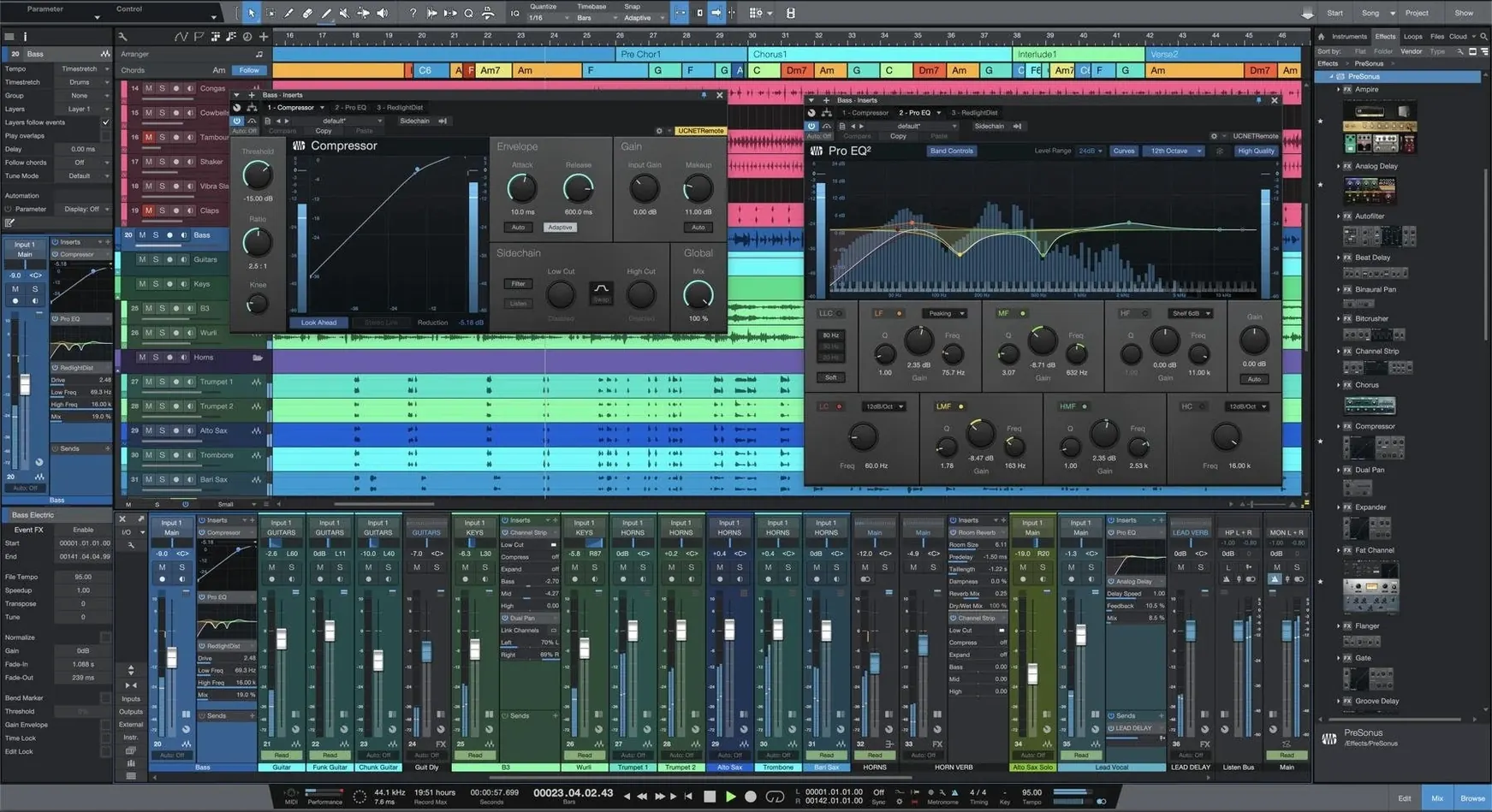
You have a rough idea recorded into Voice Memos and a drum loop you built in Logic a month ago. You drag both onto the Song page because the tracks are unlimited and the buses are too, so there is no reason to tidy up yet.
This is where Studio One tends to slot in next to other Mac audio tools. It opens projects from older versions without a conversion dance, and the drag-and-drop workflow means you move audio, plug-ins, and virtual instruments the same way you move files in the Finder. The interface rearranges itself to match how you work, not the other way round.
When the arrangement is done, the Project page takes over for mastering and compiling the final recordings. Version 7 adds AI-powered stem separation, so pulling a vocal or a drum part out of a stereo mix is a few clicks instead of a trip to another utility. The launcher now handles unlimited scenes and playlists, which makes the arranger track feel more like a live performance tool.
It does not talk to ReWire, so if your workflow still depends on that bridge, plan around it. For straightforward recording, production, and mastering on a Mac running macOS 12.4 or later, it earns its place in the dock.
Tab-to-transient for one‑click drum edits
The tab-to-transient button in the audio editor is easy to overlook. Click it once and the playhead snaps to the next transient in the waveform — useful when you are tightening drum edits without zooming in and out all afternoon. Holding Option while dragging a clip edge stretches it with time-stretching instead of trimming, which saves a trip to the inspector.
The browser has a hidden trick: type a tempo into its search field and Studio One filters loops that match. Not a separate window, not a plug-in. Just the same browser you already use for instruments and effects. The marker track accepts Command+B to drop a marker at the playhead, and markers drag horizontally to re-order sections in a long arrangement. Small things, but they accumulate across a session.
Mac-specific touches help too. The main window respects Spaces and full-screen mode properly, and the mixer undocks onto a second display without the usual window-handling fuss some cross-platform DAWs carry over from Windows. The metering follows macOS colour profiles, so what you see on a calibrated screen matches the export.
A tracking session, step by step
You open the Smart Template for vocal recording. Studio One builds the session: a click track, a reverb bus, a headphone mix, and a track armed with your default mic input. No dialogue boxes, no naming tracks one by one.
You recorded acoustic guitar yesterday. You drag the stem separation tool onto the stereo file on its track. Thirty seconds later you have the guitar isolated on a new track, the bleed from the room mic split away. You mute the original and nudge the separated part forward three milliseconds to align the transient with the vocal take you are about to record.
The singer wants a different feel for the chorus. You open the Launcher, grab the chorus section from the arrangement, and drop it into a scene slot. You duplicate the scene, strip the drums, and play it back as a sparse alternate. Later you drag the chosen scene back into the arrangement window. The whole process is non-destructive, so the original arrangement stays intact on the Song page.
By the time you reach the rough mix, you have four scenes in the Launcher, two stem-separated reference tracks, and a tempo map that the advanced detection pulled from an old demo MP3 you imported as a guide. The session file sits around 200 MB with all the undo history intact.
Cold launch in under six seconds on Apple Silicon
On Apple Silicon the app launches cold in under six seconds. The plug-in scanner runs in the background and does not block the start screen. With twenty audio tracks, a handful of Native Effects, and the stem separation engine chewing on a four-minute stereo file, memory pressure stays in the green on machines with 16 GB of RAM.
Intel Macs run it capably, though stem separation takes noticeably longer — the neural engine on M-series chips does real work here. The fan rarely spins up during playback; it is the offline processing that pushes the thermals, and version 7 spreads those tasks across efficiency cores sensibly. I have seen a single crash in the first month, and that was a third-party AU plug-in that also fell over in Logic. The built-in effects plug-ins have never caused a beach ball.
Bounce-in-place is fast enough that you do not reach for your phone while waiting, and the mix engine runs at 64-bit floating point throughout, so gain staging errors do not clip internally before they hit the master fader. Not glamorous, but it means fewer surprises when you export.
Drag‑and‑drop arrangement and a dedicated mastering page
Against Logic Pro, the difference is the arrangement workflow. Logic gives you a deep library of sounds and a polished score editor. Studio One gives you drag-and-drop everywhere and a mastering page that Logic simply does not have. If you write notation or lean on Drummer, Logic pulls ahead. If you track bands and finish your own masters, Studio One is the straighter line.
Compared with Ableton Live, the split is clearer. Live is a performance instrument first and a linear recorder second. Studio One works the other way: the Song page is a traditional timeline, and the Launcher brings clip launching into that world without making you rebuild your session for a live set. The stem separation in version 7 is offline and AI-driven, where Live's equivalent tools lean on cloud processing or Max for Live devices. Different philosophies, and the choice depends on whether you start with a blank grid or a full arrangement.
Next to Cubase, Studio One feels less encrusted. Cubase has decades of features packed into menus and sub-menus, which is powerful if you already know where everything lives. Studio One strips a lot of that back: the channel strip is unified, the mix console is one window, and the Smart Templates replace the need to build session skeletons from scratch. If you are coming from Cubase, the transition costs about a week of muscle-memory rewiring, after which the screen feels less cluttered.
For someone hunting down a studio one for mac setup that does not demand an internet connection for core features, version 7 installs cleanly and activates locally. That matters in a studio machine that stays offline for stability. The download lands as a standard package with clear instructions, and because it installs alongside older versions, you can keep a known-good Studio One 6 installation while you test the new one. No forced migration, no overwritten preferences.
What’s new
Adds unlimited Launcher Scenes and Playlists. Adds AI-powered offline Stem Separation. Adds advanced tempo detection.Requirements
- macOS 12.4 or later
- Runs on Intel and Apple Silicon Macs
FAQ
Does Studio One 7 open projects from older versions?
Yes, version 7 opens songs, projects, and shows created in earlier Studio One versions.
Does Studio One 7 support ReWire?
No, Studio One 6 and 7 do not support ReWire.
What does the Project page do?
The Project page is used for mastering compositions and compiling recordings.
Comments 0
Sign in or create an account to leave a comment.
No comments yet…
If you’ve installed it, say how it went. Mention your Mac and macOS version — it helps the next person more than you’d think.