
SiteSucker Pro for macOS
Description
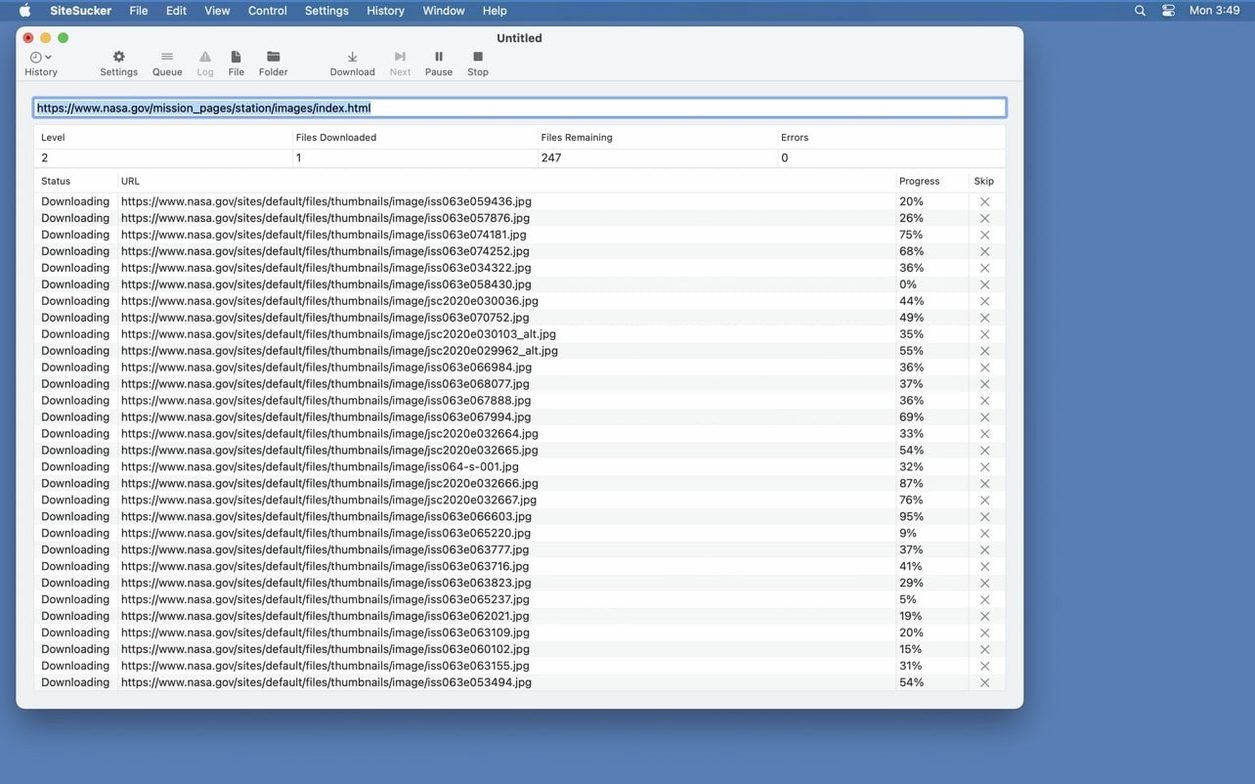
Spotty train Wi-Fi and research trips don't mix. When you need a site's pages, images and files on your drive — not in a browser tab — this is the app that pulls them down in one go.
- Version 6.2.2 fixes bugs that broke PDF creation and adds a Format HTML option in Webpage settings.
- The Limits section sets how deep links go, how many files are grabbed, and the smallest and largest file sizes allowed.
- File Types can be set to download everything or only the formats you tick. By default, paths blocked in robots.txt are skipped, but that's a toggle you can switch off.
- Open Log dumps the session details into Console so you can see exactly what it fetched and what it skipped.
- The Advanced section lets you pick a user agent that mimics Safari or Firefox, which helps when a server is fussy about who's asking.
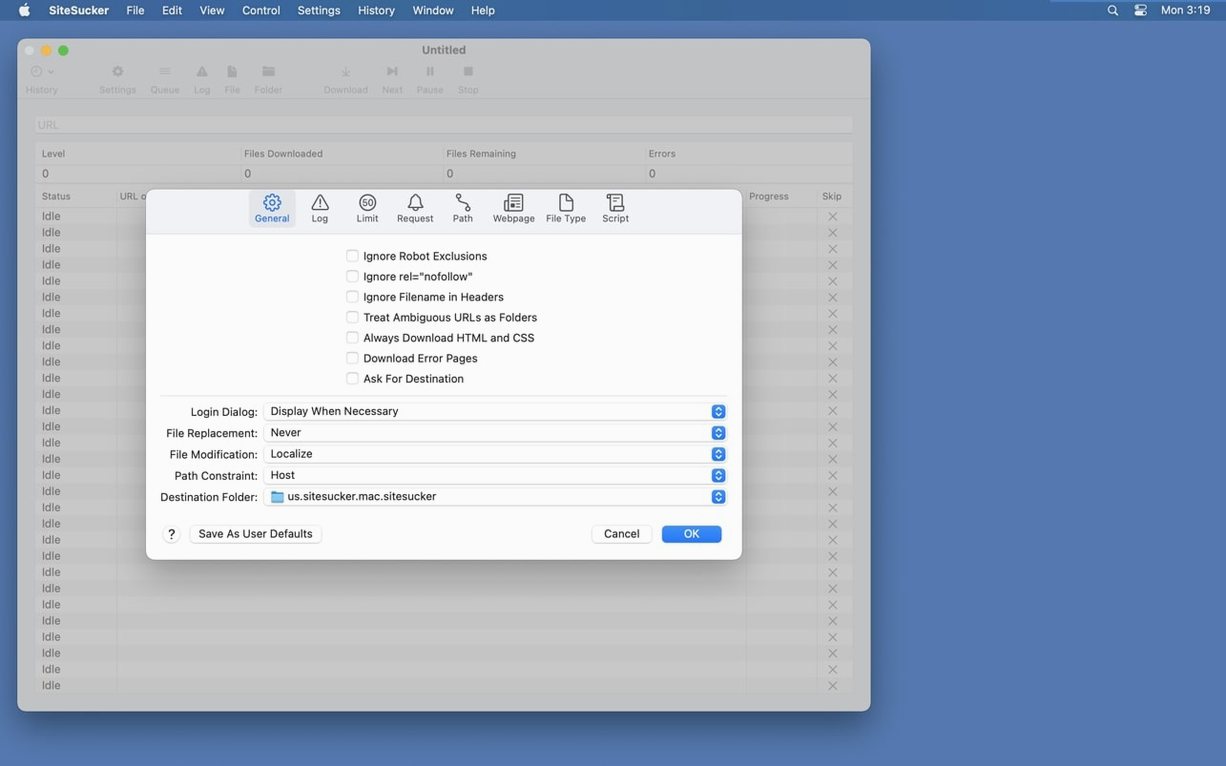
It's the Pro edition, so embedded video downloading is baked in. Preferences are split into straightforward tabs — General, Logs, Limits, File Types, Paths, Advanced — and nothing hides behind vague buttons. If you archive reference material or just want a local copy for a long flight, this is the tool for the job.
Runs separately from Safari, not as an extension
SiteSucker Pro doesn't plug into Safari or hook into your browser extensions. It works alongside whatever you normally use — grab a URL, paste it in, and let it run. Once the download finishes, the site lands as a normal folder on your Mac. You can open the index page in any browser, drop it into a ~/Sites/ folder for local testing, or zip it up and pass it to a colleague who needs offline reference copies.
If you use Spotlight or HoudahSpot, the copied HTML files and PDFs are indexed like anything else on your drive. For developers who pull down documentation sites before a flight, the directory structure mirrors the server exactly — relative links stay intact, so browsing locally feels close to the real thing. Just don't expect forms or search boxes to work after the grab.
Daily performance and quirks
It's a single-minded app. Most sites download at whatever speed the server allows, and the app stays responsive even when you're pulling thousands of small assets. CPU use is modest — mostly disk writes and network I/O. RAM footprint sits around 200 MB on a typical medium-sized site. On a Mac Studio or a recent MacBook Pro, you won't notice it running alongside other tools.
Large video files change the picture. If you ask it to download embedded YouTube or Vimeo content on a connection that's already patchy, expect the progress bar to stall now and then. The log in Console tells you exactly what timed out, which is more useful than a generic error message. Stability under 6.2.2 is solid — no crashes during our tests even when we threw a 12-level-deep documentation wiki at it. The PDF fix in this version tidied up the one reproducible annoyance from earlier builds.
Native Apple Silicon build and login limits
Will it run on Apple Silicon? Yes. The build is universal, so it runs natively on both Intel and Apple Silicon Macs. No Rosetta needed.
Can I download a site that needs a login? Not directly. SiteSucker doesn't handle authentication forms. The workaround is to set the user agent to Safari or Firefox in the Advanced tab and hope the server doesn't gate content behind a session cookie. If it does, you'll get the login page saved instead of the content.
Does it follow links to external domains? Only if you tell it to. By default it stays on the domain you entered. The Paths section lets you add specific external links to include or block, so you're not accidentally pulling half of a CDN onto your drive.
What about JavaScript-heavy sites? It downloads the HTML, CSS, images, and media — but it doesn't execute JavaScript. Single-page apps and React sites that build the DOM at runtime won't render offline the way they do in a browser. You'll get the static shell and whatever assets the source references.
What’s new
- Fixes bugs related to creating PDFs.
- Adds a Format HTML option to Webpage settings.
Requirements
- macOS 26 or later
- Apple Silicon or Intel Mac
FAQ
Does SiteSucker Pro download files blocked by robots.txt?
By default, no. The exclusion can be turned off in settings under the relevant section.
Can I see which files were downloaded?
Yes. Click Open Log on the toolbar to view the full session log in Console.
Can I limit what gets downloaded?
Absolutely. Use the Limits section to cap link depth, total file count, and minimum or maximum file size.
Comments 0
Sign in or create an account to leave a comment.
No comments yet…
If you’ve installed it, say how it went. Mention your Mac and macOS version — it helps the next person more than you’d think.