Screen Studio for macOS
Description
Screen Studio runs on any Mac that can install macOS 13 (Ventura) or later. Apple Silicon and Intel machines are both supported. It is a native app, not an Electron wrapper, so it feels at home on macOS.
| Detail | Info |
|---|---|
| Version | 3.7.5-4595 |
| macOS | 13 or later |
| Export | Up to 4K at 60 fps |
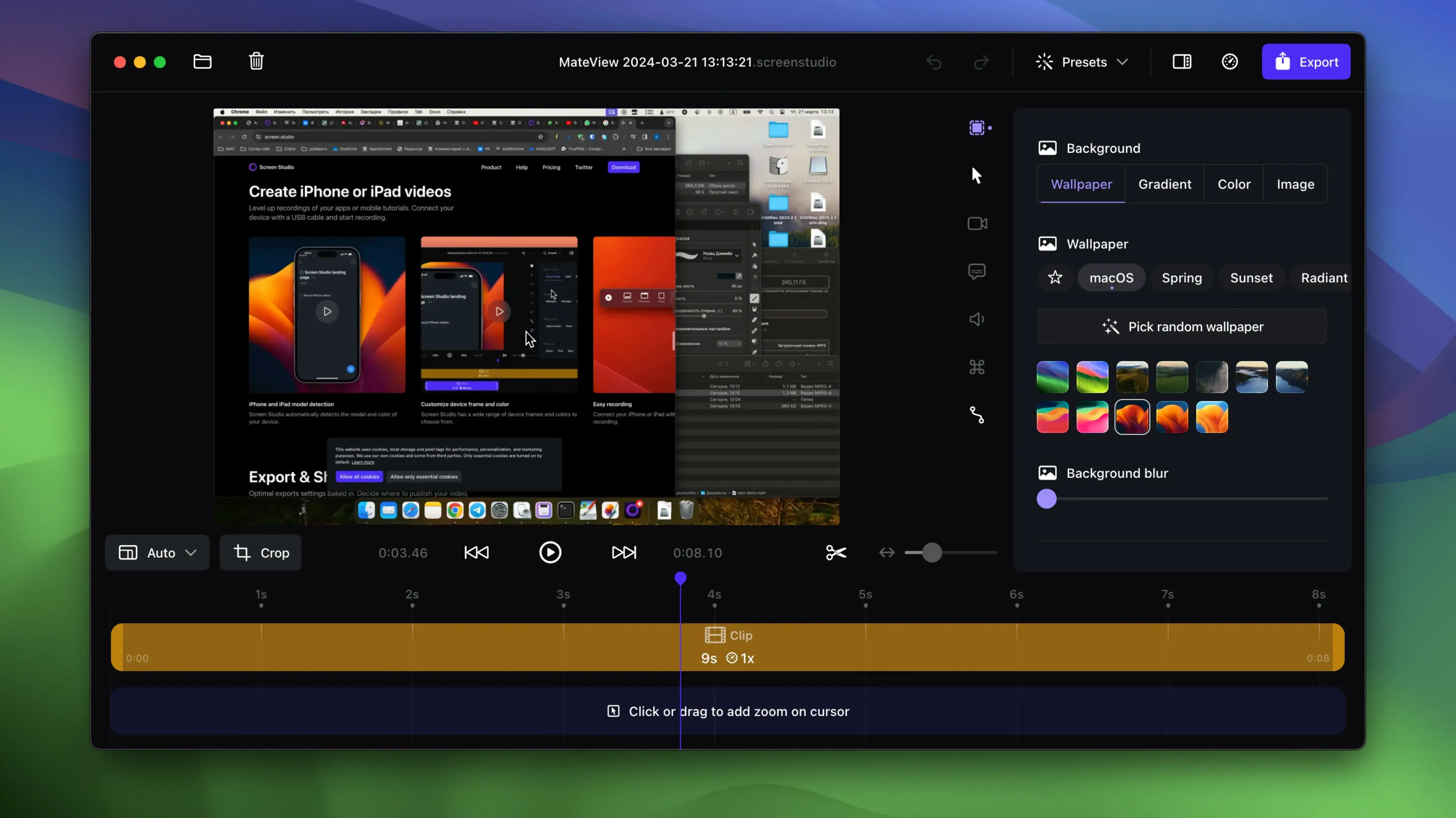
Say you need a quick walkthrough of a new feature for a colleague. You record the window. While you talk, the app follows your clicks with smooth zooms and adds a subtle shadow behind the window. You stop recording and trim the start where you coughed. You drag a couple of zoom changes on the timeline to tighten the focus. Background noise removal cleans up the audio with one tick. You set it to export vertically, let it adjust the scaling, and copy the finished clip straight to the clipboard for Slack. The cursor loop trick means the pointer ends back at the start, which is a small thing that makes the loop look deliberate. It is a focused tool. No timeline clutter, no multi-track overwhelm. Just record, tidy up, export.
Transcript scrolls alongside your timeline, created locally
Version 3.7 brought local transcript generation. The transcript is created on your Mac, not in the cloud. It appears as a text track you can scroll through while editing, which is useful for finding the exact moment you explained something badly and need to cut.
System audio recording got more precise. You can now capture sound from all apps or pick specific ones, so a Slack notification ping does not ruin a demo unless you let it. The iPhone and iPad recording path improved too. Plug in a device via USB and Screen Studio detects the model and colour automatically. The framing adjusts to match the device bezel, which saves ten minutes of fiddling with crop handles.
Earlier 3.x releases added the cursor loop feature and automatic static cursor hiding. Both are small touches that remove editing busywork. The speed adjustment tool became more flexible: you can speed up one segment of a recording while leaving the rest at normal pace, and the zoom behaviour stays smooth across the change.
Clipboard export becomes a muscle memory shortcut
Product designers and developers making short feature walkthroughs. The automatic zoom means they do not need to think about camera keyframes. They record, trim, and send. The clipboard export is fast enough that it becomes a habit.
Tutorial creators who publish to social media. Vertical export with automatic scaling takes a landscape recording and reframes it for a phone screen without manual repositioning. The selfie overlay shrinks to a sensible size rather than blocking a quarter of the frame. These are not monumental features, but together they cut the time between recording and posting.
Customer support and sales people who record quick replies. The noise removal and voice normalisation mean a recording made in a busy office sounds passable. Keyboard shortcut display helps when explaining how to do something rather than just showing the result. Hiding desktop icons keeps the focus on the app, not the mess behind it.
Anyone who hates the timeline in a traditional video editor. Screen Studio does not pretend to be Final Cut. It gives you a single track, a few trim handles, and zoom markers you can drag. That is the whole editing model. For a two-minute screencast, it is enough.
Paste a trimmed clip directly into Slack or email
It plays well with the Mac clipboard. Record, trim, press copy, paste into Slack, Notion, or an email. No file to name, no Finder window to navigate. The shareable link option does the same job when the file is too large for a chat upload.
GIF export is there for the times a still screenshot is not enough but a video link feels too heavy. Drop a five-second recording into a documentation page or a pull request comment.
If you already use a proper video editor, Screen Studio works as a pre-processing step. Record the raw capture with zooms baked in, then bring the clip into DaVinci Resolve or Final Cut for titles and transitions. The 4K 60 fps export means you are not starting from a compressed mess. For simple jobs, the built-in tools are enough and the round trip is not needed.
On macOS Ventura and later, the screen recording permission prompt is standard. Grant it once in System Settings and it does not nag you again. The app uses the same recording APIs that QuickTime Player does, so there is nothing unusual about how it hooks into the system.
Requirements
- macOS 13 or later
- Apple Silicon or Intel Mac
FAQ
Does it run natively on Apple Silicon Macs?
Yes, Screen Studio is a native macOS application and runs on both Apple Silicon and Intel Macs.
Can it export vertical video for social media?
It can export vertically and automatically adjusts the scaling to suit that format.
Comments 0
Sign in or create an account to leave a comment.
No comments yet…
If you’ve installed it, say how it went. Mention your Mac and macOS version — it helps the next person more than you’d think.