Movavi Video Suite for macOS
Description
The app recognises over 180 file formats without asking for extra codecs.
Can I pull phone clips straight into a timeline?
Yes. Connect your phone over the local network and transfer files directly into the program. It skips the cable hunt and works while the phone sits on the desk.
What does a quick screen recording look like?
You grab a selected area or the full screen with system audio included. Afterwards you can add a mouse highlight effect to point viewers at a menu command or a tiny checkbox — useful for training walkthroughs.
How do I turn that into a finished video?
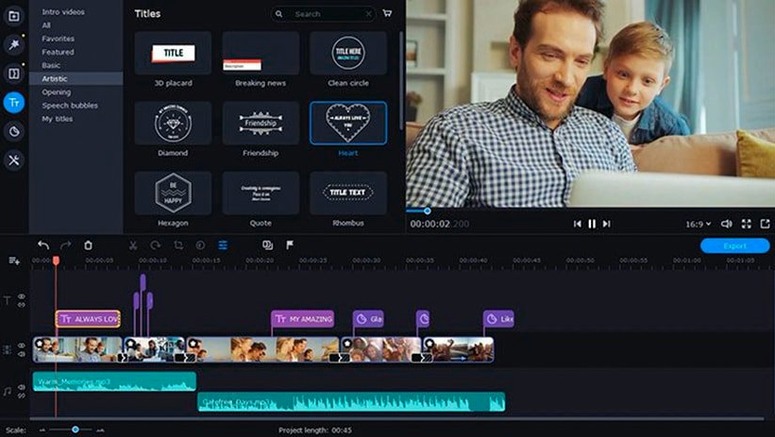
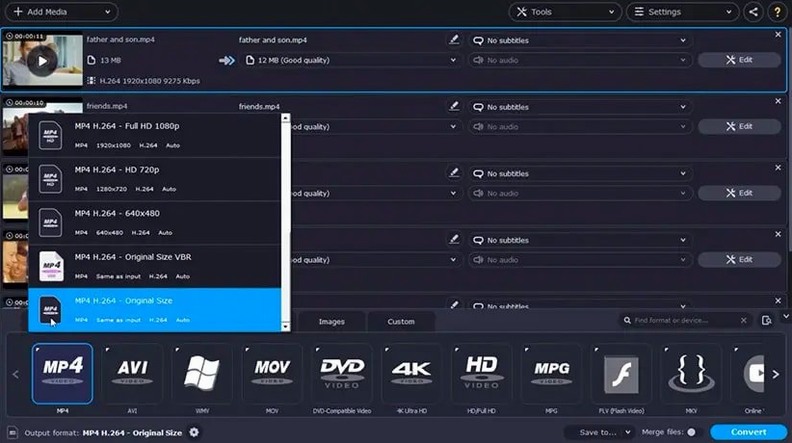
Drop the recording onto the editing timeline, trim the ends, and use the built-in effects and music. When you're done, export via the conversion tools — batch processing means you can queue several output formats at once.
Add soft subtitles from the queue’s right-click menu
Right-click a file in the conversion queue and you can add soft subtitles without opening a separate editor. It is buried one menu deep, so people who only drag-and-drop often skip right past it.
While recording the screen, tap the Option key and click to draw a temporary circle around your cursor. It fades after a second — quicker than the full highlight effect when you just need to nudge someone's eye toward a single click. Most users never discover it because the manual mentions it in a single line.
The editing timeline lets you nudge clips frame-by-frame with Command-Left and Command-Right. If you have ever tried to trim a clip by dragging with a trackpad, you will appreciate the keyboard control. It works on audio tracks too.
Send straight to the converter via the macOS Share menu
Movavi Video Suite registers itself as a destination in the macOS Share menu. Select a video file in Finder, hit the Share button, and the conversion window opens with that file already queued. It saves a launch step when someone sends you a clip in a format your player chokes on.
Screen recordings appear in the timeline as standard clips. Drop them into a project, then pull in a voiceover recorded in QuickTime Player or a music file from Voice Memos — the app reads the formats without protest. You can even drag an audio file straight from a Finder window onto the timeline, which is the kind of thing Apple's own iMovie sometimes frowns at.
If you work with a colleague who edits on Windows, the batch converter handles MOV-to-MP4 and ProRes-to-H.264 without adding extra software. It keeps folder structures intact when you convert multiple files, so a folder of dailies stays organised on the other side.
Produce a software walkthrough in one sitting
Remote trainers and support staff. The screen recorder's mouse effects and audio commentary tools mean you can produce a software walkthrough in one sitting — record, trim the awkward pauses, export as a small MP4, and send it off. No stitching together separate apps.
People who receive footage in whatever format the sender felt like using. The 180-format claim is not marketing fluff; it handles FLV files from older screencasts, MTS from camcorders, and WMV clips from Windows users. The batch queue turns a pile of mixed formats into a consistent set while you get on with something else.
Students and researchers who record lectures or webinars. Full-screen capture with system audio plus the option to transfer phone clips over Wi-Fi covers the two main sources of material. The subtitle tool during conversion is handy for accessibility or for adding translated notes to a recording without re-rendering the whole timeline.
It is not a replacement for a dedicated NLE if you do heavy colour work or multi-camera edits. But for people who need to record, convert, and assemble without learning three different workflows, the suite earns its keep. If you grabbed the Movavi Video Suite torrent to try it out, take ten minutes to poke through the right-click menus — the small shortcuts are where the speed lives.
What’s new
Fixes a title-related crash that shut the app down mid-edit. Adds new music tracks and updates the indicator icon for applied effects.
Requirements
- macOS 10.13 or later
- Intel processor
- Interface: English
FAQ
Can Movavi Video Suite handle multiple file formats in a single project?
Yes, it supports more than 180 formats natively and can batch-convert mixed clips to a uniform format.
Comments 0
Sign in or create an account to leave a comment.
No comments yet…
If you’ve installed it, say how it went. Mention your Mac and macOS version — it helps the next person more than you’d think.