DynamicLake Pro for macOS

Description
Version 1.8 arrived without a public changelog, but it keeps the app in step with macOS updates and refines the collection of floating widgets. If you have been waiting for a quieter release before trying it, this is the one most users will land on.
A home for alerts above the menu bar clutter
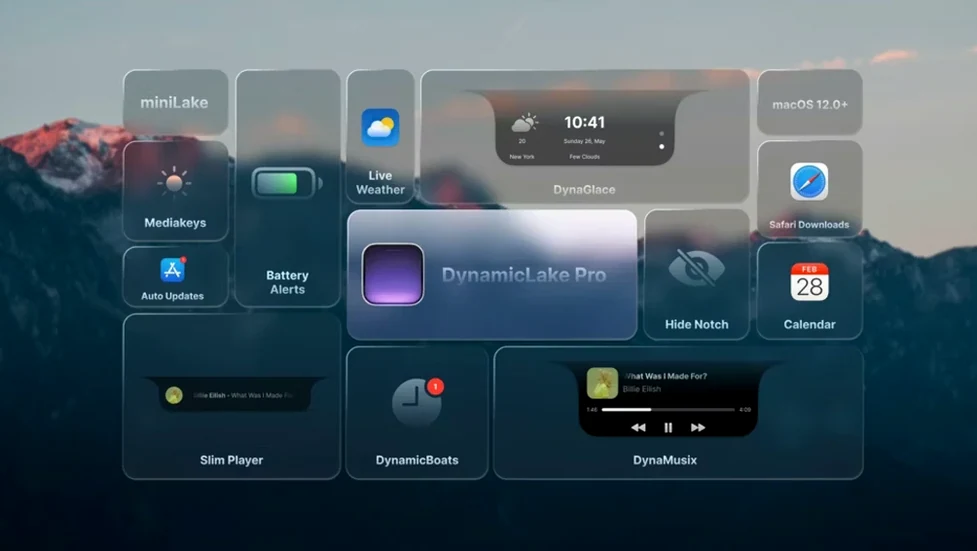
DynamicLake Pro carves out a space at the top of the screen that neither the Dock nor the menu bar use. It handles glanceable information—battery alerts, calendar nudges, AirDrop transfers—so the menu bar stays less cluttered. The Dock still launches apps; DynamicLake just shows you what is happening inside them.
How does DynaSwitcher change app switching?
It replaces the standard Command+Tab overlay with one that lives in the DynamicLake area when you press Option+Tab. The visual is closer to what you get on an iPhone with a Dynamic Island. It does not add extra steps, just a different, more compact look.
What do DynaKeys and DynaMusic control?
DynaKeys puts volume, brightness and keyboard backlight adjustments into a small animated pill. DynaMusic pulls the current track info and playback controls into the same floating zone. Both are optional and work independently of whatever audio or display app you have open.
How does miniLake slim things down?
miniLake is a compact mode that strips some animations to show only the core function you are using—volume level, a calendar alert, an incoming file. It is useful if you want the utility without the full visual treatment.
No window appears when you launch it
The most common one is launching the app and then staring at a blank menu bar, wondering why nothing happened. DynamicLake Pro does not open a traditional window. It sits in the menu bar as a small pill icon. Click that to reach preferences and toggle the widgets you want.
Another frequent slip: enabling every widget at once. The floating zone gets crowded fast when music controls, calendar alerts, Bluetooth notifications and AirDrop transfers all compete for the same space. Pick two or three to start with. You can always add more later once you know which ones earn their keep.
Some users miss that DynaSwitcher uses Option+Tab, not Command+Tab. macOS still reserves the standard shortcut, so the developer had to pick a different modifier. If you keep hitting Command+Tab out of muscle memory, you will see the regular app switcher and think DynaSwitcher is broken. It is not. Just use the right keys.
People also forget to grant accessibility permissions. The first time you trigger DynaKeys or DynaSwitcher, macOS shows a prompt asking for permission to control your Mac. If you dismiss it without reading, the feature stays greyed out. Head to System Settings > Privacy & Security > Accessibility and flip the switch for DynamicLake Pro.
Widgets vanish by design—here's how to make them linger
The pill disappears after a few seconds. That is by design. Widgets animate in, show their information, then retreat. You cannot pin them open, but you can adjust how long they linger in the app preferences. Look for the display duration slider.
DynaMusic shows the wrong track or nothing at all. First, confirm your music app is one of the supported players. Then check that DynamicLake has permission to read media information. Sometimes the app needs a relaunch after an update to re-establish the handshake with Apple Music or Spotify.
AirDrop transfers trigger no animation. The feature works only when DynamicLake is running and the AirDrop widget is enabled. If you turned it off while troubleshooting something else, it stays silent. Also, the animation appears for incoming transfers, not outgoing ones.
Bluetooth alerts become annoying. DynaConnect fires a notification every time a device connects or disconnects. With wireless headphones that auto-sleep, that can mean several pings an hour. Most people are happier disabling Bluetooth alerts and just keeping the system Bluetooth icon in the menu bar for manual checks.
The app does not launch at login. DynamicLake does not add itself to Login Items automatically. Open System Settings > General > Login Items and drag the app in, or enable the option inside DynamicLake's own preferences if the current build offers it.
If the interface stutters on an older Intel Mac, try switching to miniLake mode. It sheds the heavier animations and runs more smoothly on machines where the GPU is already busy with other tasks.
Built for notification-heavy workflows
Notification-heavy workers. If your day is a stream of calendar alerts, meeting reminders and incoming files, DynamicLake gives you a single spot to catch them without switching context. The glanceable format suits people who need to see a notification, decide not now, and keep typing.
Musicians and audio editors. DynaMusic plus DynaKeys means track info, play/pause, and volume all live in one compact zone. That is genuinely useful when a DAW occupies both screens and you just want to skip a track without hunting for the Music app window.
Users migrating from a newer iPhone. Anyone who has grown accustomed to the Dynamic Island on an iPhone 14 Pro or later will find the Mac version immediately familiar. The animation language and the way notifications expand and contract match what they already know, which cuts the learning curve to nearly zero.
Minimalist desktop fans. Some people hide the Dock, strip the menu bar down to the clock, and want every pixel to earn its place. DynamicLake removes the need for half a dozen menu bar utilities—volume display, calendar alerts, Bluetooth status—by consolidating them into one transient interface element.
Multilingual users. With interface support for thirteen languages, it slots into workflows where the system language is not English. The localisation is functional rather than elegant, but it covers the labels and preferences well enough for daily use.
Worth it if you want your Mac to feel a little more like your phone without buying a separate display widget or cluttering the menu bar.
Requirements
- macOS 11 or later
- Intel or Apple Silicon Mac
FAQ
Which macOS versions does it need?
DynamicLake Pro requires macOS 11 or later and runs on both Intel and Apple Silicon Macs.
Comments 0
Sign in or create an account to leave a comment.
No comments yet…
If you’ve installed it, say how it went. Mention your Mac and macOS version — it helps the next person more than you’d think.