DriveDx for macOS
Description
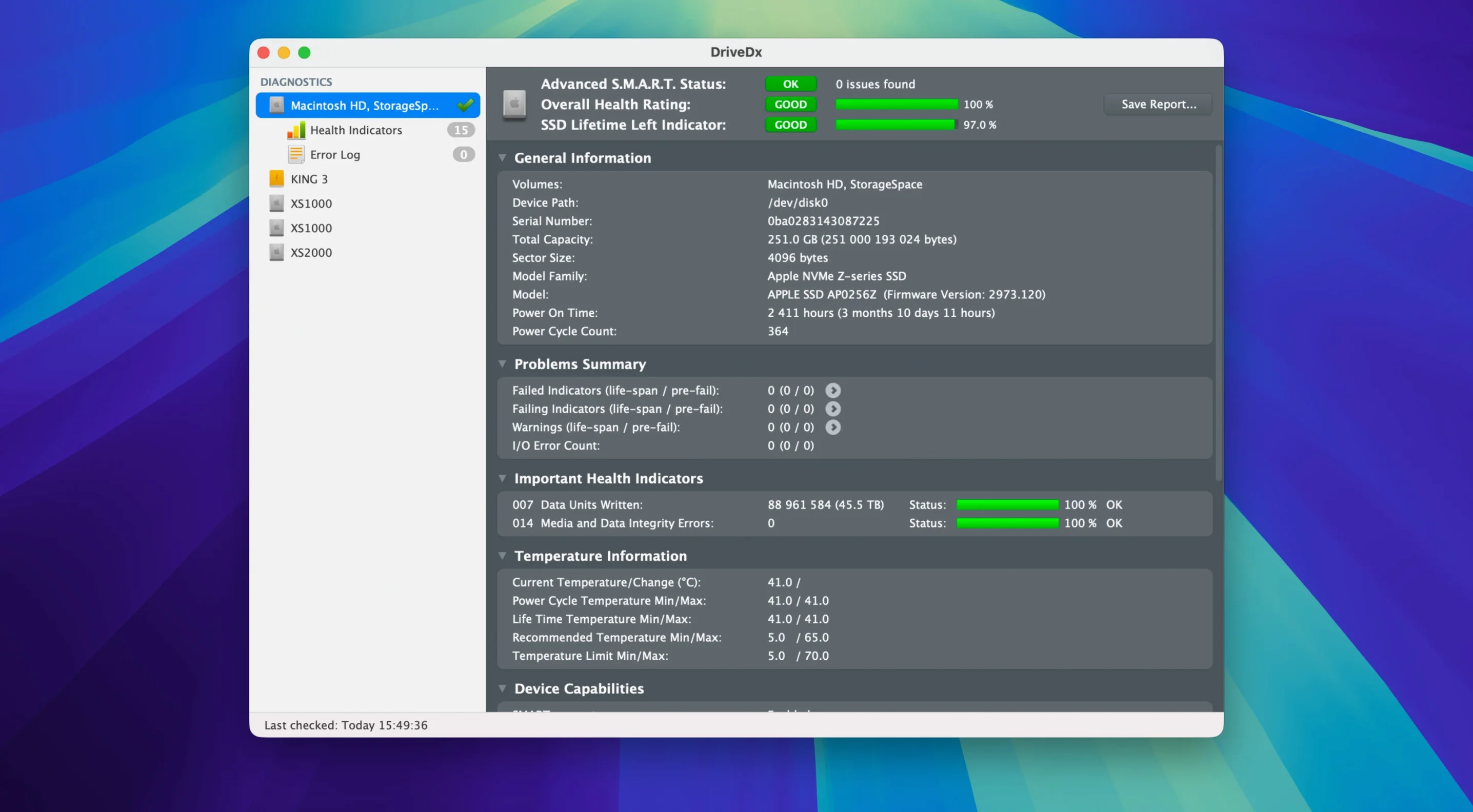
DriveDx is a drive health monitor that reads S.M.A.R.T. data and uses its own heuristics to flag problems before you lose files. It works with internal and external HDDs and SSDs.
Apple Silicon driver drops Rosetta 2
The current build runs natively on Apple Silicon and Intel Macs from macOS 10.9 Mavericks onward. The 1.12.1 driver installer no longer needs Rosetta 2, so setup is straightforward on M-series machines.
What it watches
It checks the standard S.M.A.R.T. indicators and adds custom algorithms to spot early signs of trouble. Status moves through OK, Warning and Failing states—not just a binary pass/fail—so you get notice while there is still time to copy data.
How it warns you
Run it in the background and it will fire a notification the moment a health metric slips. You can also trigger short or full self-tests on a drive from within the app.
Idles at near-zero CPU, 40–50 MB RAM
DriveDx sits in the menu bar and mostly stays out of the way. Memory use on an Apple Silicon Mac hovers around 40–50 MB, which is negligible. CPU draw is near zero when idle. During a full self-test on a spinning drive it spikes briefly, but you can carry on working while the test chugs in the background.
Opening the main window is quick—no beachballing, no mystery pauses while it polls drives. It rescans on launch but caches the last known state, so the interface feels snappy even with a handful of externals attached. Over weeks of uptime I have not seen it leak memory or stall.
Hold Option at launch to force a fresh scan
- Hold Option on launch to force a full re-scan of all connected drives. Handy after you have swapped a caddy or re-plugged an enclosure and the old entry lingers.
- Export health report lives under the File menu. It writes a plain-text summary of every S.M.A.R.T. attribute plus the app's own diagnostic verdict. Good to tuck into a service folder before handing a Mac to a repair shop.
- Temperature logging is quietly active for SSDs that report it. You can spot a drive slowly cooking in a poorly ventilated stack long before it throws errors.
- Custom thresholds per attribute are available in Preferences. By default the app uses its own researched limits, but you can tighten or loosen specific triggers if you know a particular drive's quirks.
Top support tickets and how to clear them
A few things trip people up. Here are the ones that reach the help desk most often.
External drive shows “Unknown” health
Some USB bridges do not pass S.M.A.R.T. commands cleanly—JMicron chips are notorious for it. Try a different enclosure or connect the drive directly via SATA if the Mac has a bay for it. Thunderbolt enclosures are generally more reliable at passing diagnostic data than cheap USB adapters.
“DriveDx would like to install a helper tool”
This prompt appears because the app needs a low-level driver to read drive attributes. The 1.12.1 installer runs native on Apple Silicon, so you will not see a Rosetta prompt. If the install fails, open System Settings → Privacy & Security and check whether macOS blocked it silently—sometimes an Allow button appears there a few seconds later.
SSD life percentage drops faster than expected
That figure comes from the drive's own wear-leveling counter, not from a DriveDx calculation. The app just surfaces what the controller reports. If the number troubles you, check for logging daemons or heavy swap use writing tens of gigabytes a day. iStat Menus or Activity Monitor can help you spot runaway processes.
Notification fatigue
The defaults are chatty if you plug and unplug drives often. In Preferences, turn off “Notify on drive connection” and leave only the health-change alerts enabled. You still get early warning when something actually degrades, without a ping every time you mount a backup disk.
Drive not appearing at all
Open Disk Utility and confirm the drive is visible there. If it is but DriveDx still cannot see it, quit the app, disconnect the drive, reconnect it after five seconds, then relaunch. The 1.12.1 heuristics handle delayed mount events better than earlier builds, but a cold rescan sometimes sorts a stubborn detection.
If you are hunting for a drivedx license key, the app runs in a fully functional trial mode long enough to assess every drive in the house. Grab it, test thoroughly, and decide from there.
What’s new
Maintenance release ready for macOS Sonoma.
Improves diagnostic algorithms and heuristics.
Fixes driver installer—Rosetta 2 is no longer required.
Improves support for Patriot P200 SSDs.
Requirements
- macOS 10.9 Mavericks or later
- Intel or Apple Silicon Mac
Comments 0
Sign in or create an account to leave a comment.
No comments yet…
If you’ve installed it, say how it went. Mention your Mac and macOS version — it helps the next person more than you’d think.