
Tone Empire EDYN for macOS
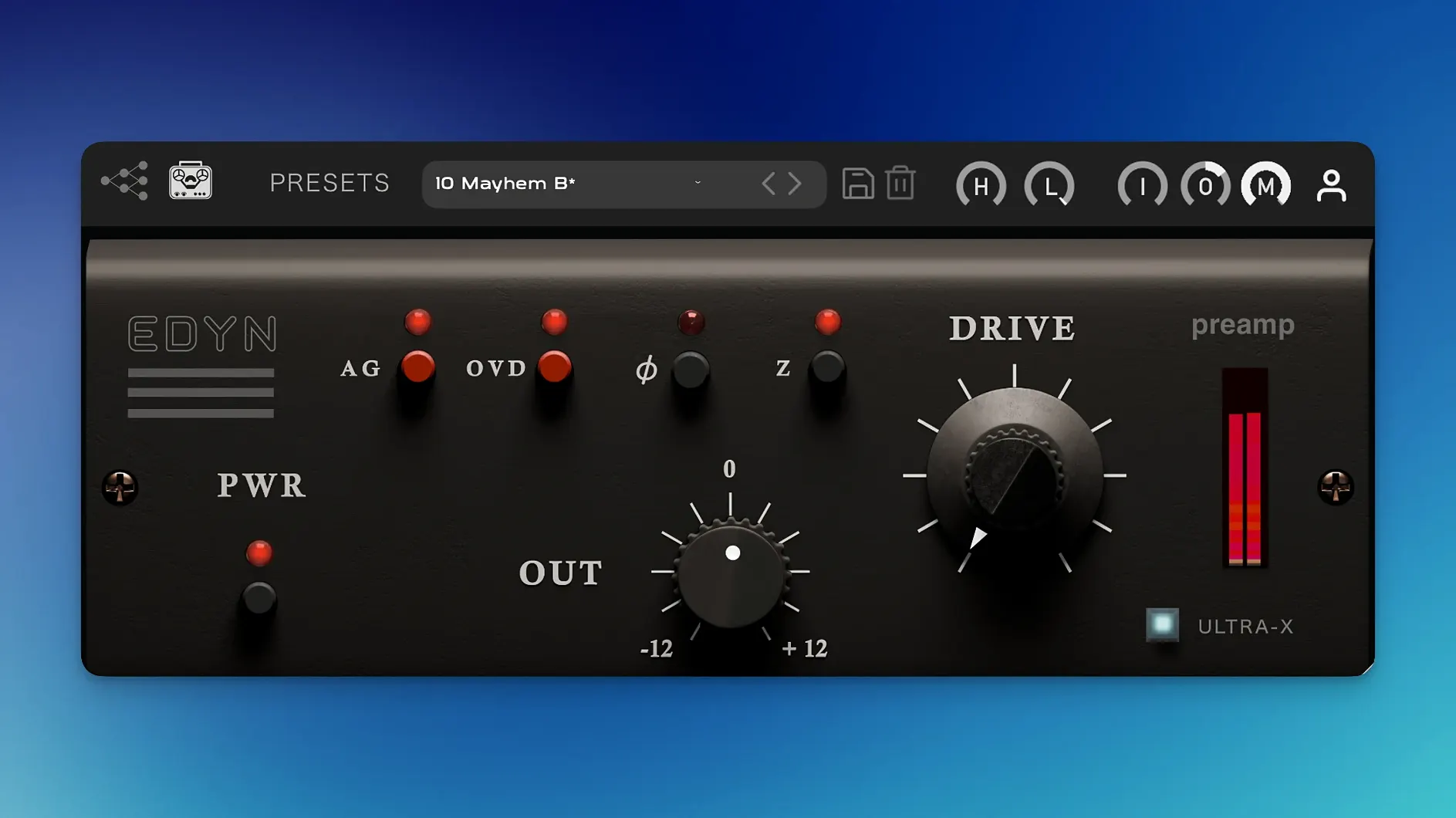
Description
Getting console-style density onto a clean digital track usually means wrestling with a plug-in that eats your CPU before it ever reaches the chorus. EDYN 1.0.2 is a Mac preamp built around a vintage American desk sound, and it keeps things practical with an Apple Silicon-native build that puts format support right where a working session needs it.
- Runs native on Apple Silicon and Intel 64-bit Macs, macOS 10.14 and up.
- Switchable input impedance (50 or 200 ohms) changes the way mics and signals hit the circuit.
- OVD overdrive mode pushes a discrete transistor preamp into heavier saturation.
- Mix control for parallel processing without extra routing.
- Phase inversion, plus Input and Output level controls to gain-stage cleanly.
- Scalable interface added in 1.0.2 – high-res displays get a legible panel for once.
The tone model is all discrete transistors: a bright midrange, fast transient snap, and a low end that feels deep rather than bloated. You get character and warmth, but the transient response stops it turning into sludge. The 1.0.2 update also squashes the crashes that plagued multiple instances in Logic Pro, and AU validation on Sequoia finally passes without a fight. Worth it if you need a console flavour that installs, validates, and actually renders offline without falling over.
Double-click resets and other hidden speed tricks
EDYN is not a panel full of cryptic dials, but a few shortcuts make it faster to work with than the interface lets on.
- Double-click any knob to return it to its default value. The high-pass and low-pass filters snap back to a flat position instantly, which is useful when you’ve chased a tone too far and need to reset mid-session.
- Hold Shift while dragging for fine adjustments. The Drive control in particular benefits from this — a pixel of movement can push the saturation from “warm edge” to “aggressive bark,” and fine mode gives you the in-between.
- The impedance switch is not just a vintage novelty. Flicking between 50 Ω and 200 Ω with a busy drum bus can tighten or loosen the low-end weight without touching an EQ. It alters the reactive load the circuit mimics, so transients land differently.
- OVD mode on a return track, not an insert. The Mix knob handles parallel dirt within the plug-in, but sending a clean vocal aux to a 100% wet OVD instance gives you a fader for the grit that lives outside the plug-in window. Small difference, easier automation.
- Gain compensation works better if you drive Input, not Output. Pushing the Output knob past unity can fool you into thinking a setting is “fatter” when it is simply louder. Drive the Input stage and let the auto-compensation keep the level honest, then compare.
A tracking-day scenario
Imagine a home studio with a treated corner but an untreated ceiling. A singer-songwriter has laid down a dry DI acoustic and a vocal take through a modest condenser. The performances are solid, but the tracks feel thin — no console, no outboard, just an interface preamp that does the job without doing any favours.
On the vocal bus, EDYN goes first. Impedance set to 200 Ω, Drive at 11 o’clock, OVD off. The discrete transistor model pushes the upper mids forward just enough that the lyric cuts the untreated room tone. The low-pass filter rolls off at 8 kHz to keep sibilance from the condenser in check, and the Mix knob dials back to 70% so the raw take still breathes underneath.
On the DI acoustic, 50 Ω input impedance tightens the pick attack. OVD mode engaged at 1 o’clock brings a fuzzy halo around the strum, not a full-on distortion. The engineer automates the Drive up half a notch in the chorus — a nudge that feels like a console channel being pushed, not a plug-in being tweaked. The whole session renders offline without a glitch, which on 1.0.2 is finally the norm rather than a gamble.
DAW won’t see it, AU validation fails, GUI goes blank
Most trouble with EDYN falls into three patterns. Each has a quick fix that doesn’t involve trashing preferences or reinstalling.
DAW doesn’t find the plug-in after install. On Apple Silicon Macs running Logic Pro or Ableton Live under native mode, a rescan sometimes misses AU components. Open Terminal and run killall -u $(whoami) cfprefsd, then restart the DAW and trigger a fresh AU validation. This clears a stale cache entry that 1.0.2’s AU fix relies on. VST3 users in Reaper should check that the plug-in path includes /Library/Audio/Plug-Ins/VST3 — some custom installs drop it elsewhere and the DAW never looks.
CPU spikes with multiple instances in Pro Tools. The 1.0.2 update halved the load for native Apple Silicon, but if you’re still on Intel or running Rosetta, OVD mode on eight or more tracks can stack up. Bounce a stereo stem of your drum bus with EDYN printed, then disable the plug-in on the individual channels. Commit early — the console flavour is meant to be mixed into, not left floating as a live insert on every track. On an Intel i7 Mac Mini from 2018, this drops CPU from 70% to around 25% in a 40-track session.
Offline bounce sounds different from real-time playback. Fixed in 1.0.2 for the master output, but if you’re bouncing a track stack or a bus internally, a few hosts still misreport the buffer size. Set your DAW’s offline render mode to “real-time” for that specific bounce, or insert a short section of silence at the head of the timeline — two seconds does it. The NM2 engine needs a couple of samples to stabilise its modelling state, and a silent lead-in gives it the breathing room it expects.
What’s new
- Fixes offline rendering on the master output.
- Fixes AU validation in Logic Pro on macOS Sequoia.
- Fixes crashes with multiple instances in Logic Pro.
- Fixes parameter automation in Pro Tools.
- Improves Apple Silicon performance and lowers CPU load.
- Improves support for high-resolution displays with a scalable interface.
Requirements
- macOS 10.14 or later
- Apple Silicon or Intel 64-bit processor
Comments 0
Sign in or create an account to leave a comment.
No comments yet…
If you’ve installed it, say how it went. Mention your Mac and macOS version — it helps the next person more than you’d think.
More in VST Plugins
All in VST Plugins-
 Toontrack EZkeys
2.1.5
Apple Silicon
Toontrack EZkeys
2.1.5
Apple Silicon
-
 Toontrack EZmix Bundle
3.2.2
Apple Silicon
Toontrack EZmix Bundle
3.2.2
Apple Silicon
-
 T-RackS
6.3.2
Apple Silicon
T-RackS
6.3.2
Apple Silicon
-
 UJAM Beatmaker VICE
2.4.0
UJAM Beatmaker VICE
2.4.0
-
 Synchro Arts VocAlign 6 Pro
6.1.30
Apple Silicon
Synchro Arts VocAlign 6 Pro
6.1.30
Apple Silicon
-
 uJAM Cinedream
1.0.1
Apple Silicon
uJAM Cinedream
1.0.1
Apple Silicon
-
 Synapse Audio The Legend HZ v2.0.2.R1
2.1
Apple Silicon
Synapse Audio The Legend HZ v2.0.2.R1
2.1
Apple Silicon
-
 UJAM Symphonic Elements STRIIIINGS
1.3.1
Apple Silicon
UJAM Symphonic Elements STRIIIINGS
1.3.1
Apple Silicon