
ShaperBox for macOS
Description
You have a part that feels static. Compression alone won't give it movement, and drawing a million automation lanes is a slow way to find a groove. That's the problem ShaperBox tackles head-on.
Rhythmic ducking and filter sweeps on your instrument channels
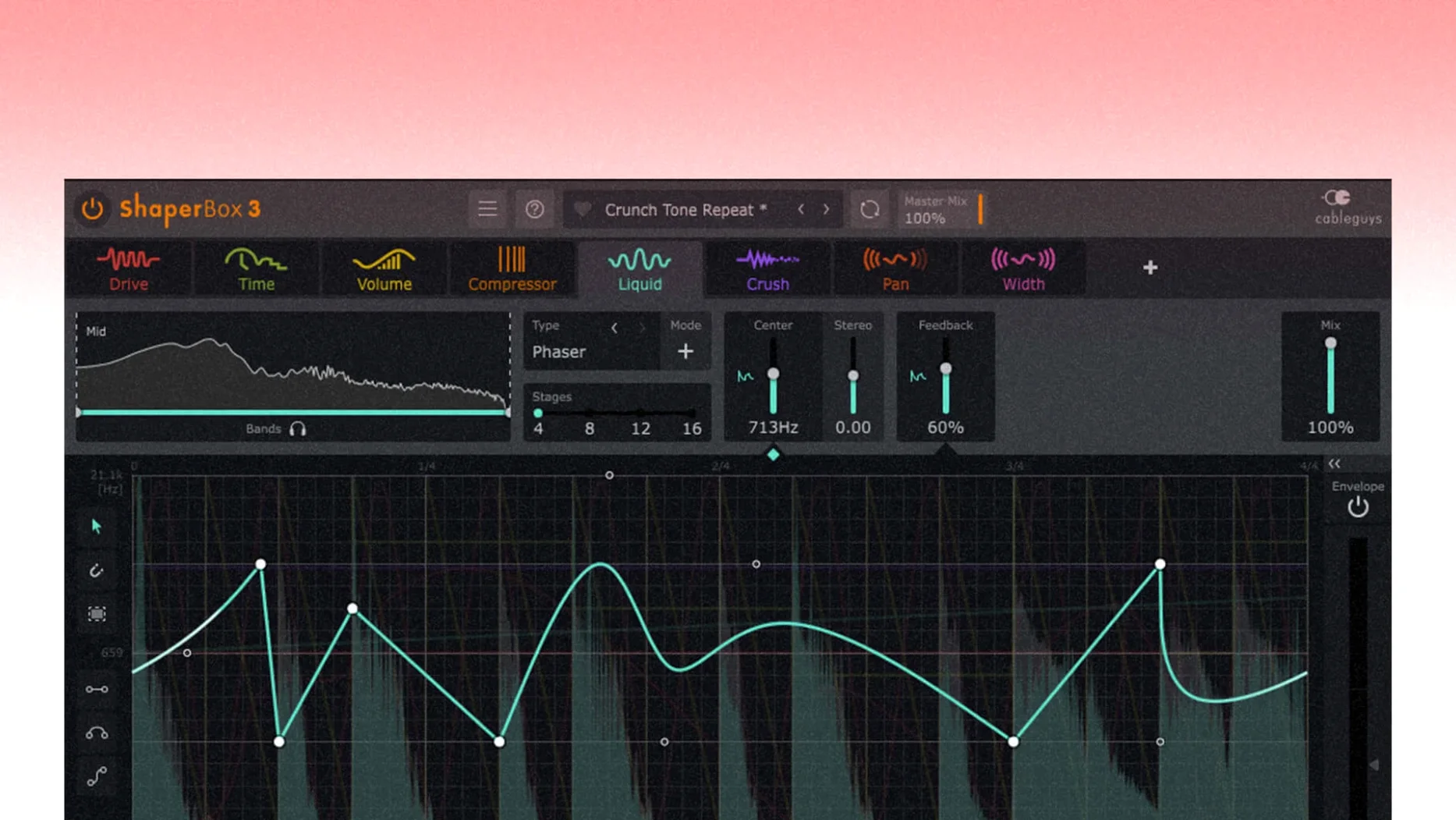
Directly on instrument and vocal channels. A synth pad gains rhythmic ducking with VolumeShaper. A hi-hat loop gets a tempo-synced filter sweep from FilterShaper that stays locked to the project BPM.
What job does it do on buses?
It glues and pushes groups without stacking five separate plugins. Place it on a drum bus to apply multiband compression that treats lows, mids and highs independently. The sidechain visual display makes it easy to see what the trigger signal is actually doing.
Where does the creative shaping happen?
On return tracks and sound-design chains. LiquidShaper adds flanger and phaser movement that follows the rhythm. The 600 presets in the browser give you a fast starting point when you want to try a few different shapes quickly.
What about a full mix?
It rarely lands on the master bus for final limiting, but a subtle TimeShaper or a gentle multiband pump on an instrumental mix bus can add a cohesive pulse that feels more musical than static gain reduction.
2–4% CPU on Apple Silicon with two or three modules active
ShaperBox 3 does its work without much fuss. On an Apple Silicon Mac, a typical instance with two or three Shaper modules active sits around 2–4% CPU in Logic Pro. Intel machines nudge that figure a little higher, but not alarmingly so. The plugin has felt snappy since the 3.0 rewrite — GUI drawing stays fluid even when you scrub through the waveform display at a few bars per beat.
Where you notice the load is stacking nine Shapers inside one instance. It will take a bite out of a single core. Splitting the same processing across two or three lighter instances on different tracks usually keeps the session more responsive.
Stability is on the solid side of average. The 3.6.1 update cleaned up a Logic Pro-specific cursor bug that had been annoying users for a while — dragging a control then finding the pointer had vanished mid-session. That's fixed. An earlier artefact where a MIDI trigger on a silent input could spit out a click is also gone. The plugin doesn't crash when you throw rapid preset changes at it, which is more than I can say for some multi-effects I've supported.
PitchShaper gain controls you can finally automate
The 3.6.1 update didn't change the interface or add new Shaper modules, but it made three practical improvements that affect everyday workflow:
- PitchShaper's Formant Link, Density, and Grain Size are now proper automation parameters. Before this, you had to draw modulation curves inside the plugin. Now you can ride them from your DAW's arrangement view — useful for building a vocal chop that gradually thins out across a breakdown.
- The audio-artefact fix on silent-input triggers means you can leave an Audio Trigger armed on a track that goes quiet for eight bars without worrying about a random transient sneaking into the bounce.
- VolumeShaper's oscilloscope no longer misbehaves when Anti-Click Trigger Smoothing was enabled alongside MIDI triggering. The waveform display and what you actually hear now match — a small thing that saves head-scratching during mixdown.
The plugin format support remains AU, VST3, and AAX, so it slots into Logic, Ableton Live, Cubase, and Pro Tools without bridge software. The 64-bit-only build means anyone still nursing a 32-bit DAW is out of luck, but that ship sailed several macOS versions ago.
Place it after your tone shaping and before peak control
ShaperBox works best as the rhythmic engine in a chain, not the tonal one. A common arrangement: an EQ or saturation plugin first to shape the tone, then ShaperBox to add movement, then a compressor or limiter to catch peaks the VolumeShaper curve might leave behind. The multiband mode on FilterShaper and VolumeShaper lets you duck only the low end while leaving the midrange transients untouched — something you'd otherwise need a sidechained dynamic EQ to pull off.
On macOS, it respects native features without demanding them. It runs in native Apple Silicon mode; the installer doesn't drag you through Rosetta. Audio Unit validation passes cleanly in Logic Pro's plugin manager, and the VST3 version sits happily in Ableton Live's plugin folder. If you use the Mac's Audio MIDI Setup to aggregate devices, ShaperBox follows the sample rate changes without complaint.
For producers who like to layer tools, ShaperBox pairs cleanly with drum replacement plugins, convolution reverbs, and tape emulations. The sidechain visual display is particularly helpful when you feed it an external trigger from a separate kick track — you can see the envelope response before you even hit play, which saves the usual three-round-trip of adjust, listen, tweak.
What’s new
Adds PitchShaper’s Formant Link, Density, and Grain Size as automation parameters. Fixes a silent-input audio artifact on MIDI or Audio Trigger events. Fixes a Logic Pro cursor disappearance issue after dragging a control.
Requirements
- macOS 10.15 or later
- Apple Silicon and Intel 64-bit support
- Audio Unit, VST3 or AAX host
Comments 0
Sign in or create an account to leave a comment.
No comments yet…
If you’ve installed it, say how it went. Mention your Mac and macOS version — it helps the next person more than you’d think.
More in VST Plugins
All in VST Plugins-
 Serum
2.0.24
Apple Silicon
Serum
2.0.24
Apple Silicon
-
 Serato Sample
2.2.0
Apple Silicon
Serato Sample
2.2.0
Apple Silicon
-
 Serato Hex FX
1.2.0
Apple Silicon
Serato Hex FX
1.2.0
Apple Silicon
-
 Slate Digital Fresh Air
1.0.9
Apple Silicon
Slate Digital Fresh Air
1.0.9
Apple Silicon
-
 Slate Digital Murda Melodies
1.1.1
Apple Silicon
Slate Digital Murda Melodies
1.1.1
Apple Silicon
-
 Slate Digital Storch Filter
1.0.6
Apple Silicon
Slate Digital Storch Filter
1.0.6
Apple Silicon
-
 Slate Digital Submerge
1.0.5
Apple Silicon
Slate Digital Submerge
1.0.5
Apple Silicon
-
 Scaler 3
3.3.2
Apple Silicon
Scaler 3
3.3.2
Apple Silicon