

Revoice Pro for macOS
Description
The problem it solves
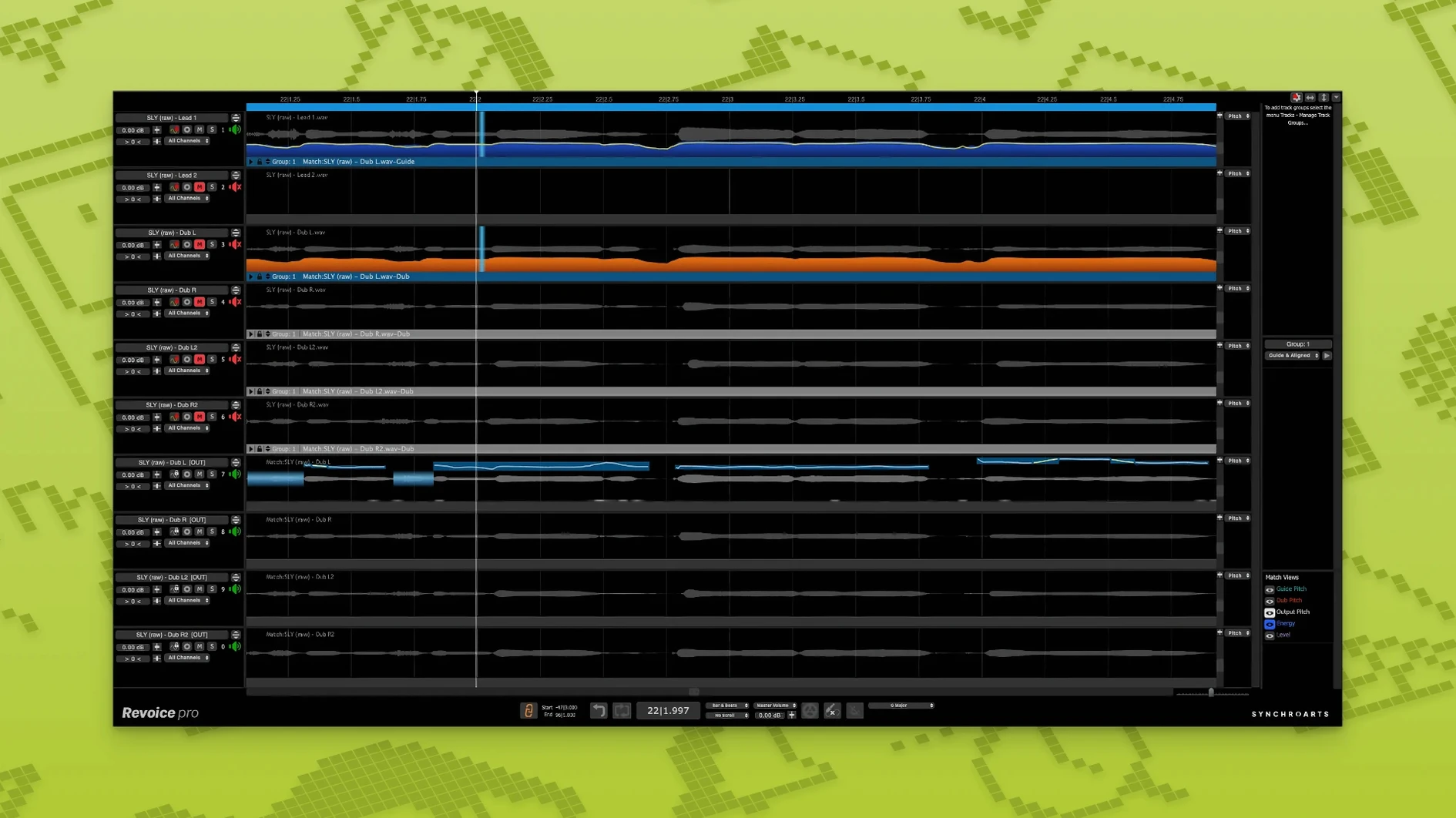
Two takes that should feel like one performance but don't quite lock together. One voice that needs a natural double without sounding like a chorus pedal. A harmony line where the pitching isn't tight enough against the lead. Revoice Pro fixes those.
A typical workflow
- Load your guide vocal and the take you want to match into an AU, VST3 or AAX host.
- Run SmartAlign. It syncs the timing of the doubled or replacement take to the guide — even if the takes start or end at different points on the timeline.
- Apply SmartPitch to pull the pitch of doubles and harmonies in line with the original, keeping things natural rather than robotic.
- Use the Shaper Tool for manual pitch tweaks where the performance needs a nudge.
- For that layered sound, the built-in vocal doubler creates a second voice from a single take that isn't just a delayed copy.
It processes time, pitch and loudness together, which is why the results tend to hold up better than stacking separate plug-ins. Designed for voice and monophonic instruments only — this isn't a polyphonic tuner.
Not just another channel-strip insert
Revoice Pro works as a plug-in — AU, VST3, or AAX 64-bit — so it slots into Logic Pro, Pro Tools, Cubase, Studio One, or any DAW that supports those formats. But it’s not yet another channel-strip insert you forget about. More often, it lives on a dedicated bus or as an offline AudioSuite-style processor where you print the result once you’re happy.
On the macOS side, it respects Core Audio routing. If your interface’s buffer is set sensibly, the plug-in stays responsive during playback. On Apple Silicon Macs it runs natively, so you’re not burning CPU cycles in Rosetta 2 while it’s analysing transients.
It also plays well with other Synchro Arts tools like VocAlign, but it doesn’t demand them. A common pattern: use VocAlign Ultra for quick timing matches on backing vocals, then switch to Revoice Pro when you need the full pitch-and-double treatment on lead lines. The two share an underlying time-stretching engine, so results are consistent — no weird phase wobble when you swap between them on the same project.
SmartAlign bridges timing gaps across mismatched takes
- Vocal producers and engineers finishing records. When you’re handed takes from different sessions — maybe a verse recorded in a home studio and a chorus from a proper booth — SmartAlign bridges the timing gaps without you slicing and dragging for hours.
- Post-production editors working with ADR. Aligning studio-recorded dialogue to noisy on-set guide tracks is cleaner here than manual nudging, and the pitch matching stays subtle enough that voices don’t sound processed.
- Songwriters building demos alone. The vocal doubler turns one decent take into something that feels like an arrangement, which is useful when you’re the only person in the room and you’re not a session singer.
- Mix engineers tidying up before a client arrives. Running SmartPitch across a stack of harmonies before the real work begins means you’re listening to tuning problems, not solving them from scratch with the artist over your shoulder.
Users hunting down a revoice pro torrent or a revoice pro mac torrent on rutracker sometimes end up here because the plug-in’s reputation for tight doubles precedes it. The alignment engine is the real draw — the pitch and doubling tools are excellent, but the timing sync is what people mention first.
A producer’s Tuesday afternoon
A producer gets a session back from a mixer: the lead vocal feels solid, but the double they tracked last week — a single take panned hard left — drifts noticeably in the second verse. The timing is close but not locked, and the pitch on a few sustained notes sags just enough to blur the centre image.
She opens the project on an M1 Max MacBook Pro running Logic. The guide vocal is already on track one. She loads Revoice Pro as an AU plug-in across the double’s channel, sets the guide as the side-chain input, and runs SmartAlign. The double snaps into place — syllables land together, breaths match. Then SmartPitch with a moderate depth; the drifting notes tighten up without losing the slight tonal edge that makes it feel like a separate performance.
The whole thing takes under ten minutes. She prints the processed double to a new track, mutes the original, and listens. The stereo image is wider but the vocal still sounds like one singer, not a machine. She bounces a rough and emails it. No manual warping. If you grabbed a Revoice Pro 5 crack, just make sure your audio interface buffer is set sensibly — the tool simply works as advertised.
What’s new
- Adds the Shaper Tool for direct pitch adjustment on a note-by-note basis.
- Adds SmartPitch for matching the pitch of doubles and harmonies to a guide track.
- Adds SmartAlign to synchronise takes with different start and end positions on the timeline.
Requirements
- macOS 10.14 or newer
- Intel or Apple Silicon processor
- AU, VST3 or AAX 64-bit host
FAQ
Does Revoice Pro only work with vocals?
It's designed for voice and monophonic instruments. Polyphonic material like piano or guitar chords isn't supported.
Can it run natively on Apple Silicon Macs?
Yes. Version 5.1.30 supports both Intel processors and Apple Silicon, with macOS 10.14 as the minimum requirement.
What plug-in formats are supported?
AU, VST3 and AAX 64-bit hosts on macOS.
Comments 0
Sign in or create an account to leave a comment.
No comments yet…
If you’ve installed it, say how it went. Mention your Mac and macOS version — it helps the next person more than you’d think.
More in VST Plugins
All in VST Plugins-
 reFX Nexus
5.5.21
Apple Silicon
reFX Nexus
5.5.21
Apple Silicon
-
 RC-20 Retro Color
1.5.1
Apple Silicon
RC-20 Retro Color
1.5.1
Apple Silicon
-
 RipX DAW Pro
8.0.3
Apple Silicon
RipX DAW Pro
8.0.3
Apple Silicon
-
 Roland Cloud Legendary Series
2025.06.29
Apple Silicon
Roland Cloud Legendary Series
2025.06.29
Apple Silicon
-
 Roland ZENOLOGY Pro
2.0.7
Apple Silicon
Roland ZENOLOGY Pro
2.0.7
Apple Silicon
-
 Safari Pedals Everything Bundle
2026.05
Apple Silicon
Safari Pedals Everything Bundle
2026.05
Apple Silicon
-
 Scaler 3
3.3.2
Apple Silicon
Scaler 3
3.3.2
Apple Silicon
-
 Pulsar Audio IPA
1.0.9
Apple Silicon
Pulsar Audio IPA
1.0.9
Apple Silicon