

Scaler 3 for macOS
Description
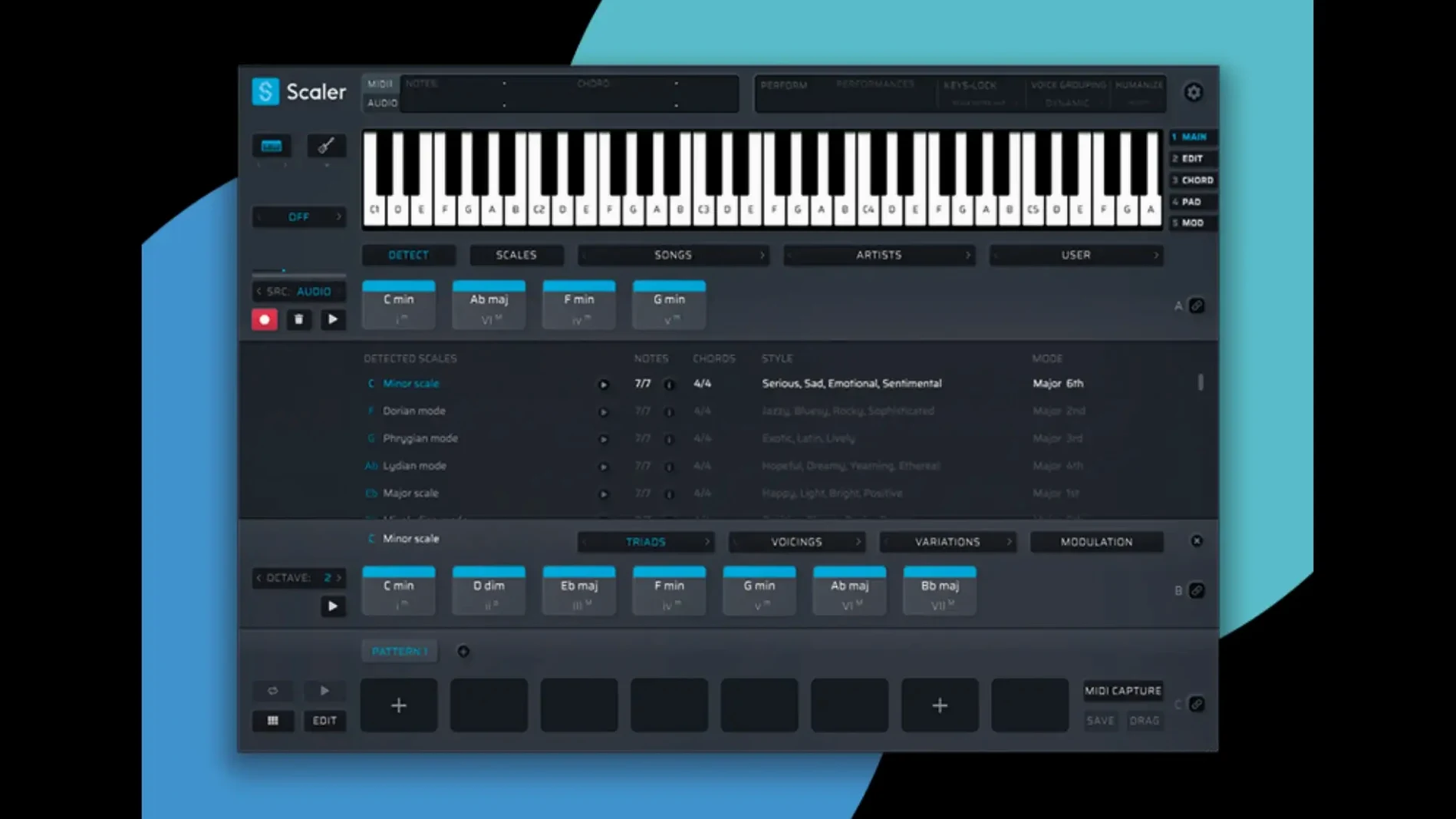
Drag a Performance preset onto a MIDI track and the chord suggestions update to match its phrasing and velocity curve. That’s where Scaler 3 sits in a session — not as a theory textbook you open once, but as a live MIDI generator parked on an instrument track, feeding a soft synth with progressions you can audition, edit and export.
On a piano-roll track, it’s a composer’s scratchpad. Tap in a key, pick an artist or genre from the chord library, and the workstation throws up movements that fit. The detection engine listens to incoming MIDI too, so you can build from a few notes you’ve already played. When the part works, drag the MIDI straight into your DAW — version 3.3.2 crops the silence at the start of the clip so it drops in cleanly on the downbeat.
It earns a spot on a bus when you want controlled harmonic movement across layered pads or strings. Send the same chord stream to multiple instruments and they stay locked. It runs as a plugin inside a DAW or as a standalone app if you’re sketching away from the session — same engine, no host required.
When the detection engine misreads your two-note interval
The detection engine won't always read your mind. Feed it a sparse two-note interval and it might guess a chord you didn't intend. The fix is simple — play three or four notes, or drag the ambiguous MIDI clip into the lane and let Scaler suggest alternatives from the chord palette. Tap the lock icon on a chord you like before moving on.
Plugin hosting trips people up. If you load a soft synth inside Scaler's chord lane and hear nothing, check that the synth's output is routed to the DAW track hosting Scaler itself. In standalone mode, go to Audio Settings and confirm your interface is selected — the app doesn't always default to the right output.
When exported MIDI lands a beat late, it's usually down to the DAW's snap setting. The 3.3.2 export trims leading silence, but if your DAW quantises the clip on import, nudge it manually or switch snap to "off" before the drag. On Logic, hold Control while dragging to bypass the grid.
Multi-Bind is powerful but literal. Binding a melody lane to a chord lane means every chord change forces a melody note shift — even during a held pad. If the result sounds jumpy, unbind the lanes temporarily, sketch the melody freely, then re-bind only the sections that need strict harmonic tracking.
How Scaler 3 compares with similar tools
Versus Captain Chords Epic
Captain Chords puts one chord lane, one bass lane and one melody lane in a tidy stack, each with its own space. Scaler gives you multiple lanes of each type on a timeline that scrolls horizontally — closer to a mini-DAW. Captain is faster for quick four-bar loops. Scaler wins when you're building a full song structure with verse and chorus sections that shift key or mode.
Captain's chord suggestions lean on named presets. Scaler's library groups chords by artist and genre too, but the detection engine means you can start from your own playing rather than browsing a menu. If you hear harmonies in your head before you can name them, Scaler fits that workflow better.
Versus Chordjam
Chordjam works by probability — you set rules and it improvises. Scaler is a deliberate editor where you pick, lock and arrange every chord. For generative, unpredictable progressions, Chordjam has the edge. For writing a part you'll repeat and develop, Scaler's manual control keeps you in charge.
Chordjam runs as a plugin only. Scaler's standalone mode matters if you compose on a laptop away from the DAW, or if you want a lightweight theory scratchpad without loading a full project.
Versus Hookpad
Hookpad is a web-first sketchpad with strong notation tools. Scaler is a desktop plugin that lives inside your production session. Hookpad suits songwriters who think in sheet music and Roman numerals. Scaler suits producers who want MIDI on a track, feeding a synth, right now.
Load it as a MIDI FX on an empty instrument track
Load Scaler 3 as a MIDI FX on an empty instrument track. Logic users drop it above a piano or synth plugin. In Ableton, it sits before an Instrument Rack. Open the standalone version if you're simply exploring — same interface, no DAW needed.
Set the key to D minor. The chord panel populates with diatonic options. Browse the artist section, pick "Explosions in the Sky" from the genre list, and the suggestions shift to open voicings and suspended movements. Audition a few by clicking — each chord rings through whatever synth is loaded downstream.
Drag four chords into the timeline lane. Stretch the last one to double length. Add a second chord lane for the chorus, switch the key hint to F major, and drop in a brighter progression. The two lanes sit on the same timeline, colour-coded, ready for arrangement.
Add a melody lane. Turn on Multi-Bind so it tracks the chorus chords. Click "Generate Melody" and Scaler writes a line that follows the harmony. It's not subtle — lots of chord tones, few passing notes — but it's a starting point. Delete the weak bars and nudge the good ones into shape with the MIDI editor. The 3.3.2 fix means every note displays cleanly now; no phantom gaps before the first chord.
Load a bass lane. Set it to root notes only, tight rhythm, and bind it to the verse progression. Now you have four lanes — chords, melody, bass and a spare for arpeggios — all locked to the same key centres, all editable as MIDI. Export each lane to a separate DAW track. The silence is trimmed, the clips snap to the bar, and you carry on mixing.
What’s new
Fixes MIDI Editor display problems — missing notes, wrong chord shapes and blank space before chords.Exported MIDI now trims empty space at the start of the clip.
Requirements
- macOS 10.15 or later
- Apple Silicon or 64-bit Intel
- 64-bit only
FAQ
Does Scaler 3 work on Apple Silicon Macs?
Yes. Scaler 3 supports both ARM (Apple Silicon) and 64-bit Intel architectures.
Can I use Scaler 3 without a DAW?
It has a standalone mode, so you can launch it directly without opening a digital audio workstation.
What did version 3.3.2 fix in the MIDI Editor?
It fixed display issues that caused missing notes, incorrect chord representations and unwanted blank space before chords.
Comments 0
Sign in or create an account to leave a comment.
No comments yet…
If you’ve installed it, say how it went. Mention your Mac and macOS version — it helps the next person more than you’d think.
More in VST Plugins
All in VST Plugins-
 Safari Pedals Everything Bundle
2026.05
Apple Silicon
Safari Pedals Everything Bundle
2026.05
Apple Silicon
-
 Roland ZENOLOGY Pro
2.0.7
Apple Silicon
Roland ZENOLOGY Pro
2.0.7
Apple Silicon
-
 Roland Cloud Legendary Series
2025.06.29
Apple Silicon
Roland Cloud Legendary Series
2025.06.29
Apple Silicon
-
 RipX DAW Pro
8.0.3
Apple Silicon
RipX DAW Pro
8.0.3
Apple Silicon
-
 Serato Hex FX
1.2.0
Apple Silicon
Serato Hex FX
1.2.0
Apple Silicon
-
 Serato Sample
2.2.0
Apple Silicon
Serato Sample
2.2.0
Apple Silicon
-
 Serum
2.0.24
Apple Silicon
Serum
2.0.24
Apple Silicon
-
 Revoice Pro
5.1.30
Apple Silicon
Revoice Pro
5.1.30
Apple Silicon