
RC-20 Retro Color for macOS
Description
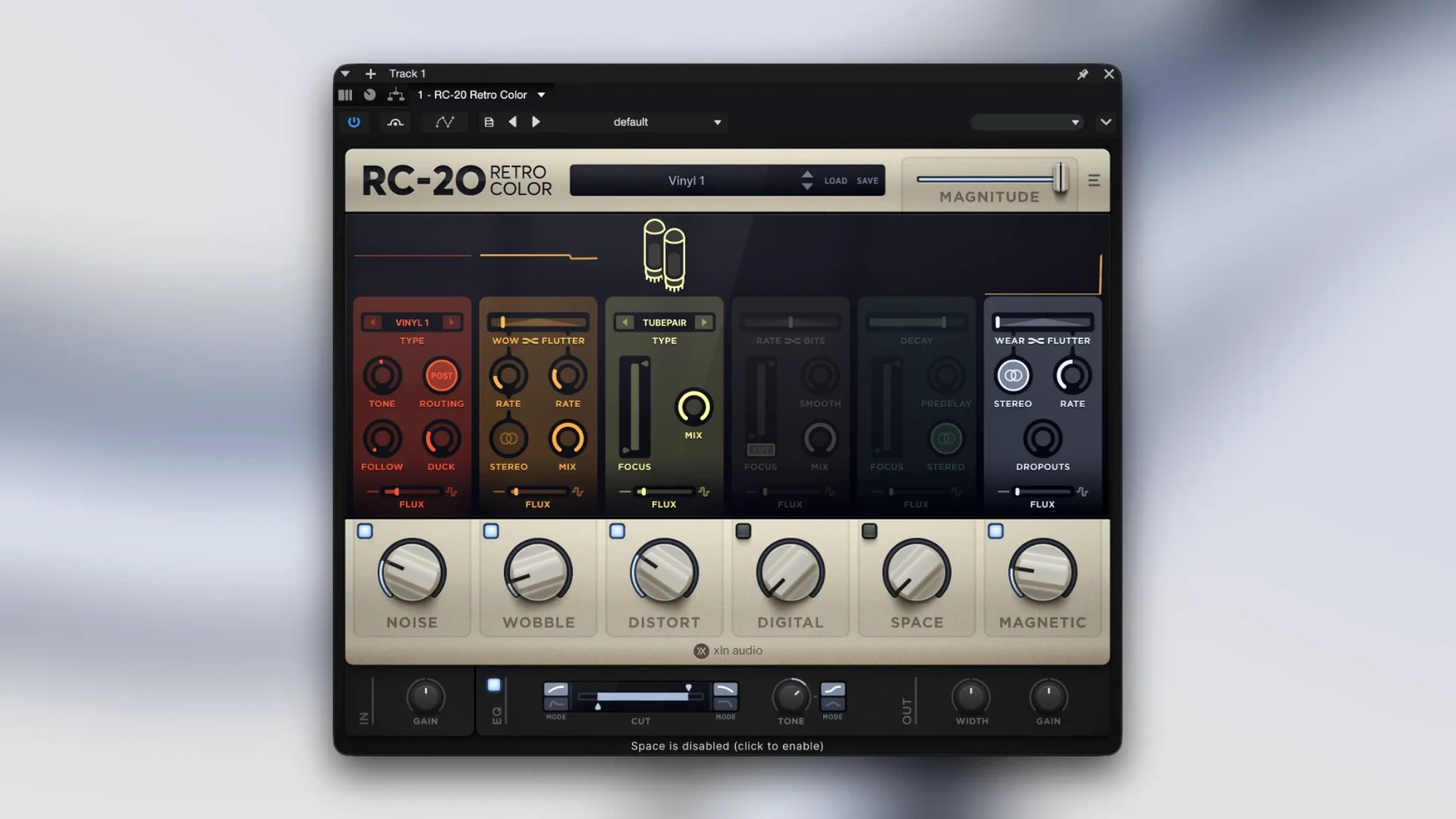
The Magnitude slider is usually where I start. It controls how much of the total effect you hear, and it's a quick way to dial things back when the preset is doing too much. This plugin sits well on a drum bus to take the sheen off a sterile sample pack, or directly on a synth track that needs to sound like it was bounced to cassette in 1987.
RC-20 is not a subtle tool by default, but it rewards restraint. Its six effect modules—Noise, Wobble, Distortion, Digital, Space and Magnetic—can be switched on and off individually. That means you can pull a mix apart and just use the wobble on a pad, or the noise on a vocal intro, without stacking the whole chain.
| Detail | Note |
|---|---|
| Formats | VST, AU, AAX |
| Architecture | Intel and Apple Silicon, 64-bit only |
On a return track, a small amount of the Flux engine can introduce slow, random variation to the noise character, so the texture doesn't loop. It gives a static reverb tail or a sterile soft synth a bit of drift. The plugin runs natively on Apple Silicon and requires macOS 10.13 or later. An in-app link takes you directly to the manual if you need it.
Rescuing sterile one-shot hi-hats from a vacuum
A hip-hop producer I know works mainly with one-shot drum samples from a library that's been on his drive for years. The kicks are fine, but the hi-hats sound like they were recorded in a vacuum. Too clean. He drops RC-20 on the hi-hat channel, kills every module except Noise and Magnetic, then pushes the Noise type to Vinyl and backs the mix down to about 15%. Suddenly the hats have a faint crackle and a slight high-end roll-off. They sit in the track instead of floating above it. He saves that as a user preset called "Hats – lived in" and uses it across the whole beat tape.
Leaning into the presets before touching a knob
The browser of factory presets is worth your first half hour. Don't tweak anything yet. Just load a few on different sources—synth, bass, vocal, drum bus—and listen for the two or three that make you lean forward. Those are the ones that match your own taste for decay and dirt. Star them. You'll return to them far more often than the ones that try to sound like a broken tape machine on a spaceship.
Try this on day one: take a clean Rhodes or piano recording, load the "Warped Memories" preset, and pull the Magnitude slider down to about 30%. Then A/B it with the bypass. That single move teaches you more about how the modules interact than reading the manual will. The Flux engine really shows its hand on sustained material like this—you'll hear the pitch drift shift slowly, and you'll learn where its randomness feels musical and where it becomes a distraction.
If your DAW supports wet/dry mixing at the insert level, use that instead of the plugin's Magnitude slider for parallel processing. It keeps your dry signal completely untouched while RC-20 does its thing on top.
Switching off Eco mode to recover lost saturation detail
Open the settings cog. The first thing to switch is the quality mode. By default it's on Eco, which saves CPU but rounds off some of the higher-frequency saturation detail. Switch it to High on individual tracks where you're pushing the Distort or Digital modules above 50% intensity. On a return track or a drum bus, Eco is fine.
Next, lock the Magnitude slider. It's in the top-right corner. When you browse presets, the Magnitude resets to wherever the preset creator left it—often at 100%. Locking it keeps your current blend while you flick through sounds. It's a small thing, but without it you'll spend too long readjusting the wet/dry balance every time you audition a new preset.
Finally, go to the Noise module and change the envelope follower setting. By default it's off, which means the noise floor runs at a constant level regardless of what the instrument is doing. Switch it to On and set a short attack and medium release. The noise will then rise and fall with the signal, so it tucks behind the transients instead of sitting flat across the whole bar. For a quick lo-fi texture fix once you've grabbed an RC-20 crack Mac download, this one adjustment gets you much closer to a natural tape feel. If you've been searching for an RC-20 download that actually delivers what it promises, spending ten minutes with the envelope follower will explain why the plugin has the reputation it does.
Requirements
- macOS 10.13 or later
- 64-bit host (VST, AU or AAX)
- Intel or Apple Silicon Mac
FAQ
Can I use the effect modules separately?
Yes. Each of the six modules can be toggled on or off, so you can use just the Wobble or Noise without the other sections.
Comments 0
Sign in or create an account to leave a comment.
No comments yet…
If you’ve installed it, say how it went. Mention your Mac and macOS version — it helps the next person more than you’d think.
More in VST Plugins
All in VST Plugins-
 reFX Nexus
5.5.21
Apple Silicon
reFX Nexus
5.5.21
Apple Silicon
-
 Revoice Pro
5.1.30
Apple Silicon
Revoice Pro
5.1.30
Apple Silicon
-
 RipX DAW Pro
8.0.3
Apple Silicon
RipX DAW Pro
8.0.3
Apple Silicon
-
 Roland Cloud Legendary Series
2025.06.29
Apple Silicon
Roland Cloud Legendary Series
2025.06.29
Apple Silicon
-
 Roland ZENOLOGY Pro
2.0.7
Apple Silicon
Roland ZENOLOGY Pro
2.0.7
Apple Silicon
-
 Safari Pedals Everything Bundle
2026.05
Apple Silicon
Safari Pedals Everything Bundle
2026.05
Apple Silicon
-
 Pulsar Audio IPA
1.0.9
Apple Silicon
Pulsar Audio IPA
1.0.9
Apple Silicon
-
 Scaler 3
3.3.2
Apple Silicon
Scaler 3
3.3.2
Apple Silicon