
Melodyne for macOS
Description
The 5.4.2 update fixes a crash when opening Melodyne in ARA and plug-in modes, adapts for macOS Sequoia, and makes trackpad scrolling less of a chore. It runs natively on Apple Silicon Macs from macOS 10.12 up.
Plug-in and host formats it drops into
Melodyne works as a plug-in in your DAW. VST, AU and AAX formats are all there. ARA support means tighter integration with compatible hosts — less swapping between windows. The installer is a standard disk image. Mount it, run the package and you're done. If you're working with a melodyne crack mac, you'll just need to handle permissions manually so the app runs well. The software itself expects a straightforward path.
Editing pitch and dynamics note by note
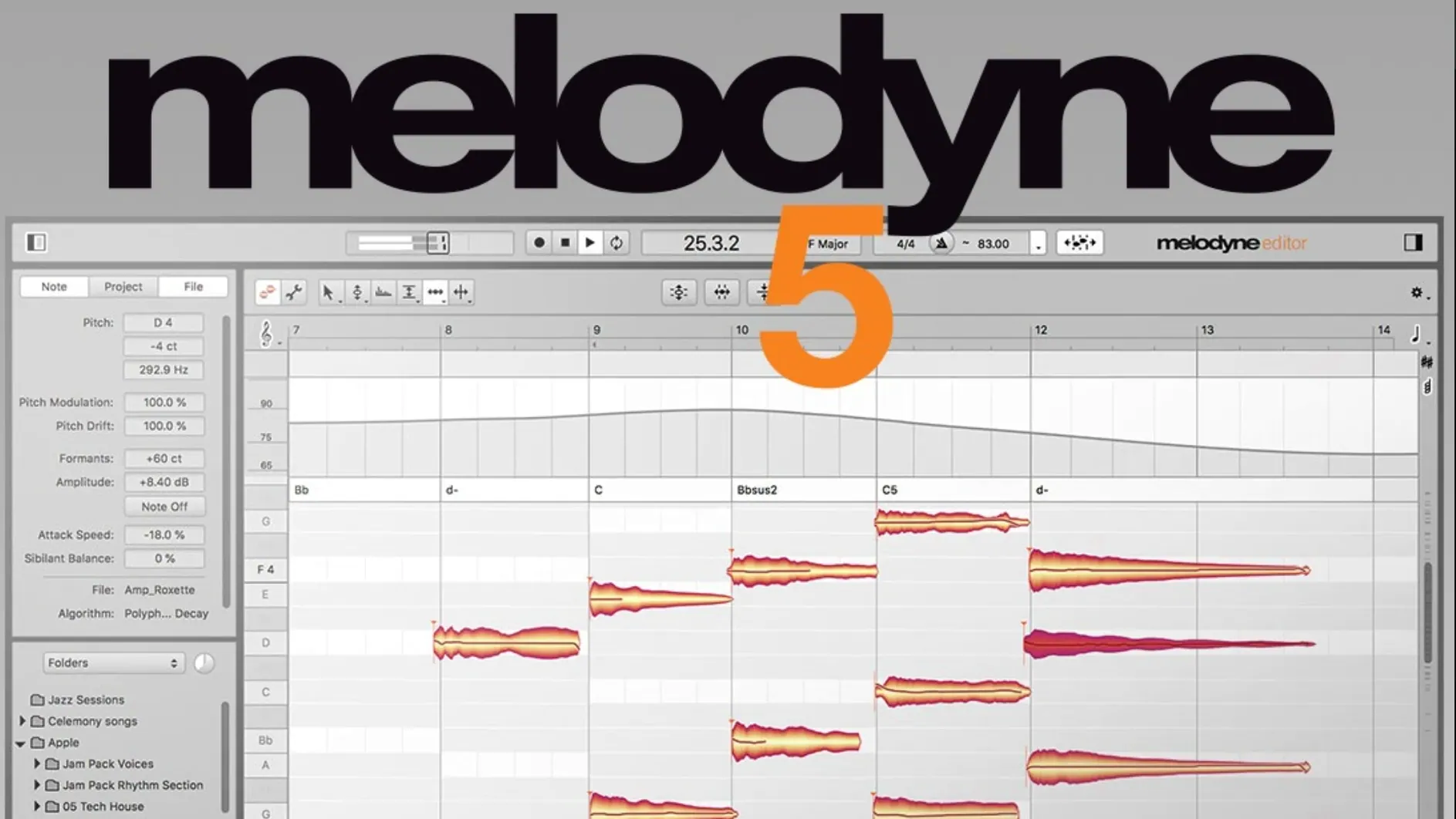
It reads audio note by note. Pitch, timing, vibrato, sibilants and level all become editable. The Fade Tool and Leveling Macro give you note-based fades and dynamic control without leaving the editor. Vocal analysis splits material into pitch, noise, breath and intonation. It recognises chords, keys and tempos on its own. Editions range from essential to studio, so what you can tweak depends on the tier you have. For detailed work on vocals and monophonic recordings, it's the tool you reach for when a simple tuner isn't enough.
Melodyne sits in a crowded corner of the toolkit, but its competitors don't overlap completely. The most common comparison is with Antares Auto-Tune. Auto-Tune does real-time pitch correction and works well for the hard-tuned vocal effect. Melodyne does that too, but its strength is surgical note-by-note editing after the fact. You can drag a single syllable in a chord without touching the rest. Auto-Tune gives you a dial; Melodyne gives you a scalpel.
Waves Tune is another option. It offers similar note-based editing and integrates with most DAWs. The workflow feels closer to Melodyne than Auto-Tune does, but the pitch detection is less forgiving on noisy recordings. If you have a clean take, Waves Tune gets the job done. If you have bleed from headphones or a slightly messy room, Melodyne's analysis holds up better. Its handling of sibilants and breath as separate elements also gives you more to work with on a vocal that needs rescuing.
Synchro Arts Revoice Pro gets mentioned for timing and pitch alignment between doubled takes. It excels at matching one performance to another. Melodyne doesn't do automatic alignment against a guide track in the same way, but its editing depth on a single source is considerably greater. You can fix a single flat note in a three-part harmony without affecting the interval. That's the trade-off. Revoice Pro aligns performances; Melodyne dissects them.
Fixing a drifting vocal and loose doubles
A producer opens a session from a singer-songwriter. The lead vocal drifts sharp in the second verse and loses energy in the bridge. The timing of the doubled track is loose enough to blur the consonants. A quick pass through Auto-Tune would clamp the pitch but leave the timing issues and the dull bridge intact. Instead, the producer transfers both takes into Melodyne via ARA.
The main vocal opens as a series of blobs. The sharp notes in verse two are visible before they are heard. A few drags downward, a slight reduction in pitch drift on the long held note, and the tuning sounds natural. The bridge gets individual note gain adjustments on the quieter syllables. The doubled vocal gets tight timing edits, note by note, until the consonants land together. By the time the producer bounces the comp, the performance sounds like a better day in the studio, not a processed fix.
Start with a four-bar vocal phrase
When you install and open Melodyne for the first time, resist the urge to edit an entire multitrack session at once. Start with a single vocal or a monophonic instrument line. A four-bar phrase is enough to learn the feel of the tools.
- Transfer a short section first. Long transfers on a first run lead to waiting and then a screen full of blobs with no clear starting point. Eight bars of vocal is plenty.
- Set the default algorithm in preferences. The software may default to the full polyphonic algorithm. Switch to a monophonic one for solo vocals or a melodic instrument. The analysis is faster and the blob separation clearer.
- Learn the keyboard shortcuts for the main tools early. Flicking between the pitch tool, the timing tool and the formant tool with the mouse slows you down. The shortcuts are listed in the help menu and take ten minutes to memorise.
- Get used to the Note Assignment mode. When Melodyne misreads a note — a B interpreted as a C — fixing the note assignment before you tune prevents a messy edit later.
Why zero pitch drift sounds synthetic
One common beginner move is editing every note to exact pitch. A vocal with zero pitch drift sounds synthetic. The software can do it, which means it is tempting. Leaving a small amount of natural variation, especially on short passing notes, keeps a performance human. If you find yourself with a Melodyne VST torrent and no manual, this is the mistake that takes the longest to unlearn.
Another is ignoring the tempo detection. If your DAW session is at 120 bpm and Melodyne has detected 119.8 bpm, your timing edits will drift against the grid. Correct the tempo in the Melodyne transport before you start quantising. It takes a few seconds and saves a headache later.
Beginners also tend to apply broad formant shifts across an entire track instead of treating individual notes. Moving the formant of a whole vocal up by two semitones changes the character of the singer. Doing it to one strained high note fixes the strain without making the artist sound like a different person. Edit with the zoom tool. The macro adjustments can wait.
Finally, some users double-click blobs constantly. A single click selects. A double-click in some contexts resets the pitch to the detected centre. If you have tuned a note carefully and then reset it by accident, you will learn to single-click the hard way. People searching a Celemony Melodyne torrent often skip the interface basics. The reset shortcut is there, but a careful click avoids the problem entirely.
What’s new
Adds optimisations and macOS Sequoia adaptations. Fixes a crash when opening Melodyne in ARA and plug-in use cases. Improves trackpad scrolling.
Requirements
- macOS 10.12 or later
- Intel or Apple Silicon Mac
- English interface
- VST, AU or AAX compatible host
FAQ
Can Melodyne edit polyphonic material?
The higher editions like editor and studio can edit polyphonic audio note by note. The essential and assistant editions are limited to monophonic sources.
Comments 0
Sign in or create an account to leave a comment.
No comments yet…
If you’ve installed it, say how it went. Mention your Mac and macOS version — it helps the next person more than you’d think.
More in VST Plugins
All in VST Plugins-
 Metric Halo Production Bundle
2025.05
Apple Silicon
Metric Halo Production Bundle
2025.05
Apple Silicon
-
 MiniMeters
1.0.30.358
Apple Silicon
MiniMeters
1.0.30.358
Apple Silicon
-
 Minuit Solstice
1.2.0
Apple Silicon
Minuit Solstice
1.2.0
Apple Silicon
-
 Native Instruments Massive X
1.7.1
Apple Silicon
Native Instruments Massive X
1.7.1
Apple Silicon
-
 Neural DSP Archetype Cory Wong X
1.0.1
Apple Silicon
Neural DSP Archetype Cory Wong X
1.0.1
Apple Silicon
-
 Neural DSP Archetype Petrucci
1.0.0
Apple Silicon
Neural DSP Archetype Petrucci
1.0.0
Apple Silicon
-
 LFOTool
1.768
Apple Silicon
LFOTool
1.768
Apple Silicon
-
 Neural DSP Archetype Rabea X
1.0.1
Apple Silicon
Neural DSP Archetype Rabea X
1.0.1
Apple Silicon