

iZotope Nectar for macOS
Description
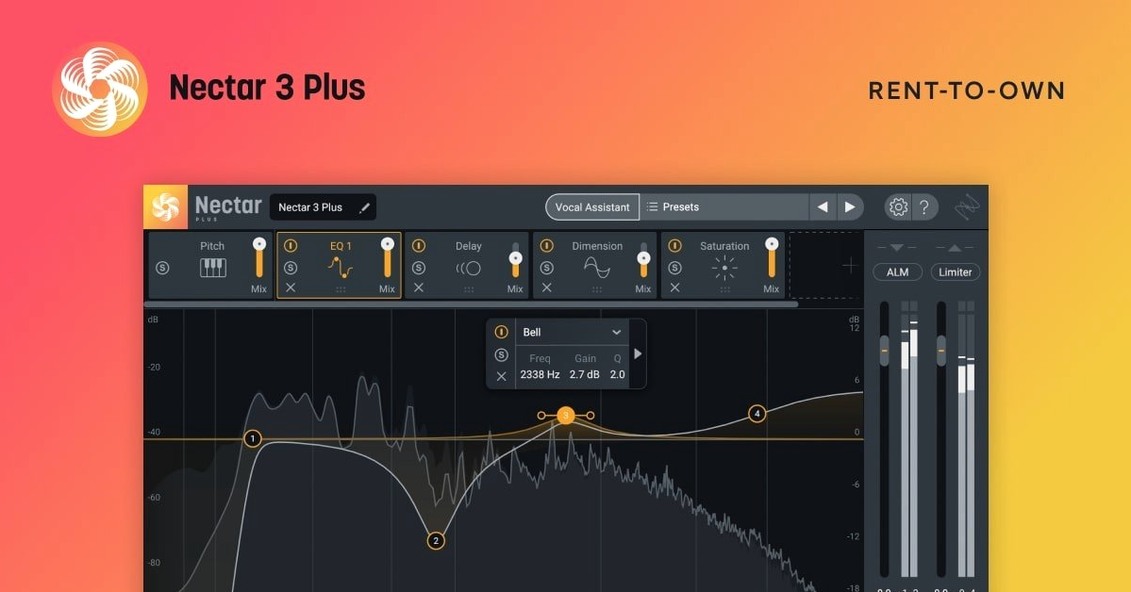
If you have ever stacked a compressor, de-esser, EQ and doubler on a vocal track and still wished for one knob that just dealt with the loudness wobbles, Nectar is that rack of processors condensed into a purpose-built vocal channel. Auto-Level now does the riding for you before the signal hits the fader.
Even out the performance
The Auto-Level module catches phrases that get swallowed and reins in the ones that jump out. It reads the vocal like a steady-handed engineer who never takes a tea break.
Clean up the takes
Breath Control targets the gaps. You set a threshold and it pushes the inhales down without touching the words. Quiet, surgical, done.
Add voices you did not record
Backer and Voices are the new modules that make Nectar 4 more than a cleanup tool. Voices stacks up to four harmony or unison layers from a single lead, and Backer doubles or textures the part without you needing three more singers.
Vocal Assistant evens out guest and host levels
Someone cutting a weekly interview show rarely has time to ride faders by hand. They drop Nectar on the guest track, let Vocal Assistant listen for ten seconds, and the loudness differences between a quiet guest and a host who laughs into the mic even out. Auto-Level handles the bulk of it. Breath Control keeps the inhales from distracting. The editor moves on to tightening gaps instead of automating gain.
Ventura floor cuts off older Macs
The jump to macOS Ventura 13.7.4 as the floor matters more than it sounds. Older machines stuck on Catalina or Big Sur no longer run this build, which keeps the plugin from pretending to work where it cannot. Apple Silicon and Intel Macs are still covered.
On the everyday side, the fixes are less flashy but useful. An iLok authorization failure for Nectar Standard got sorted, which should stop the plugin from vanishing after a reboot for some users. Windows HiDPI support arrived too, though Mac users on Retina displays were already fine.
One-mic home vocals get the fastest fix
Home recorders with one mic and a small room benefit quickly. Nectar does the heavy lifting on a vocal that was never going to see a pro studio. Singer-songwriters who double their own harmonies can use Voices instead of stacking take after take.
Mixing engineers working on pop, R&B or dense productions use Backer to widen a lead without cluttering the arrangement. Content creators on a tight schedule lean on Vocal Assistant for a starting point, then tweak. If you only ever touch a compressor and a reverb, the Elements edition covers the basics. The full Standard and Advanced modules suit people who mix vocals every day.
Let Vocal Assistant listen before you tweak
Start with one vocal track, not a whole session. Insert Nectar, play the loudest section, and let Vocal Assistant listen before you touch anything. It sets a baseline you can pull back later.
- Turn Auto-Level on early. It works best before you reach for a compressor, so the compressor gets a steadier signal.
- If a harmony sounds synthetic, lower the Voices mix and push the humanise control a touch.
- Watch Breath Control on soft passages. Too aggressive a threshold can shave the ends of quiet words.
- A/B the Backer module in mono. If the vocal thins out, reduce the width rather than the level.
- Save a default preset after your first good result. The assistant is fast, but your own starting point is faster.
If macOS blocks the installer on first launch, right-click the package and choose Open. The activation guide in the package covers the rest.
Worth it if you mix vocals every week and want the boring parts handled before you get creative.
What’s new
- Adds Windows HiDPI support
- Fixes iLok authorization failure on Nectar Standard
- Updates supported DAW and NLE versions
- Changes minimum macOS to Ventura 13.7.4
Requirements
- macOS Ventura 13.7.4 or later
- Intel or Apple Silicon Mac
- VST, AU or AAX-compatible host
- Language: English
FAQ
What is the difference between Nectar 4 Elements, Standard and Advanced?
Elements gives you the core vocal assistant and basic modules. Standard adds Auto-Level, Voices and Backer. Advanced includes the full module set plus cross-plugin communication with other iZotope Advanced products.
Can I run Nectar 4 on an older Mac?
Version 4.1.0 raised the minimum to macOS Ventura 13.7.4. Earlier versions supported Catalina and later, but current installs need Ventura 13.7.4 or newer.
What does the Backer module actually do?
Backer generates doubled or textured background vocal layers from the lead take. You control width, variation and timing to build a thicker vocal arrangement without tracking extra passes.
Comments 0
Sign in or create an account to leave a comment.
No comments yet…
If you’ve installed it, say how it went. Mention your Mac and macOS version — it helps the next person more than you’d think.
More in VST Plugins
All in VST Plugins-
 iZotope Insight
2.4.0
iZotope Insight
2.4.0
-
 iZotope Neutron
5.2.0
Apple Silicon
iZotope Neutron
5.2.0
Apple Silicon
-
 iZotope RX
12.0.0
Apple Silicon
iZotope RX
12.0.0
Apple Silicon
-
 iZotope Tonal Balance Control
3.0.0
Apple Silicon
iZotope Tonal Balance Control
3.0.0
Apple Silicon
-
 Kalifornia Dynamic KD Alkane
1.0.17.0
Apple Silicon
Kalifornia Dynamic KD Alkane
1.0.17.0
Apple Silicon
-
 Komplete FX Bundle
2026.1
Apple Silicon
Komplete FX Bundle
2026.1
Apple Silicon
-
 Komplete Kontrol
3.5.4
Apple Silicon
Komplete Kontrol
3.5.4
Apple Silicon
-
 KORG Collection
1.0.3
Apple Silicon
KORG Collection
1.0.3
Apple Silicon