

EZdrummer for macOS
Description
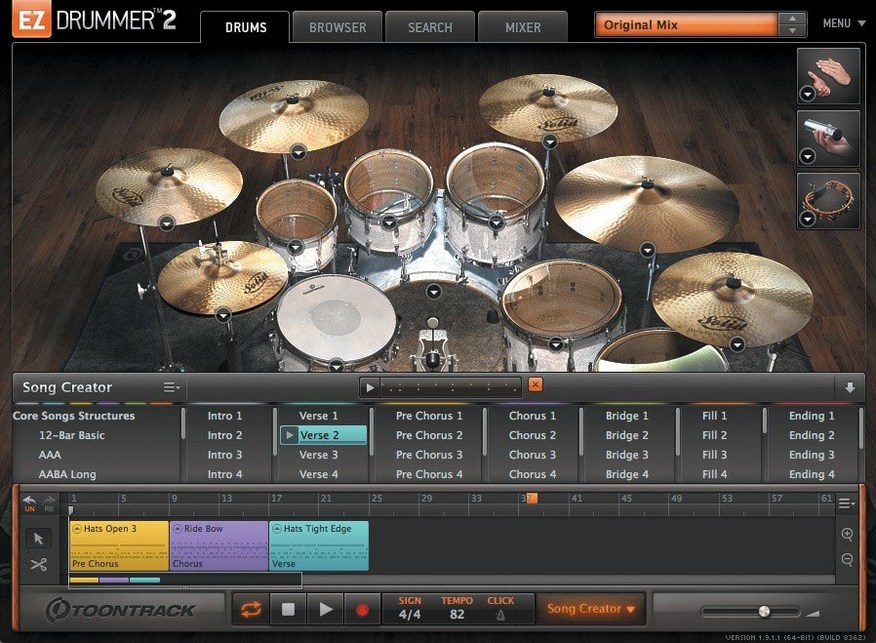
Songwriters who don't want to become drum programmers. That's who EZdrummer is built for. You get seven kits, a library of grooves and percussion, all inside one plug-in. Version 3.1.2 needs macOS 10.15 or later and runs on Intel and Apple silicon.
Find a groove by tapping
Tap2Find lets you hit a key in rhythm and it searches the groove library to match it. No browsing menus, no auditioning hundreds of MIDI files one by one.
Edit the feel, not just the notes
Edit Play Style changes a groove's intensity or complexity in real time without rewriting the pattern. Drag your pick straight to the song track, then cut, copy and rearrange blocks to build the arrangement.
Write a pattern from nothing
The built-in Grid Editor gives you a piano roll for drum hits when you want to click a part in yourself. It sits next to the kit mixer, so you hear the change immediately.
A quick workflow: scratch track to finished drums in ten minutes
You have a guitar riff and a rough vocal idea. The arrangement is verse-chorus-verse but you have no drums. Here is one path that stays inside EZdrummer from start to finish.
- Drag the guitar audio onto the Bandmate panel. It analyses the transients and suggests three groove options. Pick the one that sits tightest against the riff. This is your verse.
- Open Tap2Find and finger-drum the chorus rhythm you hear in your head. Drag the top match straight to bar 9 of the song track. That is your chorus sorted.
- Select the verse block, hold Option and drag a copy to bar 17. Now you have verse two.
- Click the Song Creator, tell it you have two blocks, and ask for a bridge. It stitches in an eight-bar section you can tweak later.
- Highlight the bridge, open Edit Play Style and pull the complexity slider right a few notches. The hats get busier, the kick moves more. It sounds like a deliberate lift.
- Go to the mixer. Pick the Tight Room preset. Add a little overhead to the snare with the single fader. Done.
No external MIDI editor, no drum map. Everything happens inside the same window while the transport runs.
Matching Tahoe‑style icons in your Dock
Two things you will notice straight away. The standalone icon and the project icon now match the macOS Tahoe style, so it stops looking like a leftover from 2019 in the Dock. Small thing, but it bothered people.
The bigger change is under the hood. Internal improvements for Infinity Grid EZX mean the grid-based expansion runs leaner. Fewer dropouts when previewing complex patterns on older Intel machines. If you use that expansion, the update matters.
One long-standing annoyance got squashed: hi-hat pedal and other CC messages no longer drop out during song-track recording. Before 3.1.2, you could play a foot-close pattern, record it in, and find half the CC data missing on playback. That is fixed. Likewise, toggling Solo on a mixer channel no longer wipes the Mute state you had set elsewhere. The mixer recall now behaves how you expect.
Grooves hitting wrong kit pieces until you switch first
MIDI grooves play back with the wrong kit piece. This happens when you load a groove from a different expansion while the active kit does not map the same articulations. Switch kits first, then audition grooves. If you already dragged a groove in, open the Grid Editor, select all notes, and nudge them to the correct MIDI note with the arrow keys.
Bandmate suggests patterns that feel stiff against swung audio. EZdrummer reads transients, not groove feel. If your guitar is swung, tap the rhythm into Tap2Find instead. The search listens to timing, not transients, so the match respects the shuffle.
Hi-hat pedal still behaves oddly after the update. Check that your MIDI controller is sending CC4 on channel 10. Some pedals default to a different CC. EZdrummer expects CC4. Re-mapping it in the controller's own software clears it up.
EZdrummer 3 crack or library torrent searches turn up version 3.0.0. That build pre-dates the song-track CC fix and the Infinity Grid improvements. If someone hands you a disk image that claims to be 3.1.2 but the icons look pre-Tahoe, it is the old build repackaged. The mixer bugs give it away quickly.
Splitting snare and overheads to separate aux tracks
In a DAW, EZdrummer loads as an AU or VST3 instrument. Route the kit mixer into separate DAW aux tracks and you can process the snare with your own compressor while the overheads stay untouched. That is the cleanest split between Toontrack's internal sound shaping and your mix template.
Standalone mode talks to Core MIDI directly. Any class-compliant pad controller shows up without a driver. Open Audio MIDI Setup once, check the device is listed, then launch EZdrummer. It appears in the MIDI input dropdown. No configuration inside the app needed.
If you write in notation software, export the song track as a standard MIDI file and drop it onto a staff. The mapping follows General MIDI conventions, so kick is C1, snare is D1. It slots into Sibelius or Dorico without transposition work.
macOS's built-in screen recording picks up audio from the standalone app when you set the output to a multi-output device in Audio MIDI Setup. Useful for quick performance captures without routing through a DAW.
Worth knowing if your download source is an EZdrummer torrent: the factory library sits in a fixed location inside your home folder. Moving it manually confuses the content locator. If you need it on an external drive, hold Option when launching standalone and point it at the new path. That keeps the symlinks intact.
What’s new
Adds macOS Tahoe style icons for the standalone app and project files. Improves internal handling for Infinity Grid EZX. Fixes song-track CC recording and mixer Solo/Mute recall states.
Requirements
- macOS 10.15 or later
- Intel or Apple Silicon Mac
FAQ
Does EZdrummer 3 include percussion sounds?
Yes. Percussion is included alongside the seven kits.
Can I edit a full drum arrangement inside EZdrummer?
You can. The song track lets you cut, rearrange, copy and paste groove parts to build a complete structure without switching to your DAW's timeline.
What does Edit Play Style actually do?
It alters a groove's intensity or complexity in real time, giving you variations from a single base pattern without loading new MIDI.
Comments 0
Sign in or create an account to leave a comment.
No comments yet…
If you’ve installed it, say how it went. Mention your Mac and macOS version — it helps the next person more than you’d think.
More in VST Plugins
All in VST Plugins-
 EZbass
1.3.3
Apple Silicon
EZbass
1.3.3
Apple Silicon
-
 FabFilter Total Bundle
25.06.2026
Apple Silicon
FabFilter Total Bundle
25.06.2026
Apple Silicon
-
 elastiquePitch
2.5.0
Apple Silicon
elastiquePitch
2.5.0
Apple Silicon
-
 Effectrix
1.4.8
Apple Silicon
Effectrix
1.4.8
Apple Silicon
-
 Devious Machines Infiltrator
2.5.26
Apple Silicon
Devious Machines Infiltrator
2.5.26
Apple Silicon
-
 Devious Machines Duck 2
2.0.30
Apple Silicon
Devious Machines Duck 2
2.0.30
Apple Silicon
-
 Cymatics VOXITY
1.0.0
Apple Silicon
Cymatics VOXITY
1.0.0
Apple Silicon
-
 Cymatics QUAKE
1.0.0
Apple Silicon
Cymatics QUAKE
1.0.0
Apple Silicon