

elastiquePitch for macOS
Description
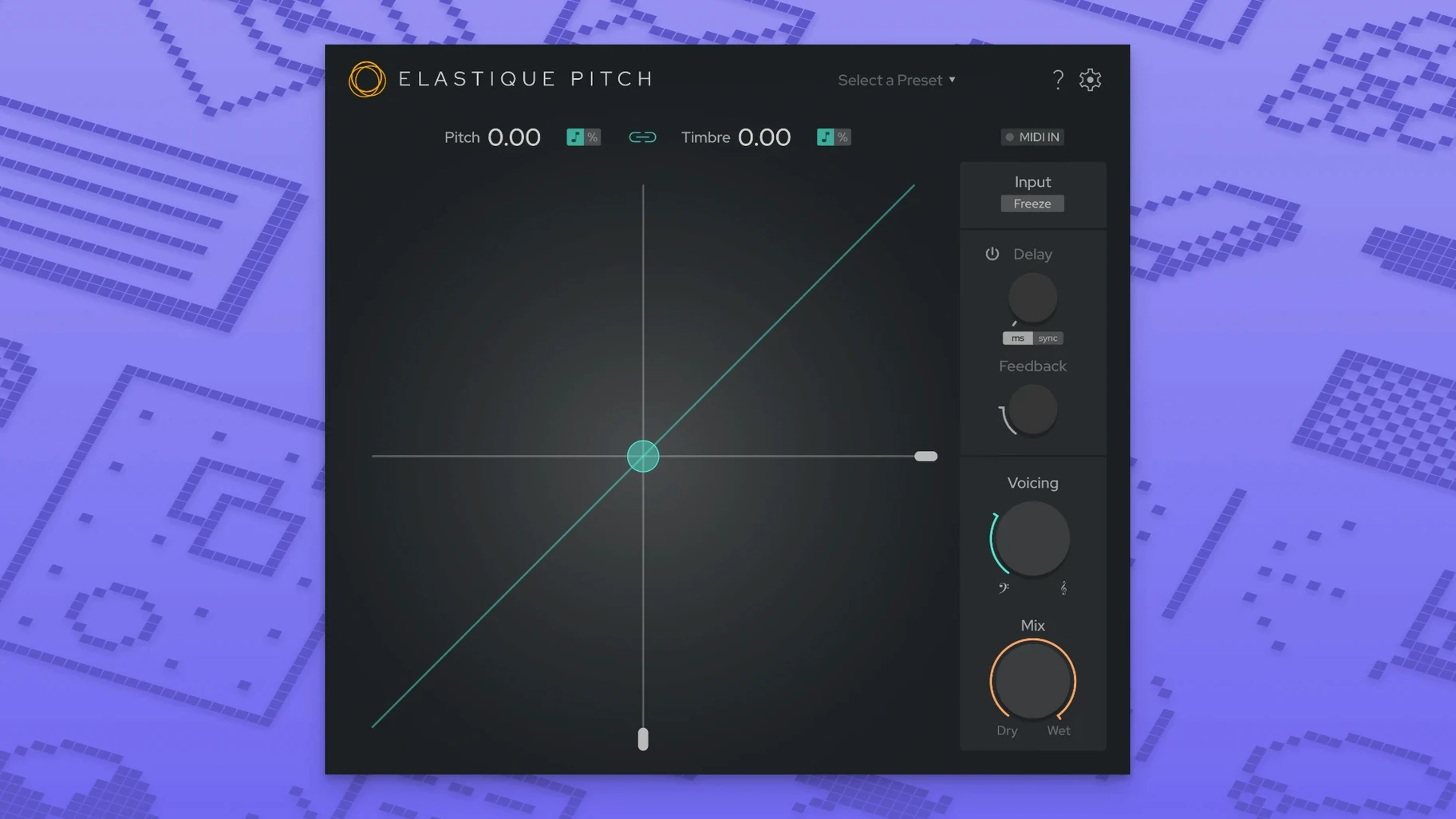
Producers and post-production editors who need to tweak a vocal take on the fly reach for elastiquePitch. It shifts pitch and formants in real time, so you hear the result while the transport is rolling — no offline rendering needed.
Pitch-shifting a voice without the chipmunk effect
- Shifting pitch and timbre independently. You can change the character of a voice without making it sound like a chipmunk.
- Adding a pitch-shifted echo that climbs or drops with each repeat. Useful for widening a lead line or building tension in a breakdown.
- Surround and multichannel workflows. Version 2.5 handles up to 16 audio channels, so it sits happily on a surround bus.
Muscle memory from v2.0 needs a day to adjust
- Needs macOS 10.15 or later. Older Macs won't run it.
- You load it inside a DAW that supports VST3, AU or AAX Native.
- The new interface is cleaner, but muscle memory from v2.0 will need a day to adjust.
Eight instances across a dense mix barely nudges the meter
elastiquePitch isn't the lightest plug-in you'll stick on a channel, but it's predictable. On Apple Silicon Macs, a single instance barely registers in Logic's performance meter. Stack eight or ten across a dense mix session — backing vocals, double-tracked guitars, a spot effect — and you'll see CPU usage climb, but not spike. The ÉLASTIQUEPRO algorithm does its heavy lifting without sudden dropouts.
Intel machines run it fine, though you'll notice the fan earlier on older MacBook Pros. The 16-channel support sounds like it should punish the system, but zplane kept the multichannel overhead sensible. I've watched a 7.1 surround stem get pitch-dropped by a minor third with no glitching and no audible artefacts piling up. That's the real test.
Stability is uneventful, which is what you want. No crashes during plug-in scans in Ableton Live or Pro Tools. No weirdness when you automate the pitch knob mid-session. If you're the type who leaves a project open for six hours and tinkers, elastiquePitch won't be the thing that brings the session down.
A post editor's Tuesday morning
Picture a dialogue editor on a mid-budget drama. The location audio has a scene where an actor's voice drifts slightly flat during a long monologue — not enough to re-record, but enough that the director notices. The editor inserts elastiquePitch on the dialogue track, shifts the offending phrase up 40 cents, and nudges the formant down a touch so the timbre still matches the actor's natural register. The fix takes ninety seconds. No offline render, no round-trip to another application. The mixer downstream gets a clean stem and nobody flags the line again.
That same editor might freeze a grain later in the day — a reverb tail from a door slam that rings out too cleanly. A quick grain freeze at 200ms turns the tail into a stuttery texture that sits better under the next scene's score. Two entirely different problems, one plug-in window.
Hear three real-time pitch variations before you commit
Mix engineers who move fast get the most out of elastiquePitch. If you're balancing a pop vocal and want to hear three pitch variations before you commit, the real-time response keeps the session flowing. No bouncing, no waiting, just a knob turn and a decision.
Sound designers like the formant independence. Lowering the formant on a creature vocal while raising the pitch gives you something unsettling without sounding like a cheap Halloween toy. The pitch-shifted echo also earns its keep here — automating the feedback for a rising shriek that spirals into silence is satisfyingly quick to set up.
Post-production editors, as the scenario above suggests, value the surgical nature of the tool. When you need to fix a performance rather than redesign it, the combination of fine pitch control and formant compensation means the fix doesn't announce itself. The 16-channel support pushes it into surround territory cleanly, which smaller dialogue plug-ins often skip.
If you mostly work with MIDI instruments and soft synths, elastiquePitch might sit unused. It's not a creative multi-effects box. It does real-time pitch and formant shifting, and it does that one job without feature-creep distractions. Musicians who record live audio — singers, horn players, string sections — will reach for it regularly. Anyone who's searched for elastique pitch free alternatives and been disappointed by warble artefacts will understand why the algorithm matters. The same applies if you've trawled elastique pitch v2 free download reddit threads and found only janky workarounds — this is the engine people actually want.
What’s new
New interface that's easier to read at a glance. Multichannel support pushed to 16 channels. Runs the latest ÉLASTIQUEPRO algorithm under the hood.
Requirements
- macOS 10.15 or later
- ARM (Apple Silicon) and x86 (Intel) architectures supported
- VST3, AU, or AAX Native host
FAQ
What plug-in formats does elastiquePitch 2.5 support?
It comes as VST3, AU, and AAX Native, so it works in most major DAWs on a Mac.
Can I change pitch and formants at the same time?
Yes. The ÉLASTIQUEPRO algorithm lets you adjust pitch and timbre separately, in real time, without one affecting the other.
Does it run natively on Apple Silicon?
Yes. Version 2.5 supports both ARM and x86 architectures, so it runs natively on M-series and Intel Macs.
Comments 0
Sign in or create an account to leave a comment.
No comments yet…
If you’ve installed it, say how it went. Mention your Mac and macOS version — it helps the next person more than you’d think.
More in VST Plugins
All in VST Plugins-
 Effectrix
1.4.8
Apple Silicon
Effectrix
1.4.8
Apple Silicon
-
 EZbass
1.3.3
Apple Silicon
EZbass
1.3.3
Apple Silicon
-
 EZdrummer
3.1.2
Apple Silicon
EZdrummer
3.1.2
Apple Silicon
-
 FabFilter Total Bundle
25.06.2026
Apple Silicon
FabFilter Total Bundle
25.06.2026
Apple Silicon
-
 Devious Machines Infiltrator
2.5.26
Apple Silicon
Devious Machines Infiltrator
2.5.26
Apple Silicon
-
 Devious Machines Duck 2
2.0.30
Apple Silicon
Devious Machines Duck 2
2.0.30
Apple Silicon
-
 Cymatics VOXITY
1.0.0
Apple Silicon
Cymatics VOXITY
1.0.0
Apple Silicon
-
 Cymatics QUAKE
1.0.0
Apple Silicon
Cymatics QUAKE
1.0.0
Apple Silicon