Devious Machines Duck 2 for macOS
Description
The multiband section is the real headline here. Three bands, each with its own envelope, separated by a linear-phase crossover at 12, 24 or 48 dB per octave. That means you can duck the low end of a bass against a kick drum while leaving the mid-range completely untouched, all without the usual phase smearing.
Drop-in swap from Duck 1 on Apple silicon and Intel
It runs on macOS 11 or later as a 64-bit plugin, native on both Intel and Apple silicon. If you're upgrading from Duck 1, this is a direct, drop-in replacement.
Shaping the sound
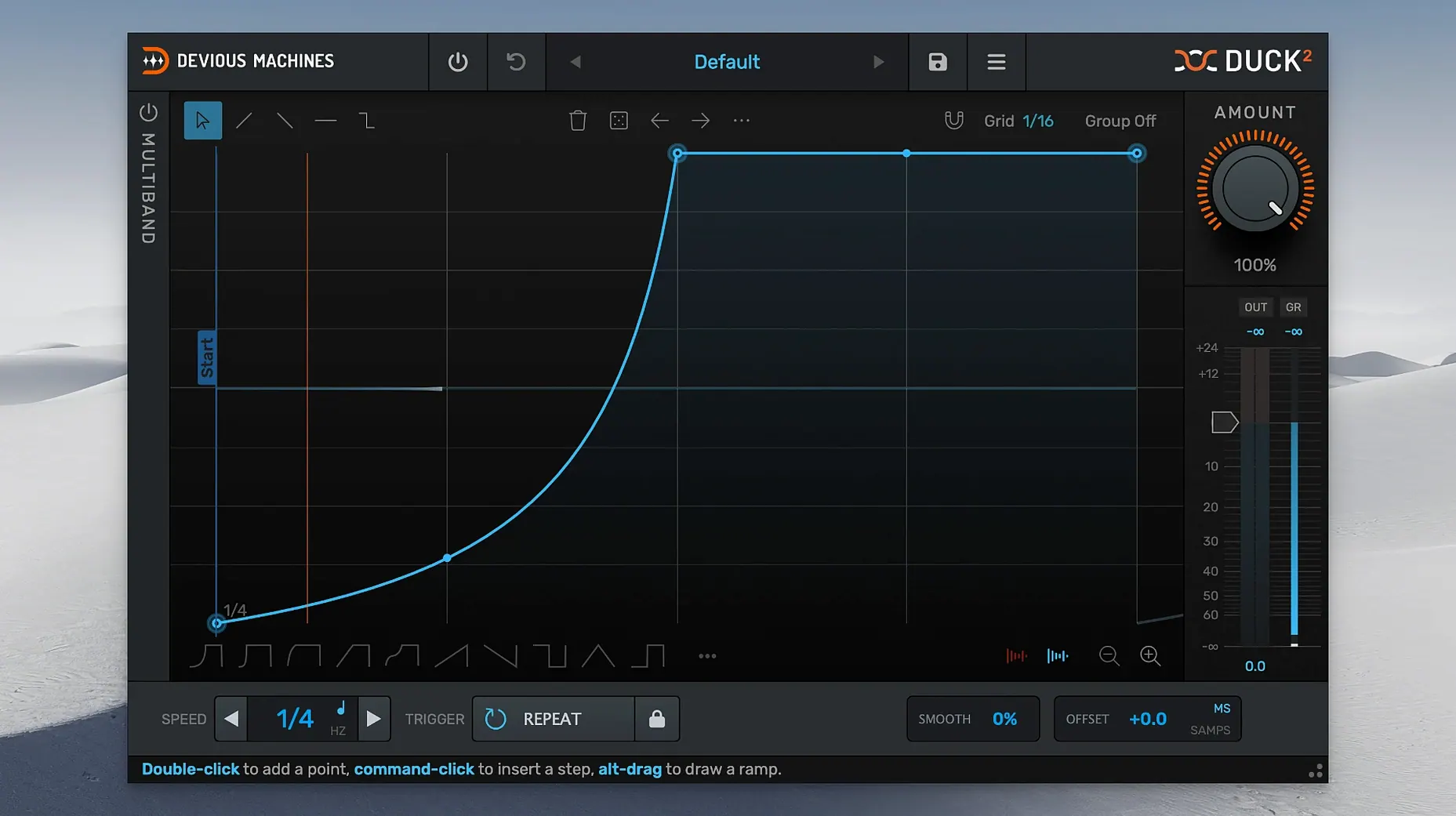
Beyond the basic sidechaining, the envelope editor lets you draw precision curves instead of settling for basic attack and release dials. You can trace a new envelope from an imported audio file or straight from the sidechain input. The LFO works in a freely tunable Hz mode if you want it detached from your host tempo. And yes, there's undo and redo for when you push a curve too far.
You won't get far with the multiband section if your crossover points are fighting the source material. Set a band boundary right in the middle of a vocal's body and you'll hear a thin, phasey notch that no amount of envelope tweaking can fix. Drag the crossover handles while the track plays and listen for where the sound naturally splits — on a bass, try just above the fundamental, around 120 Hz, then again around 2 kHz if you need to protect the upper harmonics.
Another common snag: the offset control. It combines lookahead and offset into one dial, which is clever but not immediately obvious. If you hear a click at the start of the duck, you probably have the offset too short for the attack curve. Push it further into negative values until the envelope opens cleanly. There's a gain reduction meter in the output section that makes this easier to spot — if it's jumping straight from zero to max gain reduction with no smooth transition, you need more offset.
MIDI triggering sometimes catches people out too. The release mode matters. In Loop mode the envelope repeats for as long as a note is held; in Release mode a short MIDI note triggers the full envelope once and lets it play out. If your ducking cuts off abruptly, check you haven't left it in Loop with a long envelope and short MIDI notes.
Resizable GUI that ends envelope-drawing frustration
The 2.0 line brought a freely resizable GUI, which sounds minor until you're drawing envelope curves on a 13-inch laptop screen. The old fixed-size window was a pain for precise editing. Now you can stretch the interface to fill whatever screen space you have and the envelope editor gets genuinely useful.
The multiband section — all three bands with separate envelopes per band — arrived with this version too, along with the ability to trace an envelope from imported audio or the sidechain input. That last one is worth the upgrade alone. Feed it a drum loop, trace the shape, apply that envelope to a pad, and you've got a rhythmic ducking pattern that matches your existing material without drawing a single point.
Taming a bass line with two-band sidechain split at 150 Hz
You open a project with a synth bass that's trampling over the kick drum. Load Duck 2 on the bass channel, sidechain it from the kick. Switch to two-band mode and set the crossover around 150 Hz.
On the low band, you trace the envelope from the kick itself. The plugin listens to the sidechain input and draws a shape that mirrors the kick's decay perfectly — no guessing. You tighten the release slightly in the envelope editor, then copy that curve to the high band with a shallower depth so the upper character of the bass stays present. The result is a bass that ducks only where it needs to, with the top end still breathing.
Next you push the offset a few milliseconds negative. The gain reduction meter shows the duck starting just before the kick transient now, and the low end sounds locked. You save the whole setup as a preset from the browser so it lands the same way in the next session. No messing around with compressor time constants.
Worth it if you need sidechaining that never sounds like sidechaining.
What’s new
Adds a freely resizable GUI. Adds a multiband section with 3 bands and separate envelopes. Adds trace envelope from imported audio file or sidechain input.
Requirements
- macOS 11 or later
- Intel or Apple Silicon Mac
- 64-bit host
FAQ
Does Duck 2 replace Duck 1?
Yes, it's a direct, drop-in upgrade that loads old projects and adds multiband processing and a resizable GUI.
What kind of filtering does the multiband section use?
It uses linear-phase crossover filtering with adjustable slopes of 12, 24 or 48 dB per octave.
Can I draw my own ducking curves?
Yes, the advanced envelope editor supports custom curve shapes, and you can trace envelopes from imported audio or the sidechain input.
Comments 0
Sign in or create an account to leave a comment.
No comments yet…
If you’ve installed it, say how it went. Mention your Mac and macOS version — it helps the next person more than you’d think.