Cymatics VOXITY for macOS
Description
Initial 1.0.0 release, no updates yet
This is the initial 1.0.0 release. No changes to report yet.
macOS 10.14+, Intel and Apple Silicon, 64-bit only
VOXITY runs on macOS 10.14 and later, with native support for both Intel and Apple Silicon Macs. It is a 64-bit plugin, so check your DAW runs 64-bit too.
What does VOXITY actually do to a vocal?
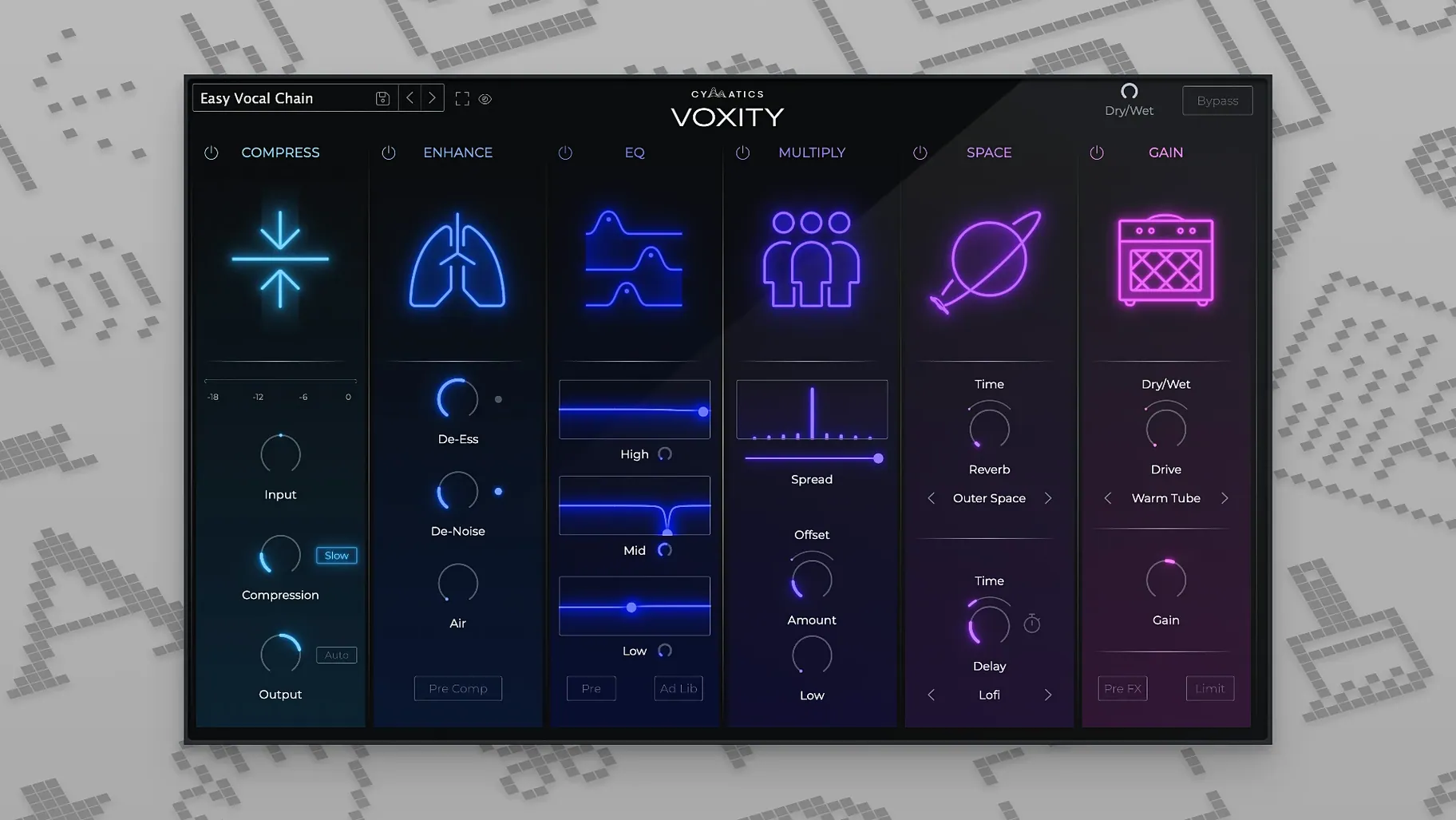
It shapes raw recordings with tools built specifically for voice. The plugin includes volume levelling to even out a performance, plus stereo widening to push the vocal across the mix. Mixing parameters are tuned for vocal processing, not general-purpose use.
How much control do the presets give you?
A wardrobe recording at 2am becomes a finished vocal
Picture a rapper who writes a verse at 2am, records it into a USB mic in the wardrobe, then stares at a blank channel strip the next day. He knows how he wants the vocal to sit but none of the knob names mean anything to him. He drags VOXITY onto the track, flicks through three presets, and lands on one that tightens the low-mids and adds a short slapback. Five seconds in, he hears his voice the way it sounded in his head. He nudges the brightness fader a touch and calls it done. That is the whole story — no manual, no YouTube tutorial rabbit hole. He exports the demo and sends it to a producer by lunchtime.
Beat-makers, sample-flippers, and video creators who dread vocal mixing
Three kinds of Mac user will find this plugin especially useful.
- Beat-makers who also record their own hooks. They already spend hours on drums and synths. VOXITY stops the vocal from becoming the weak link without pulling them away from the arrangement.
- Podcast editors working in Logic or Reaper. The de-harshing and breathing-noise reduction are fast enough for spoken word, and the presets save them from building a chain from scratch for every guest.
- Songwriters demoing ideas. They need a vocal that sits convincingly in the mix so the song sells itself. They do not need a Grammy-winning vocal chain. VOXITY gets them from raw take to plausible demo in under a minute.
If you mix other people's records full-time, you already have your own chains and probably do not need an all-in-one. For everyone else, the plugin removes the friction between recording and hearing something that sounds finished.
A typical session: one vocal, ten minutes
You have just tracked a verse and a double into Ableton Live on a MacBook Air. The raw take is boomy around 200 Hz and the esses are sharp. Here is how a session with VOXITY tends to play out.
- Insert VOXITY on the lead vocal channel. The default state does nothing until you pick a direction.
- Browse presets with the track playing. Stop when you hear one that matches the energy of the beat — maybe the one labelled for upfront rap vocals.
- The volume leveller kicks in first. You watch the meter settle the quiet phrases and stop the loud ones from jumping out.
- Dial the harshness control back until the esses lose their edge. On this take, about 11 o'clock does it.
- Push the stereo width up a few notches on the double track while keeping the lead centre. The vocal opens up without sounding phasey.
- Add a short room reverb from the built-in section. Set the mix low — just enough to give the voice a space to live in.
- Toggle the plugin bypass on and off. The difference is stark: dry and flat becomes present and placed.
Ten minutes, maybe less. The vocal is not "mixed" in the traditional sense, but it is ready for arrangement decisions, and that is the point.
From raw podcast recording to upload-ready vocal
A producer records a forty-minute interview with a guest who speaks quietly and a host who leans into the mic. The raw file has level swings, mouth clicks, and a slightly nasal tone on the host's track. The producer wants a clean, consistent result without sending the audio to an external editor.
They start by splitting the stereo file into two mono tracks in Logic. VOXITY goes on each channel. For the quiet guest, they raise the input gain inside the plugin and let the leveling section catch the peaks and dips. The de-harsh knob tames the nasal frequency on the host without dulling the whole signal — somewhere around 2.5 kHz the voice relaxes. The breathing-noise reduction catches the sharp inhales between sentences that the expander in the channel strip missed.
Once both voices sit at roughly the same perceived loudness, they add a touch of the same plate preset to both channels, barely audible, just to glue the conversation into a shared acoustic. The stereo width stays untouched for the interview — mono compatibility matters here. The producer bounces the file, trims the top and tail, and uploads. The whole vocal treatment took under fifteen minutes for a forty-minute recording. That kind of speed matters when the episode goes live the same afternoon.
Some producers grab a cymatics voxity free download to test the workflow on a real episode before committing to it. Others search for a voxity plugin crack out of habit, though the plugin is straightforward enough that the presets alone justify the installation. You will find voxity plugin discussions on forums comparing it to multi-plugin chains, and the consensus is usually that it replaces three or four utility plugins in one window. A voxity rutracker search will turn up mirrors, but the disk image from the source you trust is a safer bet. Regardless of where you get it, voxity does one thing well: it speeds up the boring part of vocal work so you can get back to the creative part.
The plugin ships with ready-made presets for different styles. They set up the core vocal chain quickly, then you tweak from there.
Requirements
- macOS 10.14 or later
- Intel or Apple Silicon Mac
- 64-bit host
FAQ
What macOS version does VOXITY need?
macOS 10.14 or later. It works on Intel and Apple Silicon Macs.
Is VOXITY a standalone app?
No, it is a plugin. You load it inside a 64-bit DAW.
What language is the interface?
English only.
Comments 0
Sign in or create an account to leave a comment.
No comments yet…
If you’ve installed it, say how it went. Mention your Mac and macOS version — it helps the next person more than you’d think.