
OmniPlan Pro for macOS
Description
Most spreadsheet-based project plans fall apart the moment someone goes on leave. OmniPlan solves that by treating people as more than a line item — it knows who is available, who is overbooked, and what happens when a task slips.
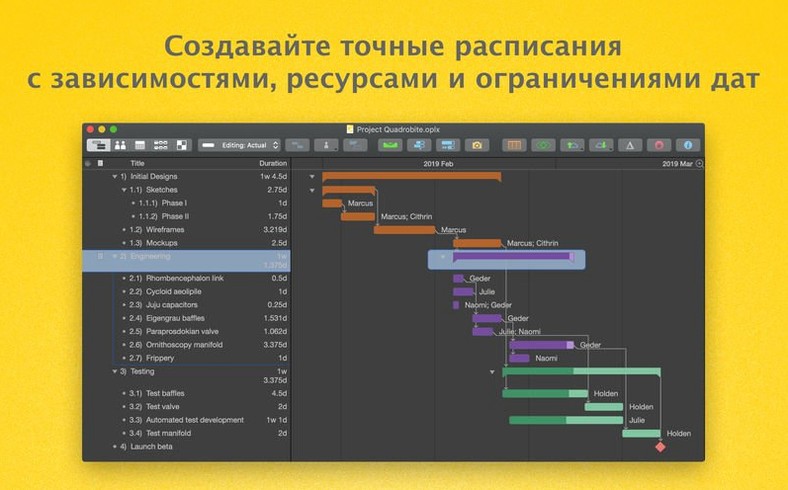
Version 4.11 doesn't rewrite the app. It tightens up compatibility with recent versions of macOS and speeds up editing when a task has a crowd of resources assigned. The engine underneath still revolves around Gantt charts, automatic levelling, and a calendar that understands days off.
What does the Pro edition add over the standard version?
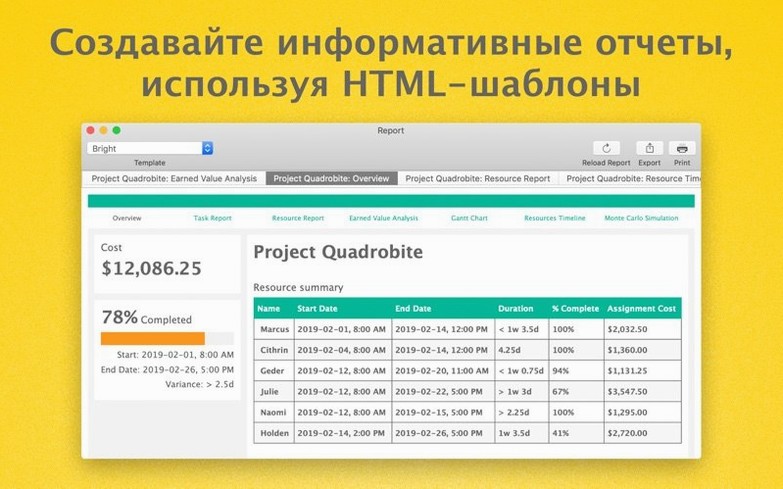
Earned value analysis, HTML reports, and automatic effort estimation. It also handles publishing and subscribing through Omni Sync Server or WebDAV, which is how teams share a live project file without stepping on each other's changes.
Does it handle staff calendars and leave?
Yes. You can add days of absence to individual calendars and OmniPlan combines that with each person's available hours. The schedule recalculates when someone isn't around.
Can colleagues work together on the same plan?
Collaboration is built in. You share project data through the sync server and colleagues see updates as they happen, provided you are using the Pro version's publish-and-subscribe features.
Speed, memory and the feel of daily use
OmniPlan is not a lightweight app. It loads a scheduling engine that recalculates dependencies, resource loads and critical paths on the fly. On Apple Silicon machines the interface stays responsive even with a few hundred tasks — scrolling through a dense Gantt chart rarely stutters. On Intel hardware the same file feels heavier, though the 4.11 update specifically improves the bottleneck when you edit a task that has many resources assigned.
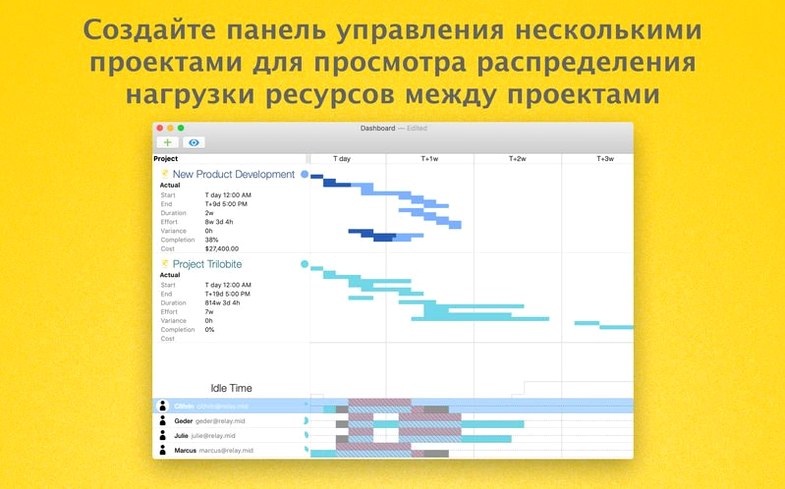
Memory use sits around 200–400 MB for a modest single-project file. Multi-project dashboards push that higher, because each sub-project brings its own resource pool and calendar into the combined view. The app does not leak memory in normal use; leaving it open for a full working week with occasional syncs didn't cause any visible degradation here.
Autosave and version browsing rely on macOS's built-in document model, so you get the same recovery behaviour you expect from TextEdit or Pages. The difference is that OmniPlan also writes a transaction log for change tracking, which adds a small disk write overhead every time you adjust a date or reassign a resource. It is negligible unless you are working off a slow network volume.
Exporting plans to OmniOutliner and OmniGraffle
Export options are the obvious bridge. Sending a plan to OmniOutliner turns tasks and groups into a structured outline for meeting notes. OmniGraffle export pulls the network diagram into a proper drawing environment where you can style nodes and connectors. CSV export feeds spreadsheets without mangling dates or durations, and ICS files drop milestones into Apple Calendar.
Less obvious is how well it plays with Focus modes and Shortcuts. Because OmniPlan uses standard macOS notifications for overdue tasks and approaching milestones, you can let them through a work Focus while silencing everything else. AppleScript support in the Pro version means you can script report generation — build an HTML summary of active projects and drop it into a shared folder each morning, triggered by a calendar event or a launchd job.
Spotlight indexes project file contents, so searching for a task name from the menu bar finds the right .oplx file without opening the app first. And because the document format is a package, Time Machine backups stay efficient: only the changed parts of the file get copied, not the whole project each time you save.
Opening Microsoft Project files cleanly
Will it open Microsoft Project files without messing up the layout? Import and export of MPP and MPPX formats is solid for task hierarchies, durations and dependencies. Custom columns and some advanced resource calendars can need a manual tidy afterwards. The import dialogue shows you what it will bring across before you commit.
Does the Monte Carlo simulation actually help, or is it just a checkbox feature? It produces a real confidence curve for your finish date based on effort ranges you set per task. If every task has a single-point estimate, the simulation adds nothing. When you take the time to enter optimistic and pessimistic durations, the output becomes a practical conversation starter about risk.
Can I use it without Omni Sync Server? For single-user work, absolutely. You only need an account if you want publish-and-subscribe collaboration. Local files and WebDAV servers work without any Omni infrastructure.
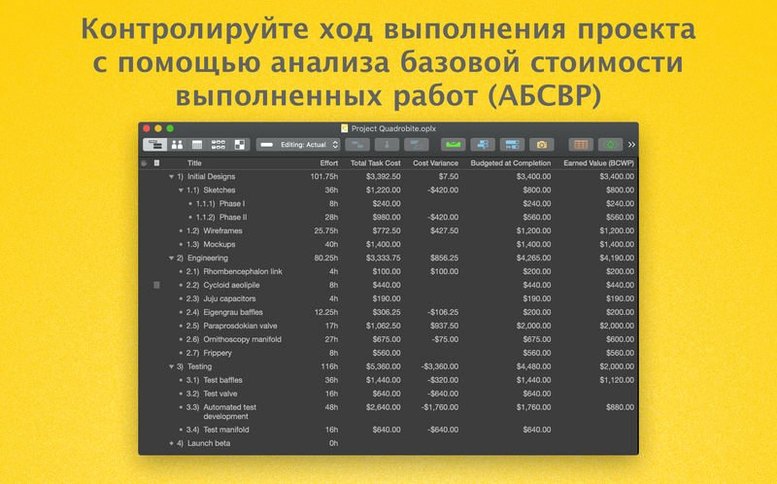
Does the earned value analysis require a textbook to interpret? The dashboard shows planned value, earned value and actual cost as graphs. The terms follow PMI definitions, but the visual comparison tells you at a glance whether you are ahead or behind on cost and schedule, which is usually enough.
What’s new
- Improves compatibility with newer versions of macOS.
- Improves performance when editing a task with many assigned resources.
Requirements
- macOS 12 or later
- Intel or Apple Silicon Mac
FAQ
Which macOS version does OmniPlan 4.11 need?
It requires macOS 12 or newer and runs on both Intel and Apple Silicon Macs.
What languages does the interface support?
It ships in Russian, English, German, Spanish, Italian, Simplified Chinese, Korean, Dutch, Portuguese, French, and Japanese.
Does it do earned value analysis?
Yes, earned value analysis is part of the Pro feature set.
Comments 0
Sign in or create an account to leave a comment.
No comments yet…
If you’ve installed it, say how it went. Mention your Mac and macOS version — it helps the next person more than you’d think.