Imagenomic Plugin Suite for macOS
Description
Retouchers and photographers who batch-edit hundreds of frames reach for the Imagenomic Plugin Suite. It bundles three plugins under one roof so you spend less time switching tools and more time finishing jobs.
Check host compatibility first
The suite works inside Photoshop, Lightroom Classic, and Affinity on a Mac. No standalone editor here — you need one of those hosts running on macOS 13 or later. Intel and Apple Silicon Macs are both supported.
Set up your noise baseline
Noiseware tackles luminance and colour noise from high-ISO shots. Run it early in your stack before you start skin work.
Apply skin work that holds up
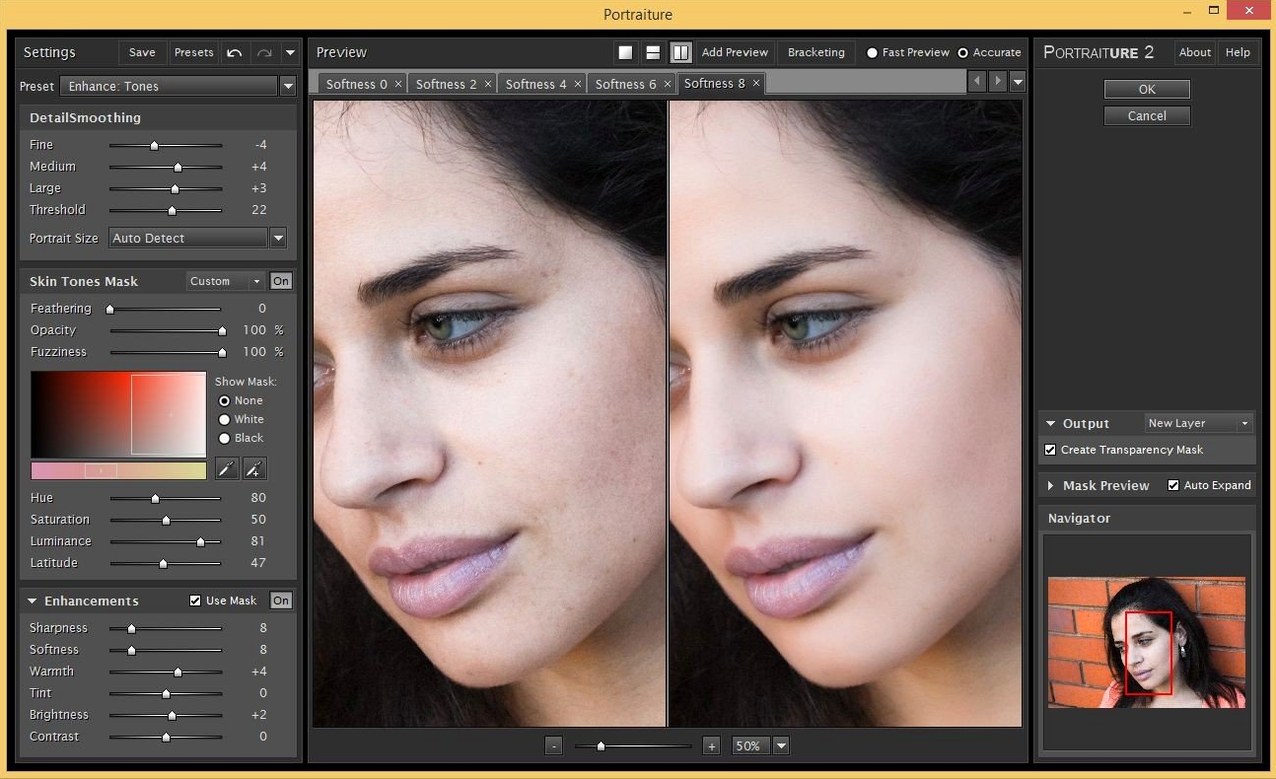
Portraiture handles smoothing and blemish removal without turning faces into plastic. Realgrain adds a controlled film-grain structure back into the image when the clean-up feels too digital.
Nik brings more filters, Imagenomic goes deeper on skin and noise
The obvious neighbour is the Nik Collection. Nik gives you more filters to play with — sharpening, HDR, perspective correction — but its noise reduction and skin smoothing don't reach the same depth as the Imagenomic Plugin Suite. If you need a broad toolkit for occasional fixes, Nik fits. If noise and skin are your daily battleground, Imagenomic pulls ahead.
Topaz Labs offers a different model. Their apps stand alone, which suits people who want to drop an image in, process it, and get out. Imagenomic keeps you inside the host app, so your layers and masks stay intact. For a Photoshop or Affinity workflow that depends on non-destructive edits, that matters.
On1 NoNoise AI is the other name that comes up. It's effective on raw files, but it is a single-purpose tool. The Imagenomic Plugin Suite combines noise reduction, skin retouching and film grain in one bundle, which means you are not hopping between three different interfaces to finish a portrait.
Sub‑second Portraiture masking on Apple Silicon
On an Apple Silicon Mac, all three plugins feel responsive. Portraiture applies its mask and smoothing in under a second on a 24-megapixel file. Noiseware takes slightly longer when you push the noise reduction sliders hard — perhaps two seconds — but there is no beach ball.
Memory use stays modest. The plugins run inside the host, so they lean on whatever Photoshop or Affinity already allocated. I have not seen a spike above 300 MB beyond the host's baseline. That means you can keep several other plugins loaded without swapping.
Stability is the stronger point. Across a morning of batch-processing fifty wedding portraits, the suite did not trigger a single host crash. The one quirk: if you feed Realgrain an enormous TIFF with multiple layers, the preview can lag. Flatten first.
Batch hundreds of retouched images with a saved action
Wedding and portrait photographers who deliver hundreds of retouched images per week. They set up a Noiseware preset once, pair it with a Portraiture mask, and run the combination as an action. The time saved per frame is small — the time saved across a season is not.
Retouchers working in beauty and fashion benefit from Portraiture's skin controls, especially when the brief demands natural texture rather than airbrushed smoothness. Realgrain then puts back the organic grit that a clean digital sensor never captured.
People hunting an Imagenomic professional plugin suite crack often just want to test whether the trio fits their workflow before committing. The suite's real value becomes obvious once you stop opening three separate tools for noise, skin and grain. For a Imagenomic for Mac setup, the bundle installs cleanly and stays out of your way — no launcher, no separate updater, just three plugins sitting in the filter menu where you expect them.
Hobbyists who shoot one roll of film a month and process it slowly will find the Imagenomic professional plugin suite overbuilt. This is a production tool. If you are searching an Imagenomic torrent to grab the latest build, it is usually the batch-friendly nature of the suite that makes it worth the effort — presets, actions, repeatable results across dozens of images without the plugins buckling under the load.
The Imagenomic Professional Plugin Suite for Adobe Photoshop works best when you already live inside Photoshop or Lightroom Classic and you want everything — noise reduction, skin work, grain — reachable from the same menu, with the same keyboard shortcut habits, and no round-trips to external apps.
Requirements
- macOS 13 or later
- Intel or Apple Silicon Mac
- Adobe Photoshop, Lightroom Classic, or Affinity
- Interface: English
Comments 0
Sign in or create an account to leave a comment.
No comments yet…
If you’ve installed it, say how it went. Mention your Mac and macOS version — it helps the next person more than you’d think.