BetterMouse for macOS
Description
Button 4 remap — that is where most people start. You assign Mission Control to the side button and suddenly the mouse feels like it belongs to the machine. BetterMouse gives every extra button a job: keyboard shortcuts, special actions, even directional gestures on a single click. It reads the hardware without Logitech Options sitting in the background, so it works across brands.
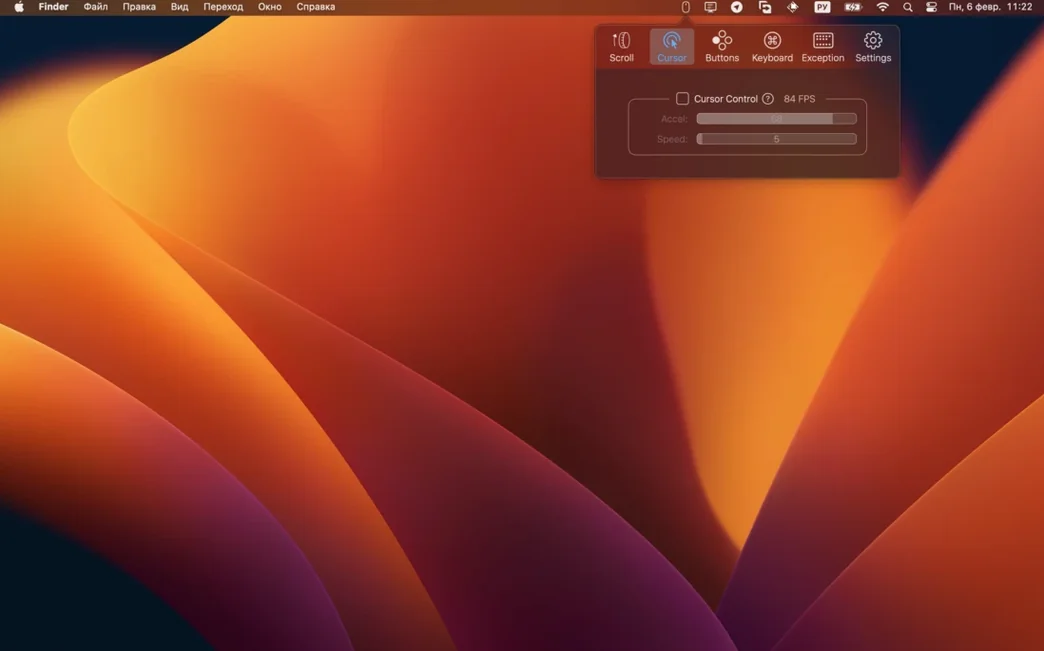
Cursor acceleration and tracking speed get their own sliders. That matters because macOS treats them as one curve, and Apple's default is not built for a high-DPI gaming mouse. Pull them apart and the pointer stops overshooting. Right-button pan scrolling and Ctrl-right-click are in there too, along with per-app click-through settings if you need a mapping to behave differently in a specific tool.
It also handles keyboards. Modifier-key remapping runs per keyboard, not globally, so you can swap Command and Option on an external mechanical board while the MacBook's built-in keys stay stock. Caps Lock remap is supported as well.
Shorten the scroll duration to 300 ms and turn off acceleration for spreadsheets
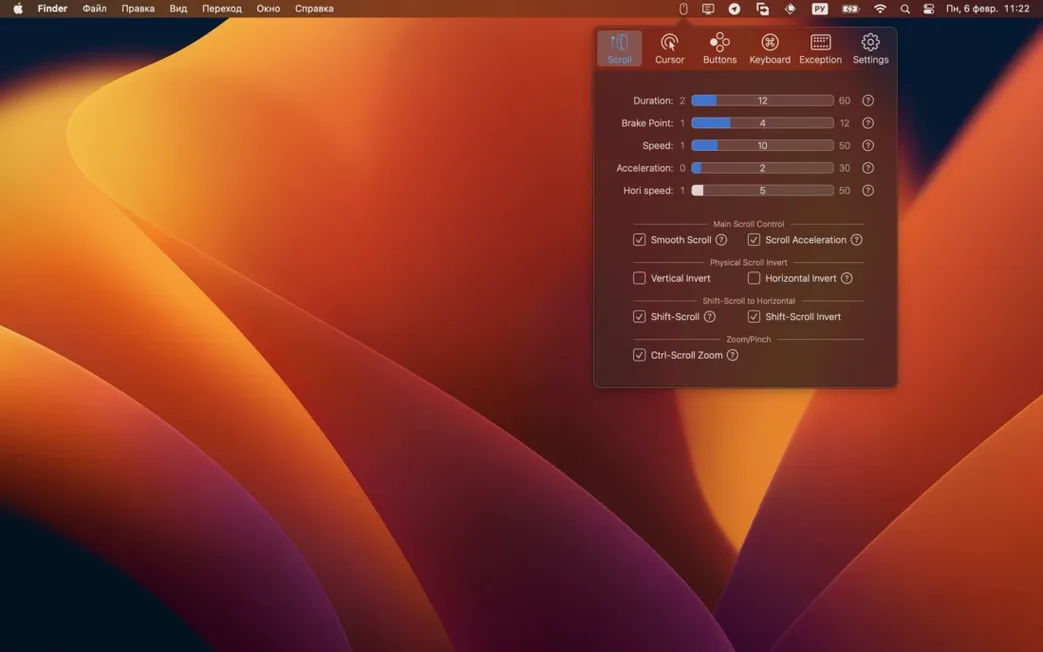
Open the Scroll tab before anything else. The default smooth-scroll curve is polite but slow — shorten the duration to about 300 ms and bump acceleration to mid-range. Discrete scrolling with acceleration off feels tighter if you work in spreadsheets or code editors where line-by-line precision matters more than momentum. Enable Shift-scroll horizontal scrolling while you are there; set direction to match your trackpad habit and the speed just below vertical scroll so it does not run away from you.
Next, kill cursor acceleration completely. Uncheck the box, set tracking speed around two-thirds up the slider, and the pointer behaves like Windows raw input. If you switch between a Magic Trackpad and an external mouse, this alone stops the whiplash when your hand moves from one device to the other.
Uninstall Logitech Options, Razer Synapse or SteerMouse before you start
BetterMouse sits between macOS and whatever driver your mouse shipped with — and it works best when that other driver is not running. Uninstall Logitech Options, Razer Synapse or SteerMouse first. The system Accessibility and Input Monitoring permissions screen will pop up on first launch; grant them once and the app handles the rest without background bloat.
Per-app button mappings let you keep a clean global setup, then override just one shortcut in an application like Blender or DaVinci Resolve. You can set a side button to scrub the timeline only when the NLE is active, and leave it as Mission Control everywhere else. The modifier-key remap plays nicely with Karabiner-Elements if you already have complex keyboard rules — just avoid remapping the same key in both places, or the result is a dead key that does nothing.
Click-through is a quiet feature that saves a click every time you reach for a background window. Enable it per mapping rather than globally, so a left click passes through to a browser tab but a right click still brings up a context menu on the window you are pointing at. Combined with the right-button pan scroll, you can drag-scroll through a long document behind the active window without bringing it forward.
It runs on Intel and Apple Silicon Macs. The current build tidies up crash fixes and lifts the floor to macOS 12.
What’s new
Raises minimum macOS to 12.0. Fixes bugs and crashes.
Requirements
- macOS 12 or later
- Apple Silicon or Intel 64-bit Mac
FAQ
Does BetterMouse replace Logitech Options?
Yes, it handles per-button mapping, scrolling behaviour and pointer control for external mice without the Logitech background service.
Can I set different key mappings for separate keyboards?
Yes, modifier-key remapping works independently for each connected keyboard, including Caps Lock.
Does it support Apple Silicon Macs?
BetterMouse runs natively on both Apple Silicon and Intel 64-bit Macs from macOS 12 onward.
Comments 0
Sign in or create an account to leave a comment.
No comments yet…
If you’ve installed it, say how it went. Mention your Mac and macOS version — it helps the next person more than you’d think.