

Ultra Audio Ultra for macOS
Description
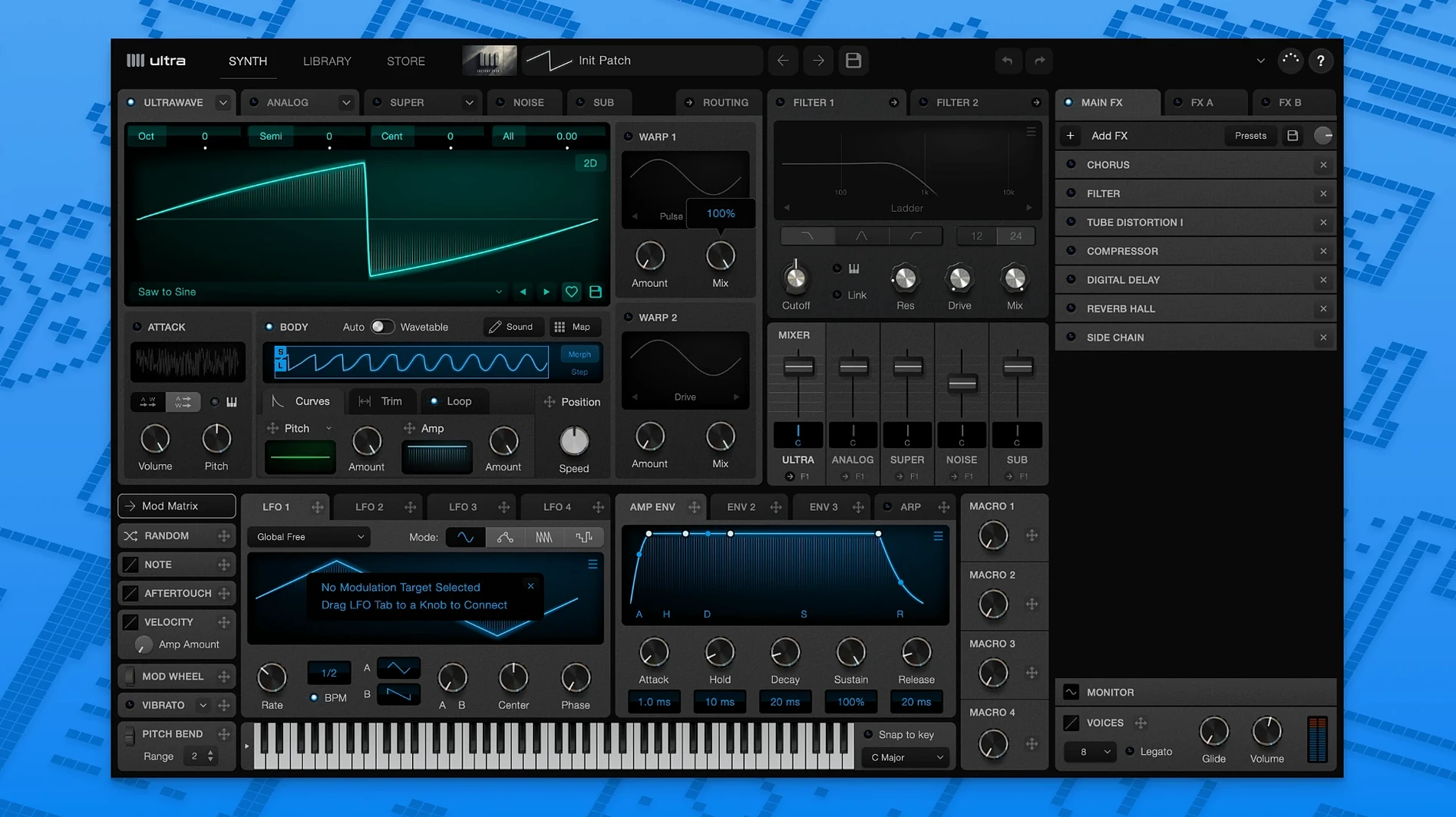
Ultra Audio Ultra runs on any Mac from OS X 10.11 onwards, Intel and Apple Silicon. It installs as a VST3, an AU and a standalone application, so it slots into Logic, Ableton Live, Cubase and most other DAWs that support one of those formats. No iLok or online activation — just a standard installer.
VST3 and Audio Unit, with a standalone flavor
Ultra comes as a 64-bit VST3 and Audio Unit, with a standalone app thrown in for sketching sounds outside a session. The developer documents compatibility with leading DAWs through those two plug-in formats. If your host loads AU or VST3, Ultra shows up. Older VST2-only setups are out of luck.
Blending wavetables with the UltraWave engine
The core is the UltraWave engine, which blends multiple wavetables in real time without glitches. You can import WAV files to build custom wavetables, or pull pitch and volume data from audio samples to shape modulation. Different wavetables can be assigned by note pitch and aftertouch strength, so a patch can shift character as you play harder or move up the keyboard. The help documentation walks through the UltraWave section clearly.
Switch on Split L/R to wake up the stereo field
The defaults are sensible, but two tweaks make a real difference. First, open the UltraWave section and set the stereo wavetable mode to Split L/R. By default it often loads mono, which wastes half the engine. You will hear the stereo field open up immediately. Second, turn off the internal reverb if you are mixing in a DAW with your own sends. The built-in tail is fine for sketching, but it clouds the wavetables before you shape them properly.
After that, assign aftertouch to filter cutoff rather than amplitude. Most preset multisamples map it to volume, which is safe but dull. A quick remap in the modulation grid gives you expressive bite without touching a knob.
A sound-design walkthrough: pitched percussion from a field recording
You have a stereo recording of a metal gate closing — a short, clangy WAV file. The goal is a tuned percussion patch that stays metallic at low velocities and smears into a pad when you dig in. Drag the WAV into Ultra to create a stereo custom wavetable. The import dialogue will ask whether to extract a loop; pick a clean single strike, not the whole file.
- Load the wavetable into oscillator A. Set oscillator B to a sine wave for a subtle sub layer — keep its level around 30%.
- In the UltraWave mixer, blend the two with a small amount of spectral crossfade. This stops the metal attack sounding brittle.
- Open the multisample mapping panel. Assign the gate wavetable to the lower half of the keyboard and a smoother, glassier wavetable from the online library to the upper half. Notes above C4 will shift from clang to chime.
- Route aftertouch to the crossfade position. At light pressure, the mix stays tight and percussive. Push harder and the glass wavetable bleeds through, stretching the attack into a longer swell.
- Add a touch of pitch envelope — a fast 20 ms drop — to mimic a struck tine. Keep the modulation depth subtle so it does not sound cartoonish.
Save the patch with a short test phrase playing across the split. You will find it sits in a track better than most sampled percussion because the wavetables move with your playing.
What’s new
Version 1.1.6. No published changes list.
Requirements
- OS X 10.11 or later
- Apple Silicon or Intel 64-bit
FAQ
Can I load my own audio into Ultra Audio Ultra?
Yes. You can import WAV files to create custom wavetables, and also extract pitch and volume data from audio samples.
Does it work as a standalone instrument?
Yes. The installer gives you a standalone app alongside the VST3 and AU plug-ins.
Comments 0
Sign in or create an account to leave a comment.
No comments yet…
If you’ve installed it, say how it went. Mention your Mac and macOS version — it helps the next person more than you’d think.
More in VST Plugins
All in VST Plugins-
 UJAM Symphonic Elements STRIIIINGS
1.3.1
Apple Silicon
-
 UnderTone Audio UnFairchild
1.0.8
Apple Silicon
-
 uJAM Cinedream
1.0.1
Apple Silicon
-
 UJAM Beatmaker VICE
2.4.0
-
 Valhalla DSP Bundle
2025.12
Apple Silicon
-
 VocalNet
1.0.4
Apple Silicon
-
 VocalSynth 2
2.6.1
Apple Silicon
-
 WaveLab Pro
13.0.30
Apple Silicon