

uJAM Cinedream for macOS
Description
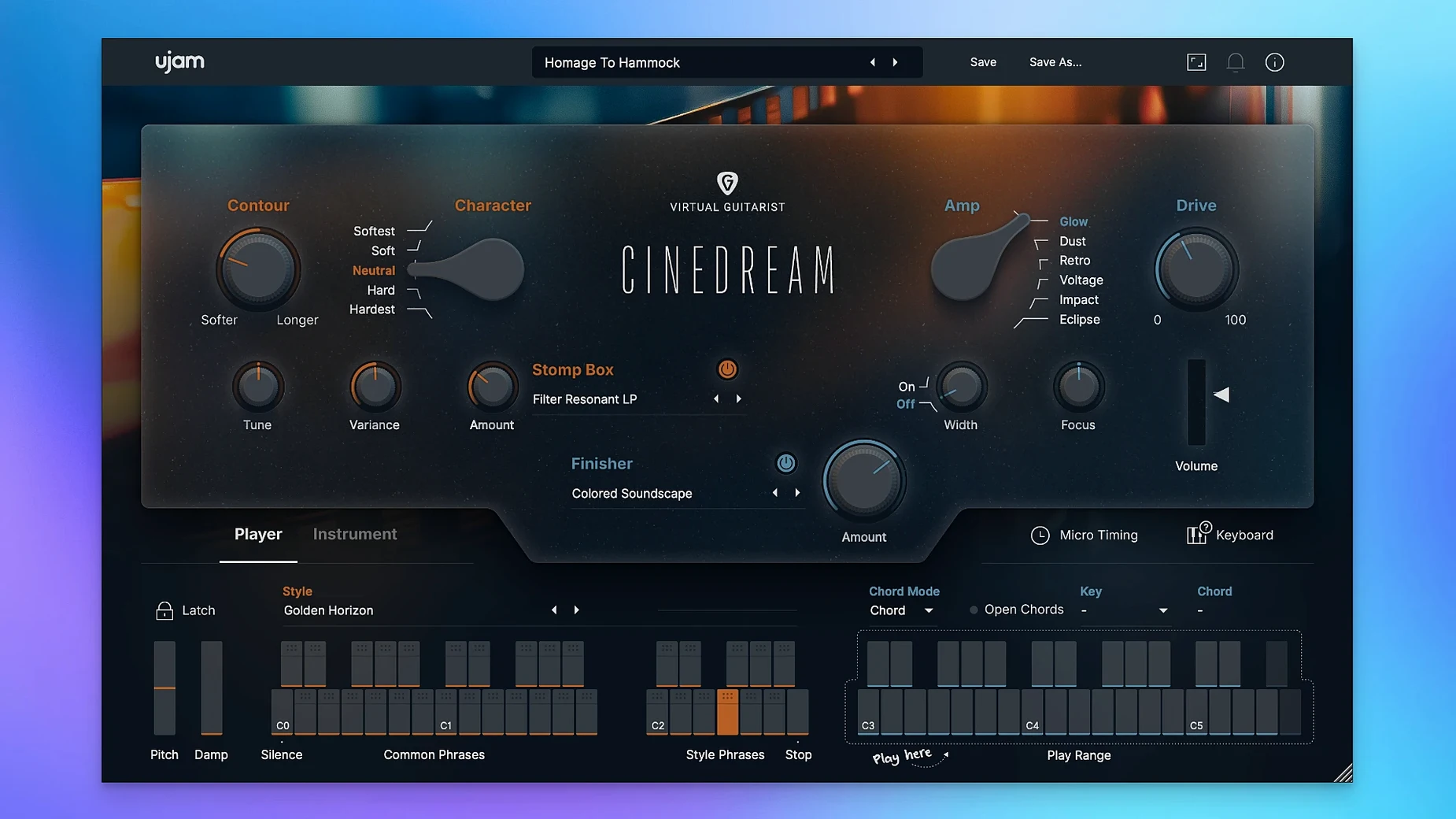
The Textures knob is where Cinedream earns its name. Twist it left and the guitar recedes into a washed-out pad. Push it right and you get a saturated, grainy layer that still sits behind a vocal or dialogue rather than stepping on it. That one control defines most of what this plugin does well.
Filling sparse arrangements with mood, not melody
- Filling out a sparse arrangement with mood rather than obvious notes.
- Quickly pulling up a ready-made style when a deadline is staring at you.
- Building soft, evolving backdrops for film, game or ambient work.
It needs your chords, not your riffs
- It is not a playable guitar on its own — you feed it chords and it gives you processed textures.
- The 8 GB RAM requirement is firm; ignore it and expect trouble on older machines.
- Interface text is English only, which may slow down speakers of other languages.
UJAM started with a real guitar signal and then processed it specifically for cinematic use. The range goes from clean and glassy through to rough and broken, all within the same plugin. Formats cover VST2, VST3, AU2 and AAX, so it slots into most DAWs on a Mac. It runs natively on Apple silicon and under Rosetta on Intel, with macOS 10.13 as the minimum.
A textural underscore from scratch
Start with an empty eight-bar loop in your DAW. Add Cinedream to a stereo instrument track and leave the default style — usually Soft Pads — alone for now. The plugin listens for chords across the whole keyboard, so draw in a simple progression. Two chords are enough. Try D minor to A minor, each held for four bars. Keep the MIDI velocities low, around 50–60, or the attack becomes too insistent for what we want.
Pull the Textures knob back to about 10 o’clock. The guitar recedes almost into a vocal breath, still harmonically present but not announcing itself. Now open the effects panel. Cinedream ships with four slots — Mod, Delay, Reverb and a fourth that swaps between Filter and Drive depending on the style. For this cue, bypass the Delay entirely. Push the Mod slot up to about 35% wet with the stock chorus; it widens the signal without introducing a wobble that would distract a picture editor. Set the Reverb to the Large Hall algorithm at 50% mix and pull its low-cut up to 300 Hz to keep mud from building.
Duplicate the original MIDI region. Transpose the copy up an octave and halve its velocity again. The upper layer adds a glassy halo above the main pad. Group both tracks and add a gentle side-chain from a muted kick or a silent MIDI pulse — ducking the texture by 2–3 dB on each beat gives the whole thing a subtle, breathing motion that works well under dialogue.
At this point you have a usable cinematic bed in under four minutes. Render it to audio, drop it under a scene, and it will do its job without anyone noticing the guitar.
Shift-click a style slot to reset it instantly
A few things in Cinedream are easy to skip if you only ever touch the main knobs. They make daily use faster.
- Shift-click a style slot. It resets that slot to the default for the current style, which is handy after you have auditioned three or four variations and lost track of what you started with.
- Command-click the Textures knob. It snaps back to noon — a quick way to hear what the raw processed guitar sounds like before you push it toward pad or grit.
- Right-click the chord trigger. It reveals a latch mode that keeps the engine running even when the transport is stopped. Useful for sound design sessions where you want to tweak knobs while the texture sustains.
- Drag a MIDI file onto the plugin window. Cinedream loads the chord progression and triggers it internally, which lets you preview styles without drawing notes first.
- The output trim, hidden in the bottom-right corner. The plugin runs hot on some styles, especially the saturated ones. Dialling it back 3–4 dB before it hits your channel strip prevents a lot of unnecessary red lights.
The Textures knob now recalls correctly in every host
The jump from the initial release to 1.0.1 was small on paper but noticeable in a session. The update improved plugin recall reliability — earlier, some hosts would lose the Textures knob position when reopening a project, and now it sticks. It also tightened the timing of the chord trigger engine, which used to drift by a few milliseconds on the first beat after a transport cycle. That drift was subtle but maddening if you had already bounced stems and noticed the attack was inconsistent. Finally, 1.0.1 added native Apple silicon support for the AU2 format, which previously ran under Rosetta even on M-series machines. Loading times dropped by about half on an M1 Mac, and the plugin no longer causes a brief CPU spike when first instantiated.
Under a deadline: a composer’s morning
A composer working on a short documentary needs thirty seconds of tense but not frightening underscore for a scene of empty streets at dawn. The picture editor has already temp-tracked it with a licensed ambient piece, so the brief is clear: same mood, different notes. The composer opens the session, drops Cinedream onto a track, and selects the Tension Beds style. They play a C minor chord with the left hand and tap the trigger. A low, rumbling texture begins, with the guitar signal pushed far back into a wash of modulated reverb.
They add a second instance — this time Evolving Arcs — and feed it the same MIDI region. The two layers sit at different depths: one close and grainy, the other distant and slow-moving. A high-pass filter on the master bus at 200 Hz keeps the low end clear for a separate sub-bass hit that lands on the picture cut. They move the Textures knob on the first instance to 2 o’clock for a little more bite, then print both tracks as a stereo stem. Total time from empty project to exported cue: eighteen minutes. The editor approves it by lunch. The composer moves on to the next reel, having not touched a real guitar once.
It is a one-purpose tool that knows what that purpose is. If you need a pad that still sounds organic, it fits.
Requirements
- macOS 10.13 or later
- Intel or Apple silicon Mac (native and Rosetta)
- 8 GB RAM
- 4 GB free disk space
- 1280 × 768 minimum display
- Internet connection
FAQ
What formats does UJAM Cinedream run in?
It is available as VST2, VST3, AU2 and AAX, covering most DAWs on a Mac.
Does Cinedream work on Apple silicon Macs?
Yes. It supports both native Apple silicon and Intel Macs via Rosetta, running from macOS 10.13 onwards.
What kind of sound does Cinedream produce?
It uses a processed real guitar sound designed for cinematic textures, ranging from soft and clean pads to more saturated, rough layers.
Comments 0
Sign in or create an account to leave a comment.
No comments yet…
If you’ve installed it, say how it went. Mention your Mac and macOS version — it helps the next person more than you’d think.
More in VST Plugins
All in VST Plugins-
 UJAM Beatmaker VICE
2.4.0
UJAM Beatmaker VICE
2.4.0
-
 UJAM Symphonic Elements STRIIIINGS
1.3.1
Apple Silicon
UJAM Symphonic Elements STRIIIINGS
1.3.1
Apple Silicon
-
 UnderTone Audio UnFairchild
1.0.8
Apple Silicon
UnderTone Audio UnFairchild
1.0.8
Apple Silicon
-
 Valhalla DSP Bundle
2025.12
Apple Silicon
Valhalla DSP Bundle
2025.12
Apple Silicon
-
 VocalNet
1.0.4
Apple Silicon
VocalNet
1.0.4
Apple Silicon
-
 VocalSynth 2
2.6.1
Apple Silicon
VocalSynth 2
2.6.1
Apple Silicon
-
 Toontrack EZmix Bundle
3.2.2
Apple Silicon
Toontrack EZmix Bundle
3.2.2
Apple Silicon
-
 Toontrack EZkeys
2.1.5
Apple Silicon
Toontrack EZkeys
2.1.5
Apple Silicon