UJAM Symphonic Elements STRIIIINGS for macOS
Description
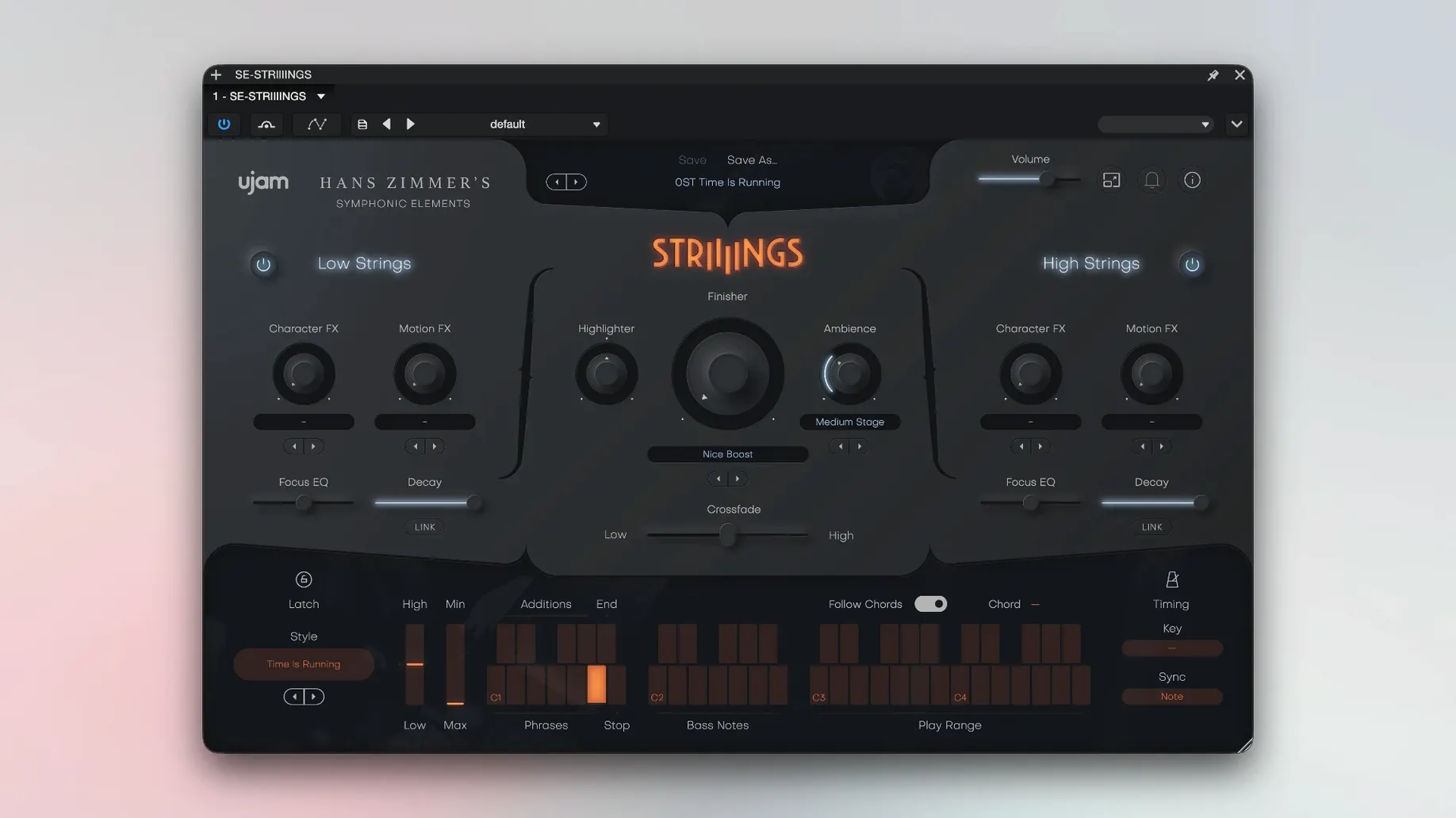
The Crossfade control is where the performance lives. It doesn't just dip between sections — it shapes how Low Strings and High Strings breathe against each other in a scene.
One instance covers basses through violas
- Track stack: Load STRIIIINGS on a stereo instrument track. The Low Strings layer handles basses and celli; High Strings covers violins and violas. You get two orchestral sections in one plug-in, not two separate patches.
- MIDI input: Play the full range. The engine splits notes intelligently — low notes route to the low section, high notes to the high section. No key-switching needed.
- Blend with Crossfade: Drag the Crossfade slider to shift weight between sections in real time. Automate it for swells that move from dark celli beds up into brighter violin textures.
- Sound design layer: Dial in the sound-design element for pads, bowed noise, or processed grit that sits behind the orchestral body. It turns a string patch into a hybrid texture without leaving the plug-in.
- Bus routing: Send the output to a reverb aux for hall placement. Keep the sound-design layer drier if it carries rhythmic detail — wetter if it's a bed.
STRIIIINGS works across Ableton Live, Logic, Pro Tools, FL Studio, Cubase, Studio One, Bitwig, Reaper and Reason. It's 64-bit only and wants 4 GB of RAM. The interface is English, and the controls are labelled plainly — no deep menu diving.
Playable voicing engine, not pre-baked phrases
People usually wonder whether this is a phrase-based library or a playable instrument. It's playable. You hold notes and the engine handles the voicing — you're not locked into pre-baked phrases. The 60 styles shape articulation and movement, but you perform them in real time.
Another common question is about system load. With 4 GB of RAM minimum, STRIIIINGS runs comfortably on most Macs from the last several years. The two-layer architecture keeps things efficient — you're loading one instance, not a multi-patch Kontakt setup. On Apple Silicon Macs the plug-in runs natively, and on Intel machines it's stable under Rosetta-free 64-bit hosts.
People also ask if the sound-design layer gets in the way when you just want a straight string sound. It doesn't. You can pull that fader right down and work with only the orchestral layers. The processed textures are there when you want them, silent when you don't.
Split high and low strings to separate bus treatments
STRIIIINGS plays well with stock macOS audio routing. On a Logic session, for instance, you can send the High Strings and Low Strings to separate buses using the plug-in's internal routing, then treat each with different reverb and EQ — Lexicon-style hall on the highs, tighter ambience on the lows. The sound-design output can hit a third bus with a bit-crusher or tape emulation for lo-fi contrast.
It also pairs neatly with drum and percussion libraries. The rhythmic articulation styles lock to your DAW's tempo, so a sixteenth-note spiccato pattern from STRIIIINGS will sit right against a kick and snare groove. No manual alignment needed — the plug-in follows host transport.
Swap the linear crossfade to avoid a hollow mid-fade
- Crossfade curve: The default crossfade is linear. If you want a smoother transition between low and high sections, nudge the curve toward a logarithmic shape. It prevents the middle of the fade from sounding hollow.
- Velocity response: Out of the box, velocity controls dynamics broadly. Tighten the range if you're programming with a consistent touch — it stops quiet notes from disappearing in a dense mix.
- Sound-design high-pass: The processed layer can carry low-end rumble you don't notice until playback on bigger speakers. Set a high-pass around 120 Hz on that layer early so it doesn't build up mud against the celli and basses.
- Style timing: Some styles default to a loose, humanised feel. If you're working to a tight grid — electronic music or trailer cues — switch timing to "tight" so the attacks land exactly on the beat.
Requirements
- macOS 10.14 (Mojave) through macOS Tahoe 26
- Intel or Apple Silicon Mac
- 4 GB RAM
- 64-bit host (AU, VST3, AAX)
FAQ
Can I use STRIIIINGS on an Intel Mac and an Apple Silicon Mac?
Yes. It supports both architectures from macOS 10.14 Mojave through to macOS Tahoe 26.
Does it come as a standalone app or only a plug-in?
It's a plug-in only — AU, VST3 and AAX — for use inside a compatible 64-bit DAW.
Comments 0
Sign in or create an account to leave a comment.
No comments yet…
If you’ve installed it, say how it went. Mention your Mac and macOS version — it helps the next person more than you’d think.