UnderTone Audio UnFairchild for macOS
Description
You strap it across a drum bus, pull the threshold down a touch and the whole kit tightens without the attack disappearing.
Feed‑back — compression reacts after the signal passes, giving the softer, more musical grab tied to classic vari‑mu behaviour.
Feed‑forward — detection happens before the signal, so the compressor can clamp faster and more predictably.
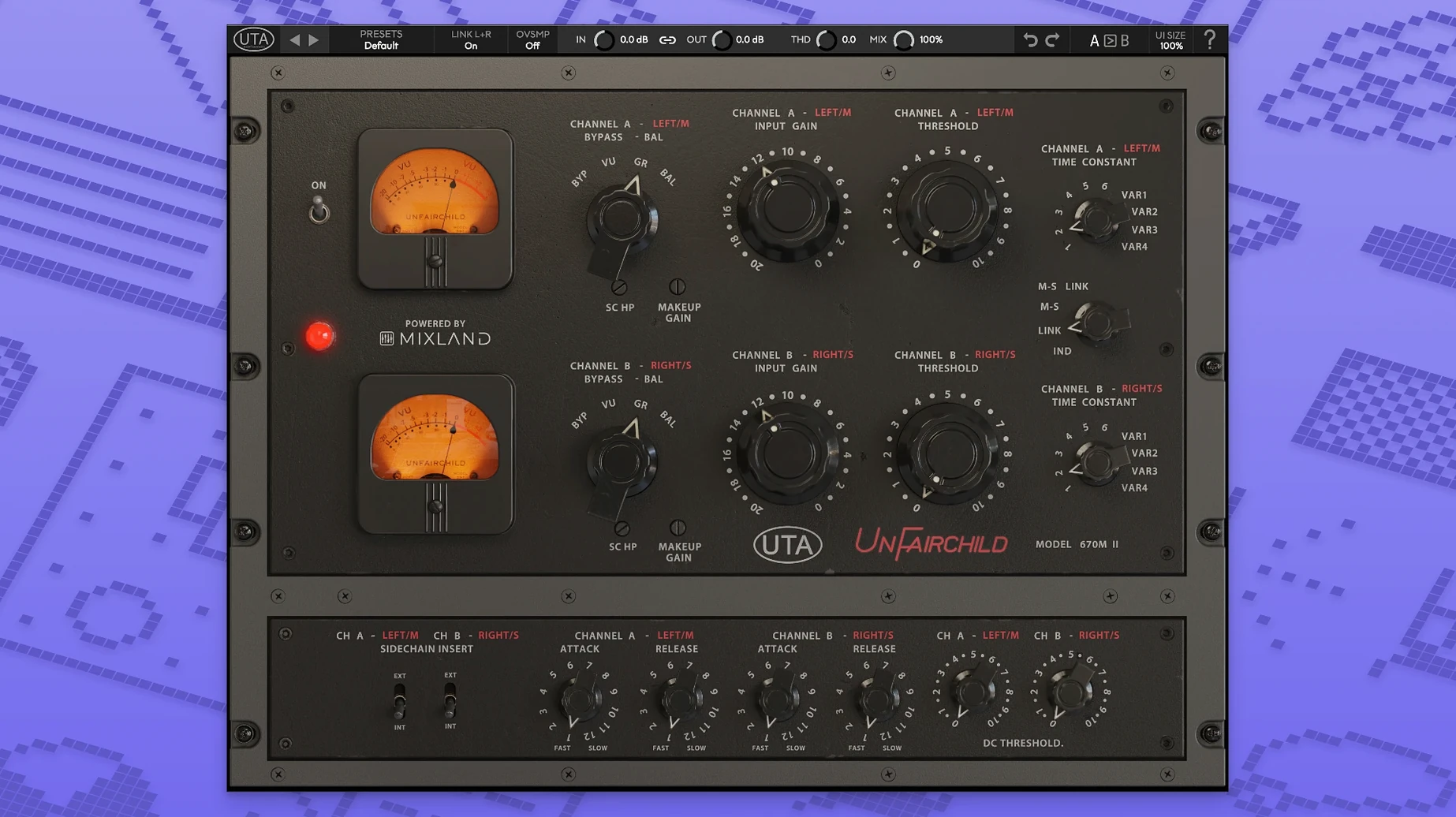
DC Threshold — an adjustable bias point that shifts how hard the unit pushes into saturation before gain reduction kicks in.
THD — total harmonic distortion control that lets you dial in extra colour independent of the compression action.
MS function — mid‑side processing so you can squeeze the centre and leave the sides breathing, or the other way round.
Wet/dry — a simple parallel compression knob without needing extra routing or a separate aux return.
Six original preset time constants cover the hardware’s established behaviours, while four variable settings let you drift outside the stock curves for tracking or mix‑bus work. Side chain processing and macOS 10.13 support round out a plugin that sits as comfortably on a vocal as it does on a full mix.
People sometimes open the plugin and wonder why the needle barely moves even with the threshold pulled down. Check the DC Threshold knob. It ships at a middle setting that can keep the compressor out of its sweet spot on modern, high‑headroom material. Nudge it up gradually while watching the gain reduction meter — you will hear the unit wake up before the meter shows much. On dense drum bus material, small DC Threshold shifts of half a mark can change the grab from ‘barely there’ to ‘glueing the room mics’.
Another snag is stereo image drift with heavy compression. The hardware has a fine Left/Right balance trim, and the plugin keeps it. If a mix bus starts leaning left when you dig in, centre the image first with the balance control before reaching for the threshold. It is also worth setting side chain filters early if you are compressing a full mix — letting subby kick transients trigger the detector pushes the low end sideways in ways that are hard to unpick later. A gentle high‑pass in the side chain settles the imaging right down.
Latency is low enough for tracking if you keep the buffer sensible. On an M‑series Mac it runs comfortably inside a session with other heavy plugs. No noticeable spikes when switching time constants mid‑playback, and true bypass disengages cleanly without clicks. CPU draw sits in the middle of the vari‑mu plugin pack — hungrier than a clean digital compressor, lighter than some of the component‑modelled channel strips that also do saturation. Memory use stays flat over long sessions.
Version 1.0.8 dealt with a handful of stability gremlins that showed up on Intel machines running newer macOS releases. The plugin now loads reliably inside hosts that previously timed out scanning it. Graphic glitches on high‑resolution displays — where the meter bezel could flicker when dragging the threshold — are fixed. Day‑to‑day use sees fewer random UI resets when reopening saved projects. The core sound did not change; the update was about making the plugin turn up when you need it and stay out of the way otherwise.
Requirements
- macOS 10.13 or later
- Intel or Apple Silicon Mac
FAQ
Is the UnFairchild plugin suited to drum buses?
Yes. The developer lists drums as an intended use, and the blend of feed‑back compression with the wet/dry control makes it straightforward to add body without flattening transients.
Does it include the time constants from the hardware?
It includes six original preset time constants taken from the UnFairchild 670M mkII hardware, plus four variable time constants for more flexible shaping.
Comments 0
Sign in or create an account to leave a comment.
No comments yet…
If you’ve installed it, say how it went. Mention your Mac and macOS version — it helps the next person more than you’d think.