
WaveLab Pro for macOS
Description
WaveLab 13.0.30 for Mac now lets Dolby Atmos master montages hold channel-based surround files alongside objects. The binaural monitor can also load a personal HRTF profile — useful if you work on headphones and need a more accurate spatial picture.
Opens Cubase projects and ARA transfers right on the Mac desktop
WaveLab Pro runs on macOS 13 Ventura and newer, native on both Intel and Apple Silicon Macs. It works as a standalone mastering editor and also as an ARA plug-in inside DAWs that support the format. Audio ranges transfer to other applications cleanly — drag and drop or copy and paste across platforms, with or without effects baked in.
File and montage navigation
File and montage navigation stays synchronised when you need it. That means less hunting around when you switch between the waveform editor and a longer montage session.
Spectral editing and restoration
The spectral editing tools let you visually identify and remove clicks, hum or other unwanted noise. Automatic waveform peak scaling in the visible area keeps quieter passages readable without changing gain, which helps when cleaning up dialogue or acoustic recordings.
Where the montage becomes your DDP and PQ sheet
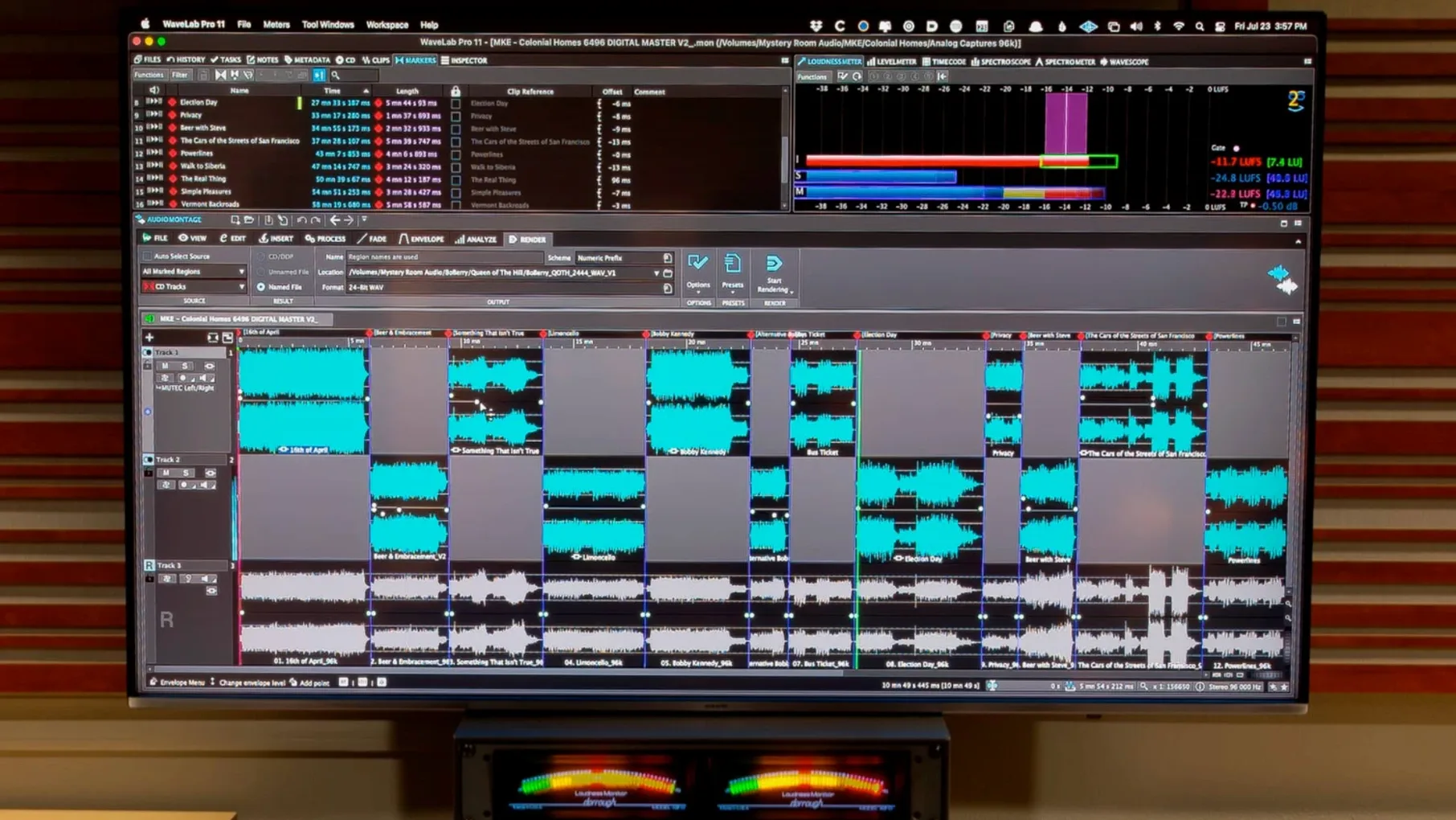
WaveLab isn't a general-purpose audio editor. It's built for people who finish records. Mastering engineers who need to assemble DDP images, trim fades by the sample and apply final-stage EQ will find the montage workspace second nature. Music producers who bounce stems from a DAW and need a reliable place to sequence an album, add metadata and audition the gaps between tracks also settle in quickly.
Post-production editors working with forensic audio or dialogue cleanup benefit from the spectral display and restoration tools. The HRTF binaural monitoring is aimed squarely at anyone mixing Dolby Atmos content on headphones — film editors, game audio designers and immersive-music producers. If you're sending revisions to a client and need the spatial image to hold up on cans, that feature alone saves a round of notes.
Hobbyist musicians who only trim a stereo bounce before uploading it can do the job in any free editor. WaveLab Pro makes sense when mastering is a repeatable, reference-checked process, not a one-off tweak.
Reconnecting the ARA plug-in after a host update
The most common trip-up is the ARA plug-in connection dropping after a DAW update. If WaveLab vanishes from Cubase or Studio One as an ARA extension, reinstall the plug-in component from the full installer. A quick repair install usually restores the link without touching your preferences.
Dolby Atmos montages that include channel-based beds can throw a "format mismatch" warning if the bed configuration doesn't match the montage's speaker layout. Fix it by right-clicking the bed clip, choosing Clip Layout and confirming the channel assignment. WaveLab won't guess for you here.
On Apple Silicon Macs running macOS 15 Sequoia, some users see the waveform overview redraw slowly when zooming deep into long files. Disabling Auto-scale peaks in visible area from the View menu usually clears it up — the feature is handy but can tax the renderer on high-resolution displays.
The HRTF profile loader expects a SOFA file. If you downloaded a profile and nothing changes in the binaural output, check the file extension. WaveLab ignores anything that isn't a valid .sofa container, and the error message is easy to miss in the montage inspector.
Mastering a three-track EP from start to finish
Here's a workflow that covers what most mastering sessions look like.
- Open a new montage and set the sample rate to match your mix files — usually 48 kHz or 96 kHz. Name the montage after the EP.
- Drag the three stereo WAV files from the Finder into the montage window. WaveLab places them as clips in sequence. Leave a two-second gap between tracks for now.
- Open the first clip in the wave editor by double-clicking it. Use the spectral display to check for subsonic rumble or stray clicks. Remove anything obvious with the spectral selection tool.
- Back in the montage, insert a transparent limiter on the master section. Set the ceiling to -1 dBTP. You're not pushing level yet — just catching overs.
- Work through each clip with the montage loudness meter open. Adjust clip gain so all three tracks sit within 2 LUFS of each other. This is the step that stops the listener reaching for the volume knob between songs.
- Trim the start and end of each clip. Zoom in until you see individual samples. Fade the tail of track one into the head of track two with a 10 ms crossfade if the transition feels abrupt.
- Add CD-Text metadata (artist, title, ISRCs) in the montage inspector. If the EP is going to streaming, enter the same data in the ID3 fields for the WAV or FLAC export.
- Render the montage to a single DDP image or to individual tracks with the metadata embedded. Listen once more on headphones with the HRTF binaural monitor off — this is the stereo master most people will hear.
The whole process takes about twenty minutes once you know the keystrokes. The montage saves everything in one project file, so revisions three months later don't mean starting from scratch.
What’s new
- Adds support for channel-based surround files inside Dolby Atmos master montages.
- Adds personal HRTF profile loading for Dolby Atmos binaural monitoring.
Requirements
- macOS 13 Ventura or later
- Intel or Apple Silicon Mac
FAQ
Can WaveLab Pro transfer audio to other Mac applications?
Yes. WaveLab Pro supports drag and drop and copy and paste across platforms, and can transfer audio ranges with or without effects to other applications.
Comments 0
Sign in or create an account to leave a comment.
No comments yet…
If you’ve installed it, say how it went. Mention your Mac and macOS version — it helps the next person more than you’d think.
More in VST Plugins
All in VST Plugins-
 Waves Ultimate
v17-26.10.07
Apple Silicon
Waves Ultimate
v17-26.10.07
Apple Silicon
-
 VocalSynth 2
2.6.1
Apple Silicon
VocalSynth 2
2.6.1
Apple Silicon
-
 VocalNet
1.0.4
Apple Silicon
VocalNet
1.0.4
Apple Silicon
-
 XLN Audio Life
1.2.3
Apple Silicon
XLN Audio Life
1.2.3
Apple Silicon
-
 XLN Audio XO
1.8.10-2026.09.04-Complete
Apple Silicon
XLN Audio XO
1.8.10-2026.09.04-Complete
Apple Silicon
-
 Xpand!2
2.3.1
Apple Silicon
Xpand!2
2.3.1
Apple Silicon
-
 Valhalla DSP Bundle
2025.12
Apple Silicon
Valhalla DSP Bundle
2025.12
Apple Silicon
-
 UnderTone Audio UnFairchild
1.0.8
Apple Silicon
UnderTone Audio UnFairchild
1.0.8
Apple Silicon