

Toontrack EZmix Bundle for macOS
Description
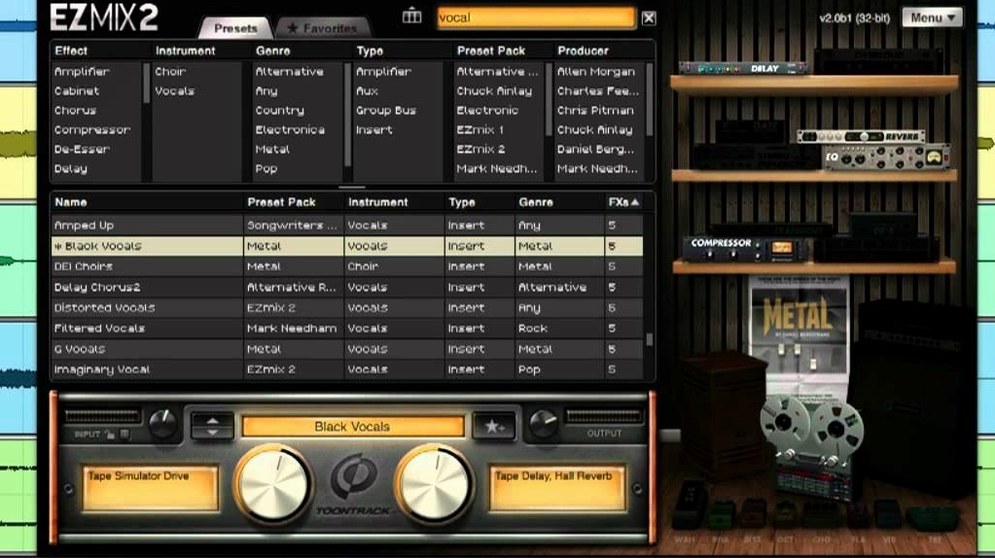
One slider sits front and centre. That is the first thing you notice. EZmix 3 does not hand you a console full of knobs. It gives you a library of mix chains, each reduced to a single wet/dry amount.
- Load the plugin on a vocal track, drum bus or full mix.
- Browse presets by instrument — guitar, bass, drums, keys, vocals.
- Pick a chain by name. The descriptions tell you what the chain is doing, not just what it is called.
- Drag the main slider to taste. Left is less processing, right is more.
- If you need the standalone host, launch it for guitar practice. Amp and cabinet simulations are built in, no DAW required.
The redesigned interface keeps the original EZmix 2 layout and content intact, so older presets stay exactly where you left them. What changes is how quickly you get a working sound. A drum bus preset adds weight and snap in one move. A vocal chain tucks a track into a mix without touching an EQ or compressor.
The compatibility gate that locks out newer EZmix packs
Version 3.2.2 is not a feature release. It is a compatibility gate. If you bought an EZmix pack released in the final quarter of 2025 or later, the plugin simply will not see it unless you are on 3.2.2. That is the whole point of the update.
In everyday use this means one thing: you open a session from a collaborator who used a newer vocal or mastering pack, and your older EZmix instance sits blank. Update to 3.2.2 and the preset loads. The slider works. The chain comes back. No drama, just a version check under the hood.
Before this, the jump from EZmix 2 to EZmix 3 brought the redesigned interface and the standalone host. The 3.2.x line has mostly been about keeping the expanding preset library usable. Toontrack releases packs regularly, and each one carries a minimum version requirement. Staying current means your library does not shrink over time.
Standalone host doubles as an instant practice amp
Does the standalone host work as a practice amp straight away? Yes. Launch it, plug in an audio interface, and you have a guitar or bass rig with amp sims, cabinets and effects. No DAW needed. It is not a replacement for a full modeller with deep editing, but for quiet practice or jotting down an idea it gets the job done.
Will my old EZmix 2 presets still work? They carry forward. Every chain you had in version 2 appears in version 3. The layout changed, the content did not. If you built a workflow around specific drum or vocal presets, they are still there with the same names and the same sound.
Can you tweak inside a preset chain? Not in the way you would with individual plugins. EZmix shows you one slider per chain. The EQ moves, compressor thresholds and saturation amounts are baked into the preset design. You blend them in, but you do not open them up. For some mixers that is a dealbreaker. For others it is the whole appeal — you stop fiddling and commit.
Does it run natively on Apple Silicon? Yes. The current build runs on Intel and ARM Macs without Rosetta. It loads as a native plugin in Logic Pro, Studio One and any other AU or VST3 host compiled for Apple Silicon.
Finished-sounding demos while you are still writing
Songwriters who track at home and mix on the same machine. People who want a finished-sounding demo without spending two hours on a snare drum. EZmix suits the moment when you are still writing and you need a rough mix that does not sound rough. Load a drum bus chain, a bass chain, a vocal chain — three sliders and the sketch sounds like a record.
Guitarists who record direct benefit from the amp and cab presets. A clean DI track through a Fender-style chain with spring reverb takes ten seconds to dial in. The standalone host makes it useful even when no DAW is open — plug in, pick a preset, play. It is quiet, consistent and does not wake the neighbours.
Mix engineers working fast on podcast dialogue or voiceover tracks also find a place for it. A single vocal chain can handle gating, compression and presence EQ with one slider move. It is not the tool for surgical repair work, but for levelling a spoken-word track quickly it is hard to beat.
If you are the kind of user who wants separate control over attack and release times, or who builds mix templates from fifteen individual plugins, EZmix will frustrate you. But if you trust a chain designed by someone who already made those decisions, it saves hours. The slider is the only decision left to make.
What’s new
- Adds support for EZmix packs released from Q4 2025 onward.
Requirements
- macOS 10.13 or higher
- Intel or Apple Silicon processor
FAQ
Does EZmix 3 replace the standalone host from older versions?
No. The independent host is included, with amp and cabinet simulations for guitar practice.
Will my old EZmix presets still work?
Yes. All previous EZmix functionality and content are retained in EZmix 3.
What Mac does EZmix 3 need?
It requires macOS 10.13 or higher and runs on both Intel and Apple Silicon processors.
Comments 0
Sign in or create an account to leave a comment.
No comments yet…
If you’ve installed it, say how it went. Mention your Mac and macOS version — it helps the next person more than you’d think.
More in VST Plugins
All in VST Plugins-
 Toontrack EZkeys
2.1.5
Apple Silicon
Toontrack EZkeys
2.1.5
Apple Silicon
-
 Tone Empire EDYN
1.0.2
Apple Silicon
Tone Empire EDYN
1.0.2
Apple Silicon
-
 UJAM Beatmaker VICE
2.4.0
UJAM Beatmaker VICE
2.4.0
-
 uJAM Cinedream
1.0.1
Apple Silicon
uJAM Cinedream
1.0.1
Apple Silicon
-
 UJAM Symphonic Elements STRIIIINGS
1.3.1
Apple Silicon
UJAM Symphonic Elements STRIIIINGS
1.3.1
Apple Silicon
-
 T-RackS
6.3.2
Apple Silicon
T-RackS
6.3.2
Apple Silicon
-
 UnderTone Audio UnFairchild
1.0.8
Apple Silicon
UnderTone Audio UnFairchild
1.0.8
Apple Silicon
-
 Synchro Arts VocAlign 6 Pro
6.1.30
Apple Silicon
Synchro Arts VocAlign 6 Pro
6.1.30
Apple Silicon