

Microsoft Excel for macOS

Description
Excel runs on any Mac that can handle macOS 13 or later. It supports both Intel and Apple Silicon processors natively, so you won't be dealing with Rosetta overhead.
Workbooks from Windows open without conversion
- Will it open workbooks from the Windows version? Yes. The workbook formats are the same on both platforms.
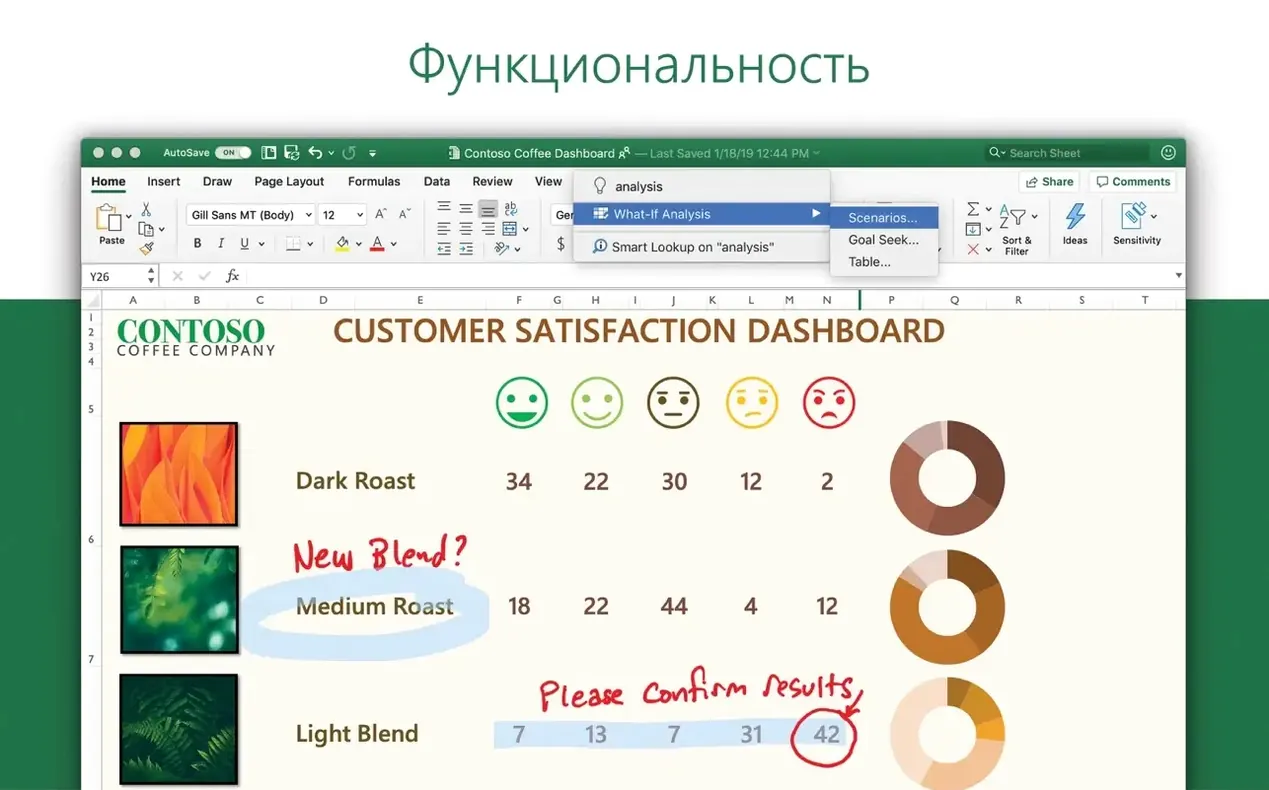
- Does it include Ideas? Yes. Version 16.93 includes Ideas for spotting trends and visualising data.
- Can I set the interface to Polish or Korean? The app ships with 21 languages, including Polish, Korean, Russian and Japanese. It follows the language set in System Settings.
What's actually new
A few conveniences sit right under the toolbar and nobody talks about them. The formula bar handles multi-line editing when you drag its lower edge down. That alone saves staring at a single cramped line of nested IF statements. The status bar is customisable: right-click it and you can add or remove quick-sum figures for Average, Count, Numerical Count, Min and Max without opening a single dialogue.
Keyboard shortcuts worth memorising: Control+Option+V opens Paste Special with current formatting ignored. Fn+Control+Left Arrow jumps to the first used cell in a row; the same with Up Arrow takes you to the top of the used range. Shift+F11 inserts a new sheet before the active one. These are all Mac-native combos, not the Windows-style Ctrl shortcuts.
One easily missed option hides in Preferences > Edit: "After pressing Return, move selection". Set it to Down and data entry becomes a rapid one-hand operation. Combined with AutoFill on small ranges, you can complete a full week of figures without touching the mouse.
Performance and the feel of daily use
Excel 16.93 on Apple Silicon starts cold in under two seconds. Opening a 40 MB workbook with six sheets and a few thousand VLOOKUP references takes about four seconds. Scrolling through 50,000 rows is smooth; the grid redraws fast enough that you never see blank tiles waiting to catch up.
Memory use sits around 280 MB for a moderate workbook and climbs toward 800 MB with larger files containing embedded charts. That isn't light, but it leaves headroom on any Mac with 8 GB of RAM. The app rarely beaches the CPU once a recalculation finishes, so battery drain on MacBooks during editing is close to what you would see in native Apple apps.
Stability is uneventful in the best way. I left the app open for four days, switching between eight workbooks, adding conditional formatting rules, and running Ideas on three sheets. No crashes, no beachballs, no sudden language switches. AutoSave to OneDrive works, but local file recovery after a forced quit brought back everything down to the last two minutes of changes.
The biggest drag on speed is Microsoft's AutoUpdate background process. It can spike CPU for 15–20 seconds when it checks for updates. Not a dealbreaker, but noticeable if you are on battery and watching Activity Monitor.
A small workflow: cleaning supplier data before a quarterly review
Suppose you get a CSV from Accounts Payable. Dates are in US format, amounts have currency symbols mixed into the number cells, and supplier names contain stray spaces. Here is a realistic path through it.
- Open the CSV. Excel drops everything into one column because the delimiter is a pipe character, not a comma. Use Data > From Text/CSV, set the delimiter to Pipe, and load.
- Date column is still text. Select the column, Data > Text to Columns, choose Delimited, click Next twice, then set Column data format to Date: MDY. Click Finish. The column converts to proper date serials.
- Currency symbols in an Amount column. Select the column, press
Command+1, choose Custom format, delete the symbol placeholder, leave the number format. The cells are still text though, so add a helper column with=VALUE(TRIM(CLEAN(B2))). Copy that down, then copy and Paste Special > Values over the original. - Supplier names have leading and trailing spaces plus odd line breaks. Use
=TRIM(CLEAN(A2))in a helper column, paste values back. Sort the list and scan for duplicates created by inconsistent capitalisation — Excel's Remove Duplicates tool is case‑insensitive, so it handles that without extra formulas. - Now you want a quick trend check. Select the date and cleaned amount columns, Insert > Recommended Charts, pick a clustered column chart, and click the Ideas button on the Home tab. Ideas highlights a few outliers and suggests a moving average trendline. Two clicks add it to the chart.
That whole sequence takes under ten minutes once you know the menu locations. The only slowdown is Text to Columns forgetting your delimiter preference every session — it always starts at Tab.
Waterfall charts replace ten minutes of manual stacking
The new chart types added in 16.93 are visible in the Insert > Charts gallery: treemap, sunburst, and waterfall now appear without plug‑ins. Waterfall charts alone replace ten minutes of manually stacking invisible series to show running totals. The formatting pane for these charts uses a single sidebar, so adjusting gaps and colours doesn't throw dialogue boxes across the screen.
Ideas is the bigger shift. It sits on the Home tab and works on any data range with headers. Click it, and a pane opens on the right with three to six auto-generated observations: "Amount increased sharply in March", "Supplier X accounts for 22% of total", that sort of thing. Each observation includes a thumbnail chart you can insert directly. It is not a replacement for a careful audit, but it catches things a tired pair of eyes skims over.
Behind the scenes, Microsoft switched the activation mechanism for the LTSC 2024 release. The Volume License Serializer now handles licensing separately from the app package, which means a corrupted preference file no longer locks you out of the whole Office suite. If activation fails after a macOS upgrade, reinstalling the serializer alone often fixes it. AutoUpdate also moved to a standalone helper, so patching Excel no longer requires updating Word and PowerPoint at the same moment.
One quiet improvement: the ribbon search bar at the top now returns results from menus you rarely visit, like "Protect Sheet" or "Goal Seek". Type the first three letters and the command appears. It makes the menu‑heavy parts of Excel feel closer to Spotlight.
This release brings new chart types and the Ideas pane for visualising trends without building your own pivot tables first.
What’s new
Adds new chart types. Adds Ideas for data and trend visualisation.
Requirements
- macOS 13 or later
- Intel or Apple Silicon (ARM) Mac
FAQ
Which file formats can it open?
It opens .xlsx, .xlsm, .xls, .csv and the rest of the standard workbook family, the same as the Windows edition.
Will it run natively on an M-series Mac?
Yes. The app runs natively on both Apple silicon and 64-bit Intel Macs, with macOS 13 or later.
Comments 0
Sign in or create an account to leave a comment.
No comments yet…
If you’ve installed it, say how it went. Mention your Mac and macOS version — it helps the next person more than you’d think.
More in Office
All in Office-
 Microsoft Office
16.93
Apple Silicon
Microsoft Office
16.93
Apple Silicon
-
 Microsoft Outlook
16.93
Apple Silicon
Microsoft Outlook
16.93
Apple Silicon
-
 Microsoft PowerPoint
16.93
Apple Silicon
Microsoft PowerPoint
16.93
Apple Silicon
-
 Microsoft Word
16.93
Apple Silicon
Microsoft Word
16.93
Apple Silicon
-
 Matlab R2025b
R2025b ARM only
Apple Silicon
Matlab R2025b
R2025b ARM only
Apple Silicon
-
 LookAway
2.4.8
Apple Silicon
LookAway
2.4.8
Apple Silicon
-
 Nitro PDF Pro
13.3.1
Apple Silicon
Nitro PDF Pro
13.3.1
Apple Silicon
-
 Numbers Creator Studio
15.3.1
Apple Silicon
Numbers Creator Studio
15.3.1
Apple Silicon