Cockos REAPER for macOS
Description
REAPER runs on anything from an old Intel Mac on 10.15 to the latest ARM64 machine on macOS 26.x.
Track type — none
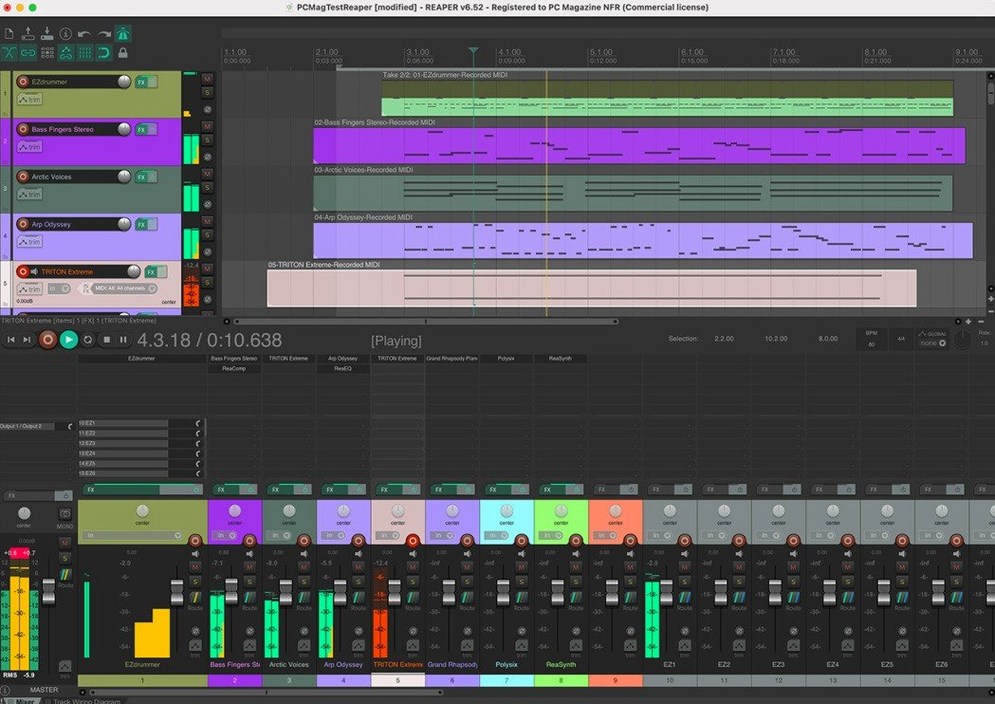
There are no separate track, bus, instrument or clip types. Any track can hold audio, MIDI, video and automation, and route to anything else.
Folder tracks — busses that record
Place a track above others and click its folder button. Child audio flows into it automatically. You can record the folder output to freeze a full drum bus with processing, non-destructively.
Routing — 512 channels in, 512 out
Hardware inputs and outputs are fully remappable. Up to 512 extra loopback channels let you pipe audio between applications without leaving the box.
Extendability — script what you need
The whole application can be extended and scripted. One installer serves everyone, from foley editors to composers building sample libraries alongside their other Mac tools.
Recording a band from scratch — start to finish
Say you have a four-piece rock band in a rehearsal room. Drums, bass, two guitars and a vocal. Two audio interfaces chained as an aggregate device on the Mac. Here's how REAPER turns that chaos into a mix you can send the band before they pack up.
- Set up the aggregate device. Open Audio MIDI Setup, create the aggregate, then pick it in REAPER’s Preferences under Audio > Device. Give it a sensible block size — 128 samples keeps latency low enough for monitoring without crackles on most machines.
- Create and name tracks. Eight mics on the kit, one each for bass DI, guitar cab, second guitar cab, and a vocal. Hit Cmd+T thirteen times. Double-click each track name and label it. No need to choose a track type — just arm them all.
- Check levels. Ask the drummer to play the kick. Set the preamp gain so it peaks around -12 dBFS. Repeat for snare, toms, overheads and room. Then bass, then guitars, then vocal. Do not clip the converters. REAPER’s meters are honest.
- Set up a rough monitor mix. Each player needs a different blend. Create sends from each input track to a hardware output feeding the headphone amp. Tweak the send levels while the band plays together.
- Hit record. Press Cmd+R. No count-in unless they want one. Let them play the song twice through. Mistakes are fine — you are capturing performances, not perfection.
- Comp takes. Split the two full takes into sections on the timeline. Drag a selection across the drum tracks, right-click and choose Take > Switch items to next take to audition the second pass. Keep the best chorus, the tightest verse.
- Rough mix on folder tracks. Select all drum tracks, right-click and choose Group. Create a new track above them, click the folder icon. Now the whole kit hits a single fader. Do the same for guitars. Add a reverb send from the vocal track to a new track with a convolution reverb loaded.
- Saturation and glue. Drop REAPER’s JS: Saturation plugin on the drum folder. Light drive. Add ReaComp on the bass track with a 4:1 ratio, attack around 30 ms, release around 100 ms. The mix already sounds like a record.
- Export a rough. Select the time range from bar 1 to the last hit. Choose File > Render. 24-bit WAV, 48 kHz. Drag it into an email or a shared folder before the drum kit is back in its cases.
That entire session took one piece of software and no template. REAPER did not care that the aggregate device was two different interfaces. It just routed the audio.
Building your own workflow, not inheriting one
People who enjoy building their own workflows rather than being handed one. If you have ever written a keyboard shortcut file for a text editor because the defaults annoyed you, REAPER fits.
Live sound engineers running multitrack capture alongside a front-of-house mix. The routing grid handles absurd channel counts without blinking. A 48-channel stage box feed plus ambience mics plus playback tracks — all recordable to a single MacBook.
Sound designers for theatre or film who need hundreds of cues, each with its own processing chain, and the ability to spot audio to timecode. REAPER’s video window and frame-accurate nudge tools make spotting footsteps to picture a methodical task, not guesswork.
Musicians who self-produce and run a home studio. The lack of track-type distinctions means you do not waste time setting up busses — you just drag one track onto another and it routes. You can record DI guitar, re-amp it later through a real amp or a plugin, and comp the best takes without leaving the arrange view.
Educators who need a single installer for a lab full of Macs. One download works on the 2017 iMac in the corner and the new M3 Mac mini. Students can take projects home on a USB stick and open them on whatever Mac they own.
It suits people who want the computer to get out of the way. The interface is not pretty, but it is fast once you learn the shortcuts.
Audio interface not showing up in REAPER
“My audio interface is not showing up.” REAPER only sees what the OS sees. Check System Report to confirm the interface appears on the USB or Thunderbolt bus. For class-compliant devices, try a different cable. For driver-based interfaces, a cold reboot of the interface often fixes handshake failures after sleep.
“MIDI notes sound late when I play them back.” Look at the track’s routing window. If you have record monitoring enabled and also have software monitoring through your interface’s mixer app, you hear double — one direct, one delayed. Mute the interface’s software return or turn off REAPER’s input monitoring on that track.
“Plugins vanish after an update.” REAPER scans AU, VST and VST3 folders on startup. If a plugin disappears, it is likely a 32-bit plugin on a newer macOS version that dropped 32-bit support. Open Preferences > Plug-ins > Compatibility and check that the relevant architecture is enabled. Rescan the folder.
“The metronome is annoying.” Right-click the metronome icon. Change the sound from the default beeps to a rimshot sample or a simple sidestick. You can also set it to only play during recording, not playback, and reduce its level independently of the click track if you printed one.
“I cannot find the mixer.” Press Cmd+M. It was hidden. If you want it docked, right-click its title bar and choose Dock mixer in docker. Now it lives at the bottom of the arrange window.
Disable the splash screen and make it feel like yours
REAPER’s defaults are functional but generic. A few tweaks make it feel like yours within ten minutes of launching.
- Disable the splash screen. Preferences > General > uncheck
Requirements
- macOS 10.15 or later
- Intel or Apple Silicon Mac
FAQ
Does REAPER use separate track types for instruments and audio?
No. A single track type handles audio, MIDI, video and automation, so you never need to switch between dedicated instrument or bus tracks.
Can I freeze folder processing without committing to a bounce?
Yes. Record the folder track's output to capture the summed processing of all child tracks non-destructively.
Comments 0
Sign in or create an account to leave a comment.
No comments yet…
If you’ve installed it, say how it went. Mention your Mac and macOS version — it helps the next person more than you’d think.