

Xpand!2 for macOS
Description
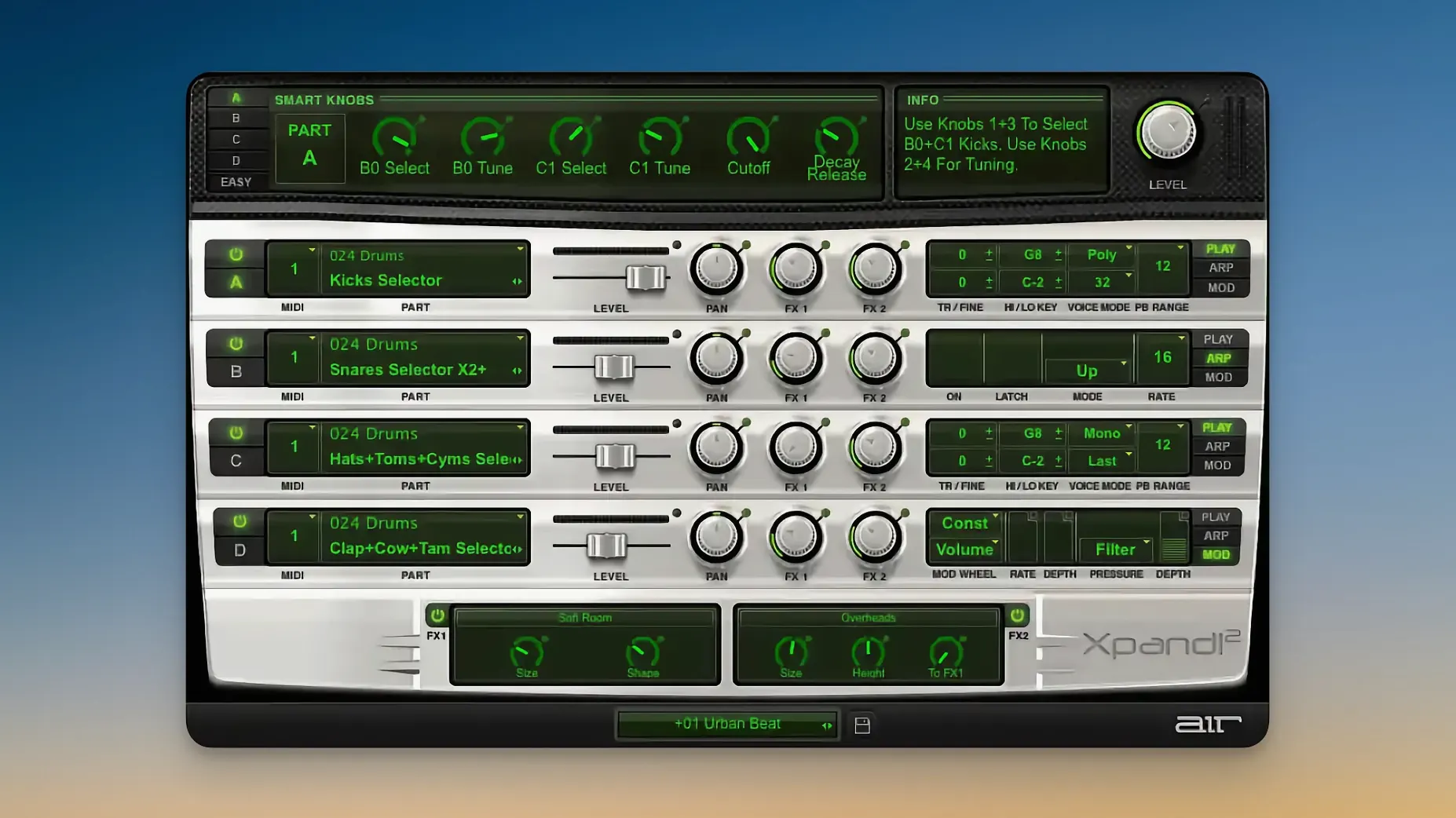
You load a preset, hold two keys, and immediately a split bass-and-pad sits under your fingers. That's the core workflow — each of the four slots gets its own MIDI channel, so a single instance can cover bass, lead, a rhythmic arp and a texture without touching another track.
- Six smart knobs per patch — typically cutoff, resonance, envelope amount and a macro or two — let you reshape a sound quickly without opening the full editor.
- Each slot can be monophonic with First, Last, Highest or Lowest note priority, which matters for basslines and lead lines that need to swallow overlapping notes cleanly.
- Polyphonic slots go up to 64 voices, enough for dense pads where you're holding chords with the sustain pedal down.
- The engine layers subtractive, FM, wavetable and straight sample playback, so a single patch can combine a sampled attack transient with a wavetable body and an FM bell on top.
- Pitch bend and aftertouch are supported per part, and MIDI Learn is there for anyone who prefers hardware knobs over mouse-dragging.
The preset library is the real reason this thing has stuck around. 2,500 patches across 29 categories — not all are gems, but the bread-and-butter electric pianos, warm basses and cinematic pads deliver with minimal tweaking.
Before you download — questions that come up
"Does this run natively on Apple Silicon?" Yes. This build is ARM-ready and expects macOS 13 or later. It won't open on an Intel Mac running Monterey. People who grab an xpand 2 mac download without checking often miss that line and wonder why it won't scan.
"Can I use it without a DAW?" Not really. Xpand!2 is a plugin — AU, VST, AAX — so it needs a host. Logic, Live, Cubase, Reaper, whatever you use. There's no standalone app in the package.
"Will it replace my other synths?" It might replace three or four. Four slots with independent arpeggiators and effects mean a single instance can cover what used to take a full track stack. That doesn't make it a better wavetable synth than Serum or a better FM engine than Dexed — but if you're sketching arrangements or building a live set, you'll reach for it before you reach for three separate plugins.
"Is it stable in Logic on Ventura and Sonoma?" In daily use, yes. AU validation passes cleanly on Apple Silicon. The plugin scans quickly, opens fast, and I've yet to see it crash during a preset change — which isn't something I'd say about every multitimbral instrument from this era.
Searches for xpand2 mac crack or xpand crack mac usually lead people here after they've already tried a version that beachballed on launch. The difference is the architecture build — if it says Intel-only, it's the wrong one for an M-series Mac.
Per-slot arpeggiator turns static patches into motion
The arpeggiator per slot isn't a bonus feature — it's the fastest way to turn a static patch into something that moves. Set slot one to a bass with the arp off, slot two to a sixteenth-note pluck pattern, slot three to a slow-up octave figure, and slot four to a pad with no arp but heavy reverb. Four parts, one instance, no automation lanes drawn yet.
MIDI Learn is global but per-parameter — right-click any knob, wiggle a controller, done. The smart knobs remember assignments per patch, so the same hardware rotary can be cutoff on a lead and reverb mix on a texture patch without re-mapping every time you switch presets.
Voice mode per slot is the quiet problem-solver. Set a bass part to monophonic with Lowest priority and it'll always grab the bottom note of any chord, even if you're sloppy with your left hand. Set a lead to High priority and it'll cut through a big right-hand voicing without losing the top line. These aren't settings people tweak on first launch — but after a few sessions where notes overlap messily, you start reaching for them.
The six smart knobs aren't locked to one function per patch. A sound designer might assign Cutoff, Resonance, Envelope Depth, Chorus Amount, Delay Mix and Reverb Decay. Another preset might give you Wavetable Position, FM Amount, Attack, Release, Filter Envelope and a macro that crossfades two layers. Glance at the labels under the knobs before you twist — they tell you what you're actually changing.
Sub-second patch loads and no splash screen
Xpand!2 is light. Loading a four-slot patch takes under a second on an M1 or M2 machine. The plugin interface appears instantly — no splash screen, no licence check delay. On an M1 Max with a moderate buffer, a four-part patch with effects on every slot and both global processors active barely nudges the meter. You can stack ten instances without hitting a CPU warning in Logic.
The trade-off is sample detail. Some acoustic patches in the library were recorded years ago for a plugin that shipped inside Pro Tools bundles, and they show their age next to modern multi-gigabyte libraries. The electric pianos and basses hold up. The orchestral strings are serviceable for sketching. The choir pads — warm, slightly lo-fi — sit in a mix without swallowing it.
Preset browsing is faster than it has any right to be. The 29 categories load as a flat list with subfolders, and switching from a bass patch to a motion pad takes about the same time as clicking the next arrow. No database scanning, no "please wait" spinner. If you've ever waited for a Kontakt library to relocate samples, you'll appreciate this.
Stability under heavy automation is good. Modulating the smart knobs with host automation — sweeping a filter while a delay feedback ramps up — doesn't crackle or glitch. The arpeggiator stays in sync even when you're switching presets during playback, though doing that mid-song is more of a live-performance move than a mixing one.
People searching xpand 2 crack mac or xpand torrent often end up with builds that stutter under automation. A clean ARM-native version doesn't do that. Four slots, two global effects, six smart knobs moving in real time — it all holds together without the plugin red-lining the audio thread.
Requirements
- macOS 13 or later
- Apple Silicon
FAQ
Does Xpand!2 run natively on Apple Silicon?
Yes, version 2.3.1 supports Apple Silicon natively and requires macOS 13 or later.
How many parts can one Xpand!2 instance play at once?
Each instance has four active sound slots, and every slot can be assigned its own MIDI channel for independent control.
Comments 0
Sign in or create an account to leave a comment.
No comments yet…
If you’ve installed it, say how it went. Mention your Mac and macOS version — it helps the next person more than you’d think.
More in VST Plugins
All in VST Plugins-
 XLN Audio XO
1.8.10-2026.09.04-Complete
Apple Silicon
XLN Audio XO
1.8.10-2026.09.04-Complete
Apple Silicon
-
 XLN Audio Life
1.2.3
Apple Silicon
XLN Audio Life
1.2.3
Apple Silicon
-
 Waves Ultimate
v17-26.10.07
Apple Silicon
Waves Ultimate
v17-26.10.07
Apple Silicon
-
 WaveLab Pro
13.0.30
Apple Silicon
WaveLab Pro
13.0.30
Apple Silicon
-
 VocalSynth 2
2.6.1
Apple Silicon
VocalSynth 2
2.6.1
Apple Silicon
-
 VocalNet
1.0.4
Apple Silicon
VocalNet
1.0.4
Apple Silicon
-
 Valhalla DSP Bundle
2025.12
Apple Silicon
Valhalla DSP Bundle
2025.12
Apple Silicon
-
 UnderTone Audio UnFairchild
1.0.8
Apple Silicon
UnderTone Audio UnFairchild
1.0.8
Apple Silicon